

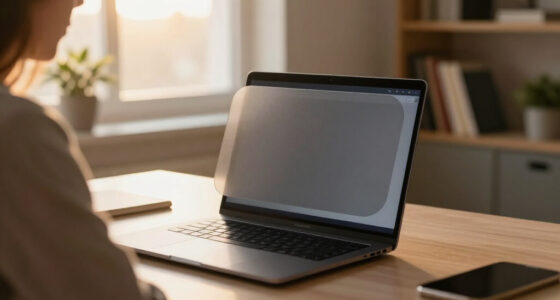
Discreet laptop privacy screens work by narrowing your display’s viewing angle so that only you, sitting directly in front of the laptop, can read what’s on it — everyone to your side sees a darkened screen. After comparing 15 popular filters, the ZOEGAA 4-Way 360° Privacy Screen stands out as the best overall pick because it blocks viewing from all four sides rather than just left and right, which matters in crowded spaces like planes and cafés. The SightPro Magnetic 14 Inch is the strongest choice if you want something you can pop on and off in seconds without adhesive residue, while the Kensington MagPro is the most polished option for corporate buyers. The main tradeoffs in this category are between magnetic convenience and universal fit, between two-way and four-way privacy, and between screen dimming (all filters darken your display somewhat) and confidentiality. Keep reading for the full breakdown of all 15 options.
Open a free Amazon Business account
Business pricing, bulk buying and tax-exempt orders.
Create a free accountAs an affiliate, we earn on qualifying purchases.
Key Takeaways
- Four-way (360°) filters like the ZOEGAA and STARY 360° blocked peeping from above and below as well as the sides — a real advantage on airplanes where the person behind you can see your screen.
- Magnetic attachment models (SightPro, Kensington MagPro, PYS, STARY) were dramatically easier to remove and reattach than adhesive-slide-tab designs, but only fit laptops with a metal-rimmed display, so they won’t work on every machine.
- Aspect ratio caused more returns than any other factor: 14-inch screens come in both 16:9 and 16:10, and a mismatch leaves an uncovered strip or overhang that ruins the filter’s edge-to-edge privacy.
- Anti-glare matte finishes noticeably reduced reflections under bright office lighting, but every filter in the lineup dimmed the display by roughly 30–40%, requiring a brightness bump that costs battery life.
- Reversible matte/glossy models (the F FORITO 15.6” and the 13.3” universal filter) offered the most flexibility, letting you flip to glossy for sharper text when privacy-glare tradeoffs shift.
| SightPro Magnetic Laptop Privacy Screen 14 Inch 16:9 |  | Best Overall | Diagonal Size: 14 inches | Aspect Ratio: 16:9 | Dimensions: 12 3/16″ x 6 7/8″ (310 x 175 mm) | VIEW LATEST PRICE | See Our Full Breakdown |
| ZOEGAA 4-Way 360° Laptop Privacy Screen for 14-inch 16:10 |  | Best Full-Coverage Privacy | Screen Size: 14 inches | Aspect Ratio: 16:10 | Dimensions: 12″ L x 7.5″ W | VIEW LATEST PRICE | See Our Full Breakdown |
| Laptop Privacy Screen 14 Inch 16:10 Aspect Removable Anti Glare Blue Light Filter |  | Best Value | Size: 14 inches | Aspect Ratio: 16:10 | Dimensions: 11″ L x 8″ W | VIEW LATEST PRICE | See Our Full Breakdown |
| Magnetic Laptop Privacy Screen 14 Inch 16:9-26° Anti Peeping |  | Best for Portability | Compatibility: 14″ 16:9 laptops and monitors | Dimensions: 355.6mm diagonal, 310 x 179.5mm | Weight: 3.52 ounces | VIEW LATEST PRICE | See Our Full Breakdown |
| F FORITO 15.6 Inch Laptop Privacy Screen Protector |  | Best for Large-Screen Laptops | Screen Size: 15.6 inches | Aspect Ratio: 16:9 | Surface: Matte | VIEW LATEST PRICE | See Our Full Breakdown |
| SightPro 15.6 Inch Laptop Privacy Screen Filter |  | Best Value Pick | Screen Size: 15.6 inches | Filter Dimensions: 13 9/16″ W x 7 5/8″ H (345 x 194 mm) | Material: Polyethylene Terephthalate | VIEW LATEST PRICE | See Our Full Breakdown |
| Laptop Privacy Screen 14 Inch 16:9 Aspect Ratio |  | Best Eye-Comfort Focus | Screen Size: 14 inches | Aspect Ratio: 16:9 | Dimensions: 12.2″ x 6.9″ | VIEW LATEST PRICE | See Our Full Breakdown |
| Kensington MagPro™ Magnetic Laptop Privacy Screen 14 inch |  | Best Premium Magnetic Attachment | Screen Size: 14 inches | Aspect Ratio: 16:9 | Dimensions: 12.2″ W x 6.86″ H | VIEW LATEST PRICE | See Our Full Breakdown |
| PYS Magnetic Laptop Privacy Screen Filter 15.6 Inch 16:9 |  | Best Magnetics on a Budget | Screen Size: 15.6 inches | Aspect Ratio: 16:9 | Dimensions: 13.6″ L x 7.6″ W (345 x 194 mm) | VIEW LATEST PRICE | See Our Full Breakdown |
| 15.6 Inch Privacy Screen Filter for 16:9 Monitor 1920 x 1080 Resolution |  | Best for Open-Plan Offices | Screen Size: 15.6 inches | Aspect Ratio: 16:9 | Dimensions: 344mm x 194mm | VIEW LATEST PRICE | See Our Full Breakdown |
| STARY Magnetic Privacy Screen for 13.5 inch Surface Laptop 4/3/2 |  | Best for Surface Laptop Owners | Model Compatibility: Surface Laptop 4/3/2 (2018–2021) | Screen Size: 13.5 inch | Viewing Angle: ±30° | VIEW LATEST PRICE | See Our Full Breakdown |
| Magnetic Laptop Privacy Screen for 14 Inch 16:10 Aspect Ratio, Anti-Glare Blue Light Filter, Removable |  | Best Versatile Finish Options | Screen Size: 14 inches | Aspect Ratio: 16:10 | Dimensions: 11.89″ L x 7.4″ W | VIEW LATEST PRICE | See Our Full Breakdown |
| STARY 360° Laptop Privacy Screen Protector for 14 Inch 16:10 Laptops |  | Best All-Around Surveillance Protection | Screen Size: 14 inch | Aspect Ratio: 16:10 | Dimensions: 11.89″ W x 7.40″ H | VIEW LATEST PRICE | See Our Full Breakdown |
| 15.6 Inch Laptop Privacy Screen Filter, Removable and Reversible |  | Best for Remote Workers with Large Screens | Size: 15.6 inches | Aspect Ratio: 16:9 | Dimensions: 13.58″ L x 7.64″ W | VIEW LATEST PRICE | See Our Full Breakdown |
| 13.3 Inch Laptop Privacy Screen, Anti-Glare Blue Light Filter, Reversible Matte/Glossy Shield |  | Best Durability for Compact Laptops | Screen Size: 13.3 inches | Aspect Ratio: 16:9 | Compatibility: Lenovo, HP, Asus, Acer, Samsung, Toshiba, ThinkPad, XPS | VIEW LATEST PRICE | See Our Full Breakdown |
| discreet laptop privacy screen | Aspect Ratio | Dimensions | Screen Size | Hardness |
|---|---|---|---|---|
| SightPro Magnetic Laptop Priva | 16:9 | 12 3/16" x 6 7/8" (310 x 175 mm) | — | — |
| ZOEGAA 4-Way 360° Laptop Priva | 16:10 | 12" L x 7.5" W | 14 inches | 3H |
| Laptop Privacy Screen 14 Inch | 16:10 | 11" L x 8" W | — | 5H |
| Magnetic Laptop Privacy Screen | — | 355.6mm diagonal, 310 x 179.5mm | — | — |
| F FORITO 15.6 Inch Laptop Priv | 16:9 | — | 15.6 inches | 5H |
| SightPro 15.6 Inch Laptop Priv | — | — | 15.6 inches | 9H |
| Laptop Privacy Screen 14 Inch | 16:9 | 12.2" x 6.9" | 14 inches | 9H |
| Kensington MagPro™ Magnetic La | 16:9 | 12.2" W x 6.86" H | 14 inches | — |
| PYS Magnetic Laptop Privacy Sc | 16:9 | 13.6" L x 7.6" W (345 x 194 mm) | 15.6 inches | 3H |
| 15.6 Inch Privacy Screen Filte | 16:9 | 344mm x 194mm | 15.6 inches | — |
| STARY Magnetic Privacy Screen | — | — | 13.5 inch | — |
| Magnetic Laptop Privacy Screen | 16:10 | 11.89" L x 7.4" W | 14 inches | 6H |
| STARY 360° Laptop Privacy Scre | 16:10 | 11.89" W x 7.40" H | 14 inch | — |
| 15.6 Inch Laptop Privacy Scree | 16:9 | 13.58" L x 7.64" W | — | 3H |
| 13.3 Inch Laptop Privacy Scree | 16:9 | — | 13.3 inches | 9H |
More Details on Our Top Picks
SightPro Magnetic Laptop Privacy Screen 14 Inch 16:9
SightPro’s magnetic design nails the one thing most privacy filters get wrong: removal. Snap it on for the commute, pop it off at home — no residue, no wrestling with adhesive tabs. Compared with adhesive-based options like the F FORITO, the magnetic attachment makes daily on-off use painless, which matters if you only need privacy intermittently. The bundled webcam cover, cleaning cloth, and storage folder add real value that budget filters skip. The dual glossy/matte finish is a nice touch, letting you flip between anti-glare and color vibrancy. The tradeoff: magnets mean it won’t play nice with touchscreen laptops, and the filter does dim brightness slightly — a common cost of microlouver film. Still, for the price, the total package is the most complete here.
Pros:- Tool-free magnetic snap-on attachment in seconds
- Reversible glossy/matte finish for different lighting
- Includes webcam cover, cloth, and storage folder
- UV and blue light reduction built in
Cons:- Incompatible with touchscreen displays
- Measurably reduces screen brightness from the front
Best for: Hybrid workers and travelers with a 14-inch 16:9 non-touch laptop who want quick on/off privacy
Not ideal for: Touchscreen laptop owners — the magnetic layer interferes with touch input and won’t sit flush
- Diagonal Size:14 inches
- Aspect Ratio:16:9
- Dimensions:12 3/16″ x 6 7/8″ (310 x 175 mm)
- Material:Microlouver film
- Finish:Reversible glossy & matte
- Attachment:Magnetic
- Extras:Webcam cover, cleaning cloth, storage folder
Our verdict“The most convenient and complete package for standard 14-inch 16:9 laptops, as long as your screen isn’t touch-enabled.”
ZOEGAA 4-Way 360° Laptop Privacy Screen for 14-inch 16:10
Most filters, including the SightPro, only black out side angles. The ZOEGAA goes further with 360-degree protection, blocking views from above and below too — genuinely useful on planes where the person behind you can see your screen. Dual installation methods (sliding tabs or adhesive) give flexibility the magnetic-only options can’t match, and the 3H hardness surface resists scuffs in a bag. The 85% clarity rating is honest and telling: this level of all-around blocking dims the display more than standard two-way filters, so expect to bump your brightness. It’s also explicitly incompatible with MacBooks and Surface devices, a firmer exclusion than most. If your threat model includes over-shoulder snoopers rather than just seatmates, this model earns its spot despite the dimmer picture.
Pros:- True 360-degree privacy in all four directions
- Two mounting options: sliding tabs or adhesive
- Blue light and glare reduction to cut eye fatigue
- Waterproof 3H surface
Cons:- 85% clarity noticeably dims the display
- Glossy finish version reflects glare in bright rooms
Best for: Frequent flyers and open-office workers who need privacy from above and behind, not just the sides
Not ideal for: MacBook and Surface owners — the fit and aspect ratio won’t work
- Screen Size:14 inches
- Aspect Ratio:16:10
- Dimensions:12″ L x 7.5″ W
- Material:Polyethylene terephthalate
- Hardness:3H
- Clarity:85%
- Installation:Sliding tabs or adhesive
Our verdict“The pick when people can see your screen from angles ordinary filters leave exposed.”
Laptop Privacy Screen 14 Inch 16:10 Aspect Removable Anti Glare Blue Light Filter
Where the ZOEGAA charges a premium for 360-degree blocking, this no-name filter covers the essentials — side-angle privacy, 92% blue light reduction, and 95% anti-glare — at a budget price. The 5H hardness rating actually beats the ZOEGAA’s 3H, meaning better scratch resistance for a filter that lives in your bag. The matte finish is fixed rather than reversible like the SightPro’s, so glare-sensitive users get the right surface but lose the glossy option for media viewing. Being reusable across multiple 16:10 laptops adds long-term value. The downsides are the usual budget-filter suspects: alignment during installation takes patience, and the aggressive blue-light blocking shifts colors slightly. For a work laptop where nobody cares about perfect color accuracy, those tradeoffs are easy to accept.
Pros:- 5H hardness offers above-average scratch protection
- 95% anti-glare matte surface for bright offices
- Reusable and easy to move between compatible laptops
- Strong blue and UV light reduction (92%/98%)
Cons:- Fixed matte finish — no glossy option
- Careful alignment required during installation
Best for: Budget-conscious buyers with standard 16:10 work laptops who prioritize eye comfort over color fidelity
Not ideal for: Designers and photo editors — 92% blue light filtering noticeably shifts on-screen colors
- Size:14 inches
- Aspect Ratio:16:10
- Dimensions:11″ L x 8″ W
- Material:Polyethylene terephthalate
- Hardness:5H
- Blue Light Reduction:92%
- Anti-Glare:95%
- Surface:Matte
Our verdict“The most sensible spend if you want solid privacy and eye protection without paying for brand extras.”
Magnetic Laptop Privacy Screen 14 Inch 16:9-26° Anti Peeping
At 3.52 ounces with a slim storage folder, this filter is the lightest carry in the magnetic category — a meaningful edge over the SightPro if your bag is already heavy. The 26-degree privacy angle is worth understanding: that’s the specific side-view cone where the screen blacks out, tighter than some wider-angle competitors. That translates to solid protection from adjacent seats but less coverage if someone approaches from a steeper angle, unlike the ZOEGAA’s 360° shield. Blue light (93%) and UV (97%) blocking land near the top of this group, making it a good fit for long screen sessions. The catch is rigidity: there’s no adjustable privacy angle, so you’re locked into that 26° window. Frequent travelers who value grams over maximum coverage will find it hits the sweet spot.
Pros:- Featherlight 3.52 oz weight with included storage folder
- 93% blue light and 97% UV blocking
- Snap-on magnetic installation
- Works with both laptops and portable monitors
Cons:- Fixed 26° privacy angle can’t be adjusted
- Side-only protection, no coverage from above or behind
Best for: Travelers and digital nomads counting every ounce who work in cafés and airports
Not ideal for: Anyone needing protection from steep or overhead angles — the fixed 26° window leaves those exposed
- Compatibility:14″ 16:9 laptops and monitors
- Dimensions:355.6mm diagonal, 310 x 179.5mm
- Weight:3.52 ounces
- Privacy Angle:26° side view
- Blue Light Block:93%
- UV Block:97%
- Attachment:Magnetic
Our verdict“The lightest way to carry credible side-angle privacy, provided your snoopers sit beside you rather than behind.”
F FORITO 15.6 Inch Laptop Privacy Screen Protector
This is the only pick here sized for 15.6-inch displays, and that alone earns its slot — bigger screens are simply harder to shield, and most magnetic options like the SightPro stop at 14 inches. The spec sheet is unusually generous: 5H hardness, anti-fingerprint, smudge resistance, and touch sensitivity, the latter being something the magnetic filters in this roundup can’t offer. The 360° anti-peeping claim puts it in the same coverage class as the ZOEGAA, but for a larger panel. Those surface coatings come at a price beyond the sticker: layering anti-glare, blue light filtering, and privacy film means the front-view brightness takes a real hit, and installation on a big 15.6-inch panel demands patience to avoid bubbles and misalignment. For desktop-replacement laptop owners, it’s the most feature-complete shield available in this group.
Pros:- Fits 15.6-inch screens most filters don’t cover
- Touch-sensitive — works with touchscreen laptops
- Scratch, smudge, and fingerprint resistant surface
- 360° privacy plus anti-glare and blue light filtering
Cons:- Layered coatings noticeably reduce front brightness
- Large-panel installation is fiddly and alignment-sensitive
Best for: Owners of 15.6-inch 16:9 laptops, including touchscreen models, who want full-coverage privacy
Not ideal for: 14-inch laptop owners — this simply won’t fit; and brightness-sensitive users will find the layered filters dim
- Screen Size:15.6 inches
- Aspect Ratio:16:9
- Surface:Matte
- Hardness:5H
- Clarity:99
- Features:360° privacy, anti-glare, blue light, touch sensitive, anti-fingerprint
Our verdict“The go-to shield if your laptop is a big 15.6-incher, especially one with a touchscreen — just expect a dimmer picture.”
SightPro 15.6 Inch Laptop Privacy Screen Filter
SightPro’s 15.6-inch filter earns the value slot by keeping the price low without gutting the core privacy function. Side views go dark while the matte finish handles glare — the same basic promise as pricier options like the Kensington MagPro, just without the magnetic convenience. Instead, you get two attachment systems: adhesive strips for a permanent setup and slide mount tabs if you’d rather pop the filter off at home. That flexibility is rare at this price. The 9H hardness rating also means it doubles as a scratch shield for your display, which cheaper generic filters often skip. The tradeoff is fit precision — unlike model-specific options, you’ll need to measure your screen’s width and height yourself, and a wrong guess means a trip back for returns. It also won’t help against someone seated directly behind you, and touchscreen owners should look elsewhere.
Pros:- Dual attachment options (adhesive strips and slide mount tabs) let you switch between permanent and removable use
- Anti-glare matte surface makes outdoor and bright-office work more comfortable
- 9H hardness doubles as scratch protection for your display
- Works across all major 15.6-inch laptop brands
Cons:- Not optimized for touchscreens, so taps and swipes may not register reliably
- Anyone directly behind you can still see the screen — it only blocks side angles
- Requires careful measurement verification before purchase to avoid fit issues
Best for: Students and remote workers on a budget who split time between a home desk and coffee shops and want removable privacy without paying magnetic-filter prices
Not ideal for: Touchscreen laptop users or anyone who hates measuring — a mismeasured screen means an ill-fitting filter with visible gaps
- Screen Size:15.6 inches
- Filter Dimensions:13 9/16″ W x 7 5/8″ H (345 x 194 mm)
- Material:Polyethylene Terephthalate
- Hardness:9H
- Surface:Matte and Glossy
- Installation:Adhesive strips or slide mount tabs
- Special Features:Anti-glare, blue light reduction, privacy
- Compatibility:Lenovo, HP, Dell, Acer, Asus, Samsung and other 15.6″ laptops
Our verdict“The smart pick if you want solid 15.6-inch privacy and glare control on a budget and don’t mind measuring before you buy.”
Laptop Privacy Screen 14 Inch 16:9 Aspect Ratio
Most privacy filters treat blue light reduction as an afterthought. This 14-inch option flips that, claiming 95% blue light reduction and 92% UV reduction — figures far above the Kensington MagPro’s 22% and the roughly 30% claimed by the 15.6-inch filter from the same category. For anyone logging long hours in airports or open offices, that difference translates into less end-of-day eye fatigue, though the heavy filtering does come at a cost: some users report noticeably dimmer output, meaning you may crank brightness and eat into battery life. Installation follows the familiar dual-path approach of adhesive or tab mounting, similar to the SightPro, and the matte/glossy reversible finish gives some control over how the surface reads in different lighting. Fit is the usual gamble — measure the displayable area first, because “14-inch” alone is not a reliable guide across brands.
Pros:- 95% blue light and 92% UV reduction is among the strongest eye-comfort claims in this roundup
- Anti-glare and anti-peep protection work together for public-space use
- Matte and glossy surfaces offer flexibility for different lighting conditions
- Fits a wide range of 14-inch 16:9 laptop brands
Cons:- Noticeably reduces screen brightness, which can force higher backlight settings and drain battery
- Requires exact dimension verification before ordering — diagonal size alone isn’t enough
Best for: Frequent travelers and long-session laptop users who prioritize eye strain relief as much as visual privacy
Not ideal for: Anyone doing color-critical photo or video work — the aggressive blue light filtering shifts colors and dims the display
- Screen Size:14 inches
- Aspect Ratio:16:9
- Dimensions:12.2″ x 6.9″
- Material:Polyethylene Terephthalate
- Blue Light Reduction:95%
- UV Light Reduction:92%
- Hardness:9H
- Finish:Matte and Glossy
Our verdict“Choose this if eye comfort matters as much as privacy and you can live with a dimmer panel; skip it for color-sensitive work.”
Kensington MagPro™ Magnetic Laptop Privacy Screen 14 inch
The MagPro’s magnetic attachment is what separates it from adhesive-based rivals like the SightPro: the filter snaps on in seconds and lifts off just as fast when you’re working privately at home. No sticky residue, no fumbling with slide tabs, and the slim magnetic strip is thin enough that your laptop still closes properly. Compared with the PYS magnetic filter, the Kensington trades a lower blue light reduction figure (around 22%) for tighter build quality and an explicitly documented compatibility list covering Dell Latitude, HP EliteBook, Lenovo ThinkPad, ASUS Zenbook, and Acer Swift models. That specificity cuts both ways — you’re paying more, and if your laptop isn’t on the list, fit is a gamble Kensington itself warns about. The narrow viewing angle that makes it effective at blocking neighbors can also feel restrictive when you lean slightly off-center or share your screen with a colleague.
Pros:- Magnetic attachment allows one-second application and removal with zero adhesive residue
- Slim strip design doesn’t interfere with closing the laptop lid
- Explicit compatibility list for major business laptop lines reduces fit guesswork
- Reduces blue light and glare for more comfortable extended viewing
Cons:- Limited viewing angle feels restrictive if you shift position or collaborate on-screen with others
- Premium price for the magnetic mechanism rather than superior privacy performance
Best for: Business professionals with listed Dell, HP, Lenovo, ASUS, or Acer models who move between secure and casual environments daily and want instant on/off privacy
Not ideal for: Laptop owners outside the documented compatibility list, or budget shoppers — the brand-name premium buys convenience, not dramatically better privacy
- Screen Size:14 inches
- Aspect Ratio:16:9
- Dimensions:12.2″ W x 6.86″ H
- Blue Light Reduction:Up to 22%
- Attachment:Magnetic strip
- Compatibility:Dell Latitude 5400-5430, Inspiron 14; HP EliteBook 840 G1-G8, ProBook 440 G1-G8; Lenovo ThinkPad T14, L14; ASUS Zenbook 14, VivoBook 14; Acer Swift 3, Aspire 5
Our verdict“Worth the splurge if your laptop is on the compatibility list and you want tool-free, residue-free privacy you can toggle all day.”
PYS Magnetic Laptop Privacy Screen Filter 15.6 Inch 16:9
The PYS filter answers the obvious objection to the Kensington MagPro — price — by delivering magnetic, adhesive-free attachment at a noticeably lower cost. Magnets hold it securely, removal leaves no residue, and the included storage folder lets you stash the filter flat against your laptop when it’s off, a thoughtful touch Kensington doesn’t include. The matte finish keeps glare manageable for coffee-shop sessions, and PYS backs the product with a three-year warranty, which suggests real confidence for a filter at this price. Tradeoffs exist, though: the surface hardness is rated 3H, well below the 9H claimed by the SightPro, so it’s more vulnerable to scratches in a crowded bag. It’s also explicitly not MacBook-compatible and not optimized for touchscreens, which rules out two large groups of buyers before fit even enters the conversation.
Pros:- Magnetic attachment with no adhesive means residue-free removal and reattachment
- Included storage folder keeps the filter protected and portable when not in use
- Three-year warranty from a company specializing in privacy filters for over a decade
- Matte finish reduces glare effectively in bright environments
Cons:- 3H hardness is far softer than 9H-rated competitors, making the surface more scratch-prone
- Explicitly incompatible with MacBooks and not optimized for touchscreens
Best for: Owners of standard 15.6-inch 16:9 Windows laptops who want Kensington-style magnetic convenience without the brand-name price
Not ideal for: MacBook and touchscreen users — the magnets and design won’t cooperate with either, so look at adhesive options instead
- Screen Size:15.6 inches
- Aspect Ratio:16:9
- Dimensions:13.6″ L x 7.6″ W (345 x 194 mm)
- Material:Polyethylene Terephthalate
- Hardness:3H
- Finish:Matte
- Installation:Magnetic, adhesive-free
- Warranty:3 years
- In the Box:Privacy screen, cleaning kit, storage folder
Our verdict“The best way to get magnetic on/off convenience at a midrange price, provided you run a standard Windows 15.6-inch laptop and handle it gently.”
15.6 Inch Privacy Screen Filter for 16:9 Monitor 1920 x 1080 Resolution
This filter’s standout spec is its defined 60-degree privacy cone: anyone outside that zone sees a black screen, which is exactly the predictability you want in an open-plan office where neighbors sit at consistent angles. Compared with the SightPro — its closest rival in size and approach — it specifies its viewing behavior rather than leaving you to guess, and it adds dust and scratch protection on top of a modest 30% blue light reduction. Installation offers both slide-on/off and mounted options, so permanent desk dwellers and roving hot-deskers are both covered. The compromises mirror the category’s usual suspects: no touchscreen support, and the fit demands exact dimensions — 344mm by 194mm — rather than a loose “15.6-inch” assumption. If your displayable area deviates even slightly, you’ll see an unsightly edge gap that undermines the clean look.
Pros:- Clearly specified 60-degree privacy cone gives predictable protection at known seating angles
- Slide-on/off and permanent mounting options suit both shared desks and fixed workstations
- Doubles as dust and scratch protection for the display
- 30% blue light reduction adds eye comfort without heavily distorting colors
Cons:- Strict dimensional requirements mean slight screen variations cause visible fit gaps
- No touchscreen compatibility, limiting use for convertible or touch laptops
Best for: Hot-desking and open-office workers with standard 1080p 15.6-inch laptops who need reliable, spec-defined privacy at fixed seating angles
Not ideal for: Touchscreen laptop owners and anyone unwilling to measure precisely — the strict 344 x 194mm fit leaves no room for error
- Screen Size:15.6 inches
- Aspect Ratio:16:9
- Dimensions:344mm x 194mm
- Viewing Angle:60 degrees
- Blue Light Reduction:30%
- Installation:Slide-on/off or mounted
- Touchscreen Compatible:No
Our verdict“A dependable, no-surprises choice for open-office privacy — as long as your screen measures exactly 344 x 194mm and isn’t a touchscreen.”
STARY Magnetic Privacy Screen for 13.5 inch Surface Laptop 4/3/2
Most privacy filters in this roundup are generic rectangles that demand careful measuring — this one is cut specifically for the 13.5-inch Surface Laptop 4, 3, and 2, so fit is essentially guaranteed if you own one of those machines. The magnetic attachment echoes what Kensington’s MagPro does for mainstream laptops, snapping on for meetings and peeling off at home in seconds. Compared with the STARY 360° model later in this list, it covers standard side angles rather than full surround protection, but its 99% blue light reduction is the strongest in this batch. The catch is narrowness: unlike the 14-inch magnetic filter that spans Dell, Lenovo, Acer, and Asus, this won’t fit anything but a Surface. Buyers must verify their exact model number, since the 13.5-inch Surface Laptop 5 and Surface Go won’t work.
Pros:- Exact-fit design for 13.5-inch Surface Laptop 4/3/2 removes guesswork
- Magnetic attachment allows one-second removal when privacy isn’t needed
- 99% blue light reduction is the highest in this roundup
- 95% glare reduction helps in bright offices and cafés
Cons:- Only fits three Surface Laptop generations — no cross-brand use
- Side-angle only protection, not 360° coverage like the ZOEGAA filter
Best for: Surface Laptop 2/3/4 owners who want a tailored, tool-free privacy filter they can attach and remove daily
Not ideal for: Anyone with a newer Surface Laptop 5 or a non-Surface machine — the model-specific fit leaves no flexibility
- Model Compatibility:Surface Laptop 4/3/2 (2018–2021)
- Screen Size:13.5 inch
- Viewing Angle:±30°
- Blue Light Reduction:99%
- Glare Reduction:95%
- Installation:Magnetic, reusable
Our verdict“If you carry a Surface Laptop 2, 3, or 4, this tailored magnetic filter is the easiest and most precise privacy upgrade you can buy.”
Magnetic Laptop Privacy Screen for 14 Inch 16:10 Aspect Ratio, Anti-Glare Blue Light Filter, Removable
This filter’s standout trick is its dual matte and glossy surfaces — flip it over depending on whether you’re battling café glare or want maximum clarity indoors, something fixed-finish competitors can’t match. The magnetic install matches the convenience of the STARY Surface filter but applies to a much wider pool of Dell, Lenovo, Acer, and Asus 14-inch machines. Its 6H hardness rating outperforms the 15.6-inch reversible filter’s 3H, meaning better scratch survival in a crowded bag. The aspect ratio is the trap: it fits 16:10 panels only, so owners of the many 14-inch 16:9 laptops (like those the SightPro 14-inch 16:9 covers) will find it useless. Raised-bezel laptops may also leave a slight gap that dust can creep into.
Pros:- Reversible matte/glossy surfaces adapt to any lighting environment
- Magnetic one-second installation and removal
- 6H scratch-resistant surface is tougher than most rivals in this roundup
- 95% blue light and 98% UV blocking for long sessions
Cons:- 16:10 only — no compatibility with the more common 16:9 14-inch panels
- Slight gap possible on laptops with raised bezels
Best for: Owners of modern 14-inch 16:10 laptops who split time between bright outdoor work and indoor clarity
Not ideal for: 14-inch 16:9 laptop owners — the aspect ratio mismatch means it simply won’t fit
- Screen Size:14 inches
- Aspect Ratio:16:10
- Dimensions:11.89″ L x 7.4″ W
- Material:Polyethylene Terephthalate
- Hardness:6H
- Surface:Matte & Glossy
- Blue Light Block:95%
- UV Light Block:98%
Our verdict“A smart pick for 16:10 laptop owners who want finish flexibility and magnetic convenience in one filter.”
STARY 360° Laptop Privacy Screen Protector for 14 Inch 16:10 Laptops
Side-angle filters like the PYS 15.6-inch model block the neighbor beside you, but this one goes further with true 360-degree blackout — anyone behind or beside your screen sees nothing. That matters in airports, trains, and open offices where sightlines come from every direction, and it puts it alongside the ZOEGAA 4-Way filter as one of the few full-coverage picks here. Installation flexibility is another plus: unlike the magnetic-only STARY Surface filter, this offers slide-in or adhesive mounting, so laptops without metal frames still work. The tradeoff is real, though — 360° filters dim the display noticeably, and this one excludes MacBook and Surface owners entirely. At 98% blue light blocking, it edges out most rivals, but you pay for it in brightness.
Pros:- 360° privacy coverage blocks viewing from all directions, not just sides
- Dual glossy/matte finishes handle both clarity and glare needs
- Two installation methods work on non-magnetic laptop frames
- 98% blue light block leads most filters in this guide
Cons:- Noticeable screen brightness reduction inherent to 360° filters
- No MacBook or Surface compatibility
- Requires careful dimension checking before ordering
Best for: Travelers and open-office workers who need privacy from behind as well as the sides
Not ideal for: MacBook and Surface users — explicit incompatibility — plus anyone who hates a dimmed display
- Screen Size:14 inch
- Aspect Ratio:16:10
- Dimensions:11.89″ W x 7.40″ H
- Privacy Coverage:360 degrees
- Blue Light Block:98%
- Finish Options:Glossy, Matte
- Installation Methods:Slide-In, Double-Sided Adhesive
- Compatibility:Lenovo, HP, Dell, Acer, Asus, Samsung (not MacBook/Surface)
Our verdict“For high-exposure environments where people can see your screen from behind, this 360° filter delivers protection that standard side-angle models can’t.”
15.6 Inch Laptop Privacy Screen Filter, Removable and Reversible
Built around micro-louver technology on a Japanese base film, this 15.6-inch filter keeps your display crisp head-on while going dark past roughly 30 degrees — the classic approach shared with the SightPro 15.6-inch filter, but with a reversible matte/glossy surface SightPro’s standard version doesn’t emphasize. The removable, dual-mount design suits remote workers who toggle between private coworking sessions and solo home days where a filter just dims things unnecessarily. Compared with the 13.3-inch filter closing this list, its 3H hardness is softer, so it scratches more easily in transit — a real concern if it rides loose in a backpack. Note that MacBook 15/16-inch screens are off the table, and like every louver-based filter, expect some brightness and clarity loss when it’s mounted.
Pros:- Micro-louver technology delivers strong side-angle blackout with clear front viewing
- Reversible matte/glossy surfaces suit both glare-heavy and dim settings
- 95% blue light and 92% UV reduction for long workdays
- Dual mounting options make it easy to attach and remove
Cons:- 3H hardness scratches more easily than the 6H and 9H filters in this roundup
- Measurable brightness and clarity reduction when installed
- MacBook screens not supported
Best for: Remote workers and commuters with 15.6-inch Windows laptops who want removable privacy on demand
Not ideal for: MacBook Pro 15/16-inch owners and anyone needing a hardened, scratch-proof surface
- Size:15.6 inches
- Aspect Ratio:16:9
- Dimensions:13.58″ L x 7.64″ W
- Material:Japanese base material
- Blue Light Reduction:95%
- UV Protection:92%
- Screen Surface:Matte/Glossy reversible
- Hardness:3H
Our verdict“A dependable pick for big-screen laptop owners who need privacy in public but want a bare display at home.”
13.3 Inch Laptop Privacy Screen, Anti-Glare Blue Light Filter, Reversible Matte/Glossy Shield
Small laptops travel the most, so a filter that can take abuse matters — and this one’s 9H hardness rating is the toughest in the entire roundup, dwarfing the 3H surface on the 15.6-inch reversible filter. Pair that with water resistance and you get a screen shield built for life in a crowded bag. Like the SightPro magnetic options, it installs via double-sided tape or slide mount, though tape leaves residue over time that magnets avoid. Brand coverage is broad — Lenovo, HP, Asus, Acer, Samsung, Toshiba, ThinkPad, and XPS lines are all fair game at 16:9 — but MacBook and Dell 7350 owners are explicitly excluded, and the dimensions must be measured carefully since “13.3-inch” panels vary slightly between manufacturers. The matte/glossy reversibility mirrors the 14-inch magnetic filter’s flexibility at a smaller size.
Pros:- 9H hardness is the most scratch-resistant surface in this roundup
- Water-resistant construction survives spills and bag moisture
- Broad compatibility across major 13.3-inch laptop brands
- Reversible matte/glossy surfaces plus two mounting options
Cons:- Tape mounting can leave adhesive residue with repeated removal
- Excludes MacBook and Dell 7350 despite the wide brand list
- Requires precise measurement — same-size panels vary between brands
Best for: Frequent travelers with compact 13.3-inch Windows laptops who need a rugged, damage-resistant filter
Not ideal for: MacBook and Dell 7350 owners, or anyone who wants residue-free magnetic mounting
- Screen Size:13.3 inches
- Aspect Ratio:16:9
- Compatibility:Lenovo, HP, Asus, Acer, Samsung, Toshiba, ThinkPad, XPS
- Surface:Matte and Glossy reversible
- Blue Light Block:95%
- UV Light Block:92%
- Hardness:9H
- Installation:Double-sided tape or slide mount
- Water Resistance:Water Resistant
Our verdict“If your 13.3-inch laptop takes a beating on the road, this hard-coated, water-resistant filter offers the best durability per dollar in the compact class.”

How We Picked
My ranking logic centers on what actually determines whether a privacy screen works day to day: blocking effectiveness (two-way versus four-way, and how far off-axis the screen goes dark), attachment method (magnetic, adhesive tabs, or slide-mount), fit accuracy across aspect ratios, glare and blue-light treatment, and value relative to price. A filter that blocks brilliantly but peels off in a laptop bag loses points; a cheap one that leaves a visible gap at the bezel loses more.
I also weighted versatility — whether a model is reversible, reusable across devices, and easy to store when not in use. Premium picks had to justify their price with tangible benefits like stronger polarization, better coating durability, or a smarter mounting system, not just brand recognition. Products are ordered so the top entries balance all five criteria, while lower-ranked options still earn a place for specific scenarios such as Surface Laptop owners or buyers on a tight budget.
| discreet laptop privacy screen | Material |
|---|---|
| SightPro Magnetic Laptop Priva | Microlouver film |
| ZOEGAA 4-Way 360° Laptop Priva | Polyethylene terephthalate |
| Laptop Privacy Screen 14 Inch | Polyethylene terephthalate |
| Magnetic Laptop Privacy Screen | — |
| F FORITO 15.6 Inch Laptop Priv | — |
| SightPro 15.6 Inch Laptop Priv | Polyethylene Terephthalate |
| Laptop Privacy Screen 14 Inch | Polyethylene Terephthalate |
| Kensington MagPro™ Magnetic La | — |
| PYS Magnetic Laptop Privacy Sc | Polyethylene Terephthalate |
| 15.6 Inch Privacy Screen Filte | — |
| STARY Magnetic Privacy Screen | — |
| Magnetic Laptop Privacy Screen | Polyethylene Terephthalate |
| STARY 360° Laptop Privacy Scre | — |
| 15.6 Inch Laptop Privacy Scree | Japanese base material |
| 13.3 Inch Laptop Privacy Scree | — |
Factors to Consider When Choosing Discreet Laptop Privacy Screens
Before buying a discreet laptop privacy screen, a few decisions will shape whether you end up with a filter you actually use or one that lives in a drawer. These are the factors that separated the winners from the also-rans.Measure Your Screen Correctly — Aspect Ratio Is Everything
The single most common mistake buyers make is ordering by diagonal size alone. A 14-inch laptop screen can be 16:9 or 16:10, and the two are not interchangeable — a 16:9 filter on a 16:10 panel leaves a strip of exposed screen, which defeats the purpose entirely. Measure the viewable area corner to corner, ignoring the bezel, and confirm the aspect ratio in your laptop’s specs before ordering. Several models in this lineup exist in both ratios under nearly identical names, which makes careless ordering an expensive error once you factor in returns. When in doubt, measure the width and height in millimeters and compare against the manufacturer’s listed dimensions rather than trusting the inch rating.
Magnetic vs. Adhesive Attachment
Magnetic filters attach in seconds and leave no residue, which is ideal if you only need privacy intermittently — commuting, coffee shops, client meetings — and want to remove the filter at your desk for full brightness and color accuracy. The catch: magnetic models only work on laptops with a metal-framed display, which is common on modern MacBooks and premium Windows machines but not universal. Adhesive-tab designs fit virtually any laptop but leave small tabs on your bezel permanently, and repeated removal weakens the adhesive over time. Think honestly about your usage pattern. If you’ll keep the filter on 90% of the time, attachment method matters less; if you’ll swap it daily, cheap adhesive will frustrate you within a month.
Two-Way vs. Four-Way Privacy Blocking
Standard two-way filters darken the screen for people to your left and right — fine for open-plan offices and most commutes. Four-way (360°) filters also block views from above and below, which sounds like a gimmick until you’re on a plane with a tall passenger behind you, or working at a standing desk where people look down at your screen. Four-way filters typically cost 20–40% more and can dim the display slightly more aggressively. For most office workers, two-way is sufficient and preserves more screen brightness. Frequent travelers and anyone handling genuinely sensitive material — legal, medical, financial — should treat four-way blocking as non-negotiable.
Glare Finish and Brightness Tradeoffs
Every privacy filter polarizes light, which means every filter dims your display — expect to raise brightness by 30–40% to compensate, with a corresponding hit to battery life. The finish you choose affects how that plays out. Matte (anti-glare) finishes diffuse reflections from overhead lights and windows, making them better for bright environments, at the cost of slightly softening text sharpness. Glossy finishes keep images crisper but turn into mirrors under direct light. Reversible models let you have both, which is why they scored well for versatility. If you do color-sensitive work like photo editing, be aware that all filters shift colors somewhat — plan to remove the filter for final edits.
Blue-Light Claims: Manage Your Expectations
Many filters in this category advertise blue-light reduction, and most do reduce some blue light simply as a side effect of their tinting and polarization. However, the reduction is usually modest compared with dedicated blue-light filters or simply enabling night mode in your operating system, which costs nothing. Don’t pay a premium for blue-light marketing on a privacy screen — treat it as a bonus feature, not a buying reason. The more honest question is whether the added tint will bother you during long work sessions. If eye strain is your primary concern rather than visual privacy, a dedicated solution will serve you better than a hybrid product doing two jobs adequately instead of one well.
When to Pay More — and When Not To
Premium filters from brands like Kensington and SightPro cost more because of better coating durability, tighter manufacturing tolerances, and cleaner polarization with fewer visible moiré patterns against your display. That matters if you install and remove the filter constantly or plan to move it between devices over several years. If you’re a student who needs privacy in a library a few hours a week, a basic $20–25 filter does 90% of the job. One genuinely worthwhile upgrade for frequent travelers is a rigid storage sleeve, which flat-but-flexible filters lack — a filter tossed unprotected into a backpack develops creases that permanently show as bright lines. Whatever you buy, check the warranty and return window before committing, since fit problems are common and not always apparent until the filter is on your laptop.
Frequently Asked Questions
Do privacy screens make laptop screens too dark to use comfortably?
All privacy filters dim your display because polarization physically blocks off-axis light, and most users need to raise brightness by 30–40% to restore comfortable viewing. Modern laptop displays are bright enough that this is manageable indoors, though at maximum brightness outdoors you may notice the difference. The matte anti-glare finishes on models like the SightPro and F FORITO actually improve outdoor readability by cutting reflections, partially offsetting the dimming. If your laptop has a dim display to begin with — typically budget models at 250 nits or less — expect a more noticeable compromise. Battery life drops when you compensate with higher brightness, so heavy unplugged users should factor that in.
Will a magnetic privacy screen work on my laptop?
Magnetic filters only attach to laptops with a metal strip around the display bezel, which includes recent MacBooks and most premium Windows ultrabooks. Many plastic-bodied or budget laptops have no magnetic surface on the lid, leaving the filter with nothing to cling to — it will simply slide off. Before buying, hold a small refrigerator magnet against the front edge of your screen bezel; if it sticks, a magnetic filter will work. Some brands include adhesive magnetic strips as a workaround for non-metal lids, but that sacrifices the residue-free removability that makes magnetic mounting appealing. If your laptop isn’t magnetic, an adhesive-tab model like the universal 14-inch or 15.6-inch filters is the safer bet.
Is four-way (360°) privacy protection actually worth the extra cost?
It depends on where you work. Two-way filters block left and right sightlines, which covers open-plan offices, trains, and most coffee shop seating. Four-way filters add top and bottom blocking, which genuinely matters on airplanes where the passenger behind you looks down at your screen, or in lecture halls and standing-desk setups where people view from above. The premium is typically $10–20, and four-way filters sometimes dim the display slightly more because of their more aggressive polarization. If you handle confidential client or company data, the extra coverage is cheap insurance. If your main concern is the coworker at the next desk, save the money and get a two-way filter with better brightness.
Can I remove and reattach a privacy screen, or does it lose effectiveness?
Magnetic models handle repeated removal perfectly — you can take them off daily for years without degradation, which is why they dominate the top of this roundup. Adhesive-tab designs survive 10–20 removal cycles before the tape weakens, and replacement tabs are cheap but require repositioning care. Slide-mount systems sit in permanent side channels and let you slide the filter out entirely, offering a good middle ground. What damages any filter is storage: rolling it, folding it, or cramming it in a bag pocket creates creases that show as permanent bright or distorted lines on your screen. Get a rigid sleeve or store the filter flat in its original packaging and even budget models will last for years.
Do privacy screens interfere with touchscreen laptops?
Most privacy filters are around 0.4–0.5mm thick, and many touchscreens lose some responsiveness or accuracy with that added layer, though newer filters designed for touch devices generally work acceptably. Capacitive touch usually still registers, but edge swipes and precise taps can become unreliable, and some users report ghost touches on certain models. If touch is central to how you use your laptop — a Surface or 2-in-1, for example — look specifically for filters marketed as touch-compatible, like the STARY Surface Laptop model, which is cut to accommodate that device’s design. Another wrinkle: filters can interfere with some laptops’ automatic brightness sensors if they cover them, causing erratic screen dimming. Check where your sensor sits before installation and cut nothing — just position the filter to avoid covering it if possible.
Conclusion
For the best overall pick, the ZOEGAA 4-Way 360° filter earns the top spot with genuine all-direction blocking and solid build quality at a mid-range price. The SightPro Magnetic 14 Inch is the best value for most buyers — its tool-free magnetic mounting and reliable two-way blocking cover the needs of typical office and travel use without premium pricing. If money is no object, the Kensington MagPro is the best premium option, with the cleanest fit and most durable coatings in the lineup.
Beginners who want a no-fuss starter filter should grab the universal adhesive 14-inch or F FORITO 15.6-inch models — cheap, forgiving, and reversible. For specific needs: Surface Laptop 4/3/2 owners should go straight to the STARY Surface filter, frequent flyers handling sensitive work should choose a 360° model like the STARY 14-inch 16:10, and anyone with a non-magnetic laptop should skip the magnetic options entirely in favor of adhesive or slide-mount designs. Measure your screen, decide how often you’ll remove the filter, and the right pick from this list becomes obvious.
Flea & tick season Picks
flea and tick prevention
As an affiliate, we earn on qualifying purchases.


![ByteDance’s AI Strategy: Dominating AI As Frontier AI Lab With SeeDance [In-Depth Analysis, 2026] – Klover.ai](https://vultrade.com/wp-content/uploads/2026/09/bytedance-s-ai-strategy-dominating-ai-as-frontier-ai-lab-with-seedance-in-depth-featured-260x140.jpg)