
The TP-Link Deco XE75 Pro 3-Pack is my best overall pick for an office that needs broad mesh coverage and a multi-gigabit wired connection at its main router. The ASUS ZenWiFi ET9 3-Pack is the premium choice for buyers who want more network controls, while the Google Nest Wifi Pro 3-Pack favors straightforward setup over advanced configuration. The main tradeoffs are coverage versus node count, wired ports versus simplicity, and the uncertainty that comes with renewed units. A WiFi 6E mesh can give compatible devices a less crowded 6 GHz band, but walls and distance can limit its reach. Read on for the full comparison and guidance on choosing a system for your office layout.

Get privacy and security gear delivered free — and shop member deals
- Fast, free delivery on millions of items
- Access to Prime Big Deal Days deals on October 6–7
- Prime Video, Amazon Music and more included
Key Takeaways
- Deco XE75 Pro 3-Pack ranks first because it combines a three-node setup with a 2.5 Gbps port on the main unit, a useful pairing for larger offices with a fast wired connection.
- ASUS ZenWiFi ET9 is the control-focused pick; it suits buyers who value deeper network settings more than the simpler setup offered by Nest or eero.
- Two- and three-node kits solve different problems: the Deco XE75 2-Pack can suit a compact office, while three units offer more placement options for spread-out layouts.
- Renewed Deco XE75 units need closer checking for included accessories, return terms, and condition; their lower commitment is not worth it if an office depends on predictable support.
- WiFi 6E’s 6 GHz band is not a whole-building shortcut. Node placement, backhaul, and device compatibility can matter more than choosing a larger kit.
| TP-Link Deco XE75 Pro AXE5400 Tri-Band Wi-Fi 6E Mesh System, 3-Pack | 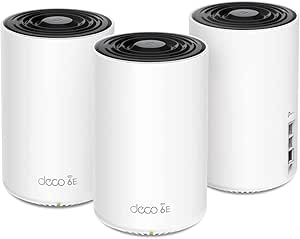 | Best Overall | Model: Deco XE75 Pro | System type: Tri-band Wi-Fi 6E mesh | Package quantity: 3 units | VIEW LATEST PRICE | See Our Full Breakdown |
| Google Nest Wifi Pro Wi-Fi 6E Mesh Router, 3-Pack, Snow |  | Best for Video-Call-Focused Teams | Technology: Wi-Fi 6E | Bands: 2.4 GHz, 5 GHz, and 6 GHz | Coverage: Up to 6,600 sq. ft. | VIEW LATEST PRICE | See Our Full Breakdown |
| Amazon eero Pro 6E Mesh Wi-Fi System, 3-Pack |  | Best for Existing eero Networks | Wi-Fi standard: Wi-Fi 6E | Package: 3-pack | Coverage: Up to 6,000 sq. ft. | VIEW LATEST PRICE | See Our Full Breakdown |
| TP-Link Deco XE75 Pro Wi-Fi 6E Tri-Band Mesh System, 3-Pack (Renewed) | | Best Renewed Coverage Pick | Model: Deco XE75 Pro | Condition: Renewed | Wi-Fi standard: Wi-Fi 6E | VIEW LATEST PRICE | See Our Full Breakdown |
| TP-Link Deco XE75 Tri-Band WiFi 6E Mesh System (1-Pack, Renewed) |  | Best for Compact Offices and Incremental Expansion | Model: Deco XE75 | Condition: Renewed | Package size: 1 unit | VIEW LATEST PRICE | See Our Full Breakdown |
| TP-Link Deco XE75 AXE5400 Tri-Band Wi-Fi 6E Mesh System, 2-Pack |  | Best for Mid-Sized Offices | Model: Deco XE75 | Wi-Fi standard: Wi-Fi 6E | Wireless bands: 2.4 GHz, 5 GHz, and 6 GHz | VIEW LATEST PRICE | See Our Full Breakdown |
| ASUS ZenWiFi Whole-Home Tri-band Mesh WiFi 6E System (ET9 3PK) |  | Best for Large Offices | Model: ET9 (W-3-PK) | Wi-Fi standard: Wi-Fi 6E | Frequency bands: Tri-band: 2.4 GHz, 5 GHz, and 6 GHz | VIEW LATEST PRICE | See Our Full Breakdown |
| WiFi 6E mesh system for office | Coverage | Model | Wi-Fi standard |
|---|---|---|---|
| TP-Link Deco XE75 Pro AXE5400 | Up to 7,200 sq. ft. | Deco XE75 Pro | — |
| Google Nest Wifi Pro Wi-Fi 6E | Up to 6,600 sq. ft. | — | — |
| Amazon eero Pro 6E Mesh Wi-Fi | Up to 6,000 sq. ft. | — | Wi-Fi 6E |
| TP-Link Deco XE75 Pro Wi-Fi 6E | Up to 7,200 sq. ft. | Deco XE75 Pro | Wi-Fi 6E |
| TP-Link Deco XE75 Tri-Band WiF | Up to 2,900 sq. ft. | Deco XE75 | — |
| TP-Link Deco XE75 AXE5400 Tri- | Up to 5,500 sq. ft. | Deco XE75 | Wi-Fi 6E |
| ASUS ZenWiFi Whole-Home Tri-ba | Up to 7,800 sq. ft. | ET9 (W-3-PK) | Wi-Fi 6E |
More Details on Our Top Picks
TP-Link Deco XE75 Pro AXE5400 Tri-Band Wi-Fi 6E Mesh System, 3-Pack
For an office spread across several rooms or floors, I’d start with the Deco XE75 Pro 3-pack: its stated coverage reaches 7,200 square feet, and the three nodes give you more placement options than the single-unit XE75. The 2.5 Gbps WAN/LAN port on each unit is a practical advantage for a faster internet connection or a wired office device, while two additional Gigabit ports provide more local connections. Its tri-band design can use 6 GHz for compatible devices or mesh backhaul, helping keep traffic organized. The tradeoff is that full 6 GHz access requires compatible hardware, and a separate modem is needed. Google Nest Wifi Pro is a simpler alternative if video-call prioritization is the main draw, but this Deco offers more explicit wired-port detail and higher stated coverage.
Pros:- Three nodes are rated to cover up to 7,200 square feet.
- Tri-band Wi-Fi 6E supports combined speeds up to 5,400 Mbps.
- Each unit has a 2.5 Gbps WAN/LAN port plus two Gigabit LAN ports.
- Deco app supports setup and network management.
Cons:- Requires a separate modem for most internet-provider setups.
- Compatible Wi-Fi 6E devices are needed to connect directly to the 6 GHz band.
- The maximum combined speed is a theoretical system figure, not a single-device speed guarantee.
Best for: Small offices with multiple work areas, many connected devices, and a need for flexible node placement and wired connections.
Not ideal for: Teams whose laptops and phones lack Wi-Fi 6E, or buyers who need a modem included in the package.
- Model:Deco XE75 Pro
- System type:Tri-band Wi-Fi 6E mesh
- Package quantity:3 units
- Coverage:Up to 7,200 sq. ft.
- Maximum combined data rate:5,400 Mbps
- Device capacity:Up to 200 devices
- Ports per unit:1 × 2.5 Gbps WAN/LAN; 2 × 1 Gbps LAN
- Management:Deco app
- Modem:Separate modem required
Our verdict“Choose this three-node Deco when an office needs broad coverage and more wired-port flexibility than a basic mesh setup.”
Google Nest Wifi Pro Wi-Fi 6E Mesh Router, 3-Pack, Snow
The Nest Wifi Pro is the most meeting-focused pick here: it can prioritize video calls and diagnose network issues, features that may help a small team identify trouble without spending time digging through settings. Its three routers are rated for up to 6,600 square feet, slightly less than the Deco XE75 Pro’s stated 7,200, so I’d favor the Deco when the office footprint is the bigger concern. Nest’s appeal is its emphasis on guided network management and guest controls rather than a detailed port selection; the supplied product information does not specify Ethernet port counts or speed. A significant limitation for existing Google mesh owners is that this model does not work with earlier Google Wifi or Nest Wifi generations, so it calls for a fresh system rather than an incremental expansion.
Pros:- Tri-band Wi-Fi 6E includes 2.4 GHz, 5 GHz, and 6 GHz bands.
- Three-router package is rated for coverage up to 6,600 square feet.
- Can prioritize video calls and diagnose network issues.
- Includes guest network controls and security features.
Cons:- Not compatible with earlier Google Wifi or Nest Wifi generations.
- The supplied specifications do not state Ethernet port details.
- Rated coverage is below the Deco XE75 Pro 3-pack’s stated 7,200 square feet.
Best for: Small teams that rely on video meetings and want call prioritization, network diagnostics, and guest-network controls.
Not ideal for: Offices planning to extend an existing Google Wifi or Nest Wifi system, or buyers who need documented multi-gig wired ports.
- Technology:Wi-Fi 6E
- Bands:2.4 GHz, 5 GHz, and 6 GHz
- Coverage:Up to 6,600 sq. ft.
- Package size:3 routers
- Video-call feature:Can prioritize video calls
- Network tools:Monitoring and diagnostics
- Guest network:Controls included
- Compatibility:Not compatible with previous Google Wifi or Nest Wifi generations
- Color:Snow
Our verdict“Pick the Nest Wifi Pro if meeting prioritization and easy diagnostics matter more than legacy Google mesh compatibility or specified wired-port options.”
Amazon eero Pro 6E Mesh Wi-Fi System, 3-Pack
If an office already uses eero, this three-unit Pro 6E has a clear advantage: it is backward-compatible with earlier eero devices, so the mesh can grow without replacing every node at once. TrueMesh technology is designed to reduce drop-offs and dead spots, while the app guides setup and remote network management. Its listed coverage of 6,000 square feet is less than the TP-Link Deco XE75 Pro’s 7,200, and the eero’s stated maximum network speed is 2.3 Gbps rather than the Deco’s 5,400 Mbps combined figure. Those figures describe different product claims, but they still make the Deco the more compelling pick for buyers focused on larger stated coverage and headline throughput. Eero’s key compromise is that some security and management tools require a separate subscription.
Pros:- Works with earlier eero devices for a gradual network upgrade.
- Three-pack is rated to cover up to 6,000 square feet.
- Supports more than 100 connected devices.
- TrueMesh aims to reduce connection drop-offs and dead spots.
Cons:- Some security and network management features require a separate subscription.
- Listed maximum network speed is up to 2.3 Gbps, below the Deco XE75 Pro’s 5,400 Mbps combined figure.
- Actual speed depends on the internet plan and connection type.
Best for: Offices already using eero that want to add Wi-Fi 6E coverage while keeping existing eero devices in the network.
Not ideal for: Buyers seeking the highest stated coverage in this group or who want security and management features without subscription requirements.
- Wi-Fi standard:Wi-Fi 6E
- Package:3-pack
- Coverage:Up to 6,000 sq. ft.
- Maximum network speed:Up to 2.3 Gbps
- Maximum wireless speed:Up to 1.6 Gbps
- Maximum wired speed:Up to 1 Gbps
- Ethernet port:2.5 Gb
- Connected devices:100+
- Mesh technology:TrueMesh
Our verdict“Choose eero Pro 6E when compatibility with an existing eero network matters more than maximum stated coverage or subscription-free management.”
TP-Link Deco XE75 Pro Wi-Fi 6E Tri-Band Mesh System, 3-Pack (Renewed)
This renewed XE75 Pro makes sense for an office that wants the same broad, three-node layout as the standard Deco XE75 Pro: the supplied specifications list up to 7,200 square feet, support for up to 200 devices, and one 2.5 Gbps port plus two Gigabit ports on every unit. That is a stronger coverage-and-wiring profile on paper than the eero Pro 6E’s stated 6,000 square feet. The core compromise is not the network design but the renewed condition: buyers should weigh that against the assurance they may prefer from a new system. HomeShield Pro features can also require a paid subscription after the free trial. As with the standard Deco package, a separate modem is commonly needed, and the 6 GHz band only benefits compatible clients directly.
Pros:- Three units are rated to cover up to 7,200 square feet.
- Tri-band Wi-Fi 6E supports network speeds up to 5,400 Mbps.
- Each unit has one 2.5 Gbps port and two Gigabit ports.
- Deco app supports setup and remote management.
Cons:- Renewed condition may not suit buyers who want a new system.
- HomeShield Pro requires a paid subscription after its free trial.
- Most internet-provider setups require a separate modem.
Best for: Office buyers who want the Deco XE75 Pro’s three-node coverage and port selection and are comfortable purchasing a renewed unit.
Not ideal for: Teams that require a new-in-box system, prefer to avoid subscription-based security features, or cannot use Wi-Fi 6E clients.
- Model:Deco XE75 Pro
- Condition:Renewed
- Wi-Fi standard:Wi-Fi 6E
- Bands:Tri-band: 6 GHz, 5 GHz, and 2.4 GHz
- Package size:3 units
- Coverage:Up to 7,200 sq. ft.
- Maximum network speed:Up to 5,400 Mbps
- Device capacity:Up to 200 devices
- Ports per unit:1 × 2.5 Gbps WAN/LAN; 2 × Gigabit
Our verdict“Consider this renewed Deco when its coverage and port layout fit your office and you accept the condition and service tradeoffs.”
TP-Link Deco XE75 Tri-Band WiFi 6E Mesh System (1-Pack, Renewed)
For a single office suite, this renewed one-unit Deco XE75 is a more targeted choice than the three-node Deco XE75 Pro: its stated coverage is up to 2,900 square feet, and its smaller package avoids buying nodes a compact space may not need. It retains tri-band Wi-Fi 6E and a stated maximum data rate of 5,400 Mbps, with the 6 GHz band intended to reduce interference and support backhaul. Its two LAN ports can serve nearby wired equipment, though they are listed at Gigabit speed; the Pro three-pack offers a 2.5 Gbps port on each unit and much broader stated coverage. Since this unit is renewed and carries a 90-day limited warranty, it is a less reassuring fit for an office that depends on constant connectivity or needs wider coverage without adding nodes.
Pros:- Single unit is rated to cover up to 2,900 square feet.
- Tri-band Wi-Fi 6E has a stated maximum data rate of 5,400 Mbps.
- Includes one WAN port and two LAN ports.
- Deco app supports setup and management.
Cons:- Renewed unit comes with a 90-day limited warranty.
- One unit may not cover a larger or multi-floor office.
- Listed LAN port bandwidth is 1,000 Mbps, unlike the Deco XE75 Pro 3-pack’s 2.5 Gbps port.
Best for: A small office or private workspace needing one Wi-Fi 6E access point, or an existing Deco owner adding coverage in a nearby area.
Not ideal for: Larger offices needing multiple mesh nodes, multi-gig wired connections, or longer warranty coverage.
- Model:Deco XE75
- Condition:Renewed
- Package size:1 unit
- Wi-Fi generation:Wi-Fi 6E
- Frequency bands:Tri-band: 2.4 GHz, 5 GHz, and 6 GHz
- Maximum data rate:5,400 Mbps
- Coverage:Up to 2,900 sq. ft.
- Ports:1 WAN; 2 LAN
- Warranty:90-day limited warranty
Our verdict“Choose this single Deco for a compact workspace or a small expansion, not as a substitute for a multi-node system across a larger office.”
TP-Link Deco XE75 AXE5400 Tri-Band Wi-Fi 6E Mesh System, 2-Pack
The Deco XE75 two-pack is a practical fit for an office that needs coverage across several rooms without stepping up to a three-node kit. Its stated reach of up to 5,500 square feet and support for up to 200 devices suit busy small offices, while the 6 GHz band can carry mesh traffic or serve compatible Wi-Fi 6E clients. Compared with the ASUS ZenWiFi ET9 3PK, this setup has a lower stated maximum speed and less listed coverage, but its two-node configuration may be simpler to place in a smaller workspace. The Deco app also keeps setup and management accessible. Tradeoffs include needing a modem for most internet services and uncertainty around which HomeShield security features require a paid tier. Choose it for broad coverage and straightforward management, not for maximum capacity or a confirmed security feature set.
Pros:- Two nodes are specified to cover up to 5,500 square feet
- Tri-band Wi-Fi 6E includes a 6 GHz band for backhaul or compatible devices
- Supports up to 200 devices
- Deco app offers setup and network management
Cons:- A separate modem is required for most internet service providers
- HomeShield includes premium features, so the scope of included security tools may be unclear
- Lower stated maximum speed and coverage than the ASUS ZenWiFi ET9 3PK
Best for: Small and mid-sized offices that need two mesh nodes, broad coverage, and app-based network management.
Not ideal for: Large offices or teams seeking the highest listed speed, and buyers who want clarity that all security features are included without a premium tier.
- Model:Deco XE75
- Wi-Fi standard:Wi-Fi 6E
- Wireless bands:2.4 GHz, 5 GHz, and 6 GHz
- Combined maximum speed:Up to 5,400 Mbps
- Coverage:Up to 5,500 sq. ft.
- Device capacity:Up to 200 devices
- Package quantity:2-pack
- Setup and management:Deco app
- Security features:TP-Link HomeShield
Our verdict“Choose the Deco XE75 two-pack for a mid-sized office that values broad two-node coverage and simple app management over the ASUS ET9’s higher stated capacity.”
ASUS ZenWiFi Whole-Home Tri-band Mesh WiFi 6E System (ET9 3PK)
For an office spread across a large floor plan, the ASUS ZenWiFi ET9 three-pack leads this pair on stated reach and speed: up to 7,800 square feet and 7,800 Mbps across tri-band Wi-Fi 6E. That makes it a stronger fit than the TP-Link Deco XE75 two-pack when several work areas need mesh coverage, though the figures are maximum specifications rather than a promise of real-world throughput. ASUS also lists four LAN ports per unit, lifetime internet security, parental controls, and AiMesh compatibility, offering useful wired connections and room to expand within compatible ASUS systems. The main drawback is the supplied unit’s 90-day limited warranty; the listing also identifies it as renewed, which may concern offices that prioritize long service life and warranty coverage. I’d favor it for reach and flexibility, not for buyers seeking the lower-risk warranty option.
Pros:- Three-pack coverage is specified for up to 7,800 square feet
- Tri-band Wi-Fi 6E supports a stated maximum speed of 7,800 Mbps
- Four LAN ports per unit provide options for wired office equipment
- Lists lifetime free internet security, parental controls, and AiMesh compatibility
Cons:- The 90-day limited warranty is short for a business network purchase
- The renewed condition may be a concern for buyers prioritizing expected service life
- Its coverage and capacity may be unnecessary for a smaller workspace
Best for: Businesses with large offices that need three mesh nodes, multiple wired LAN connections, and compatibility with an existing AiMesh setup.
Not ideal for: Small offices that do not need extensive coverage, or buyers who require a longer warranty and prefer a new unit over a renewed one.
- Model:ET9 (W-3-PK)
- Wi-Fi standard:Wi-Fi 6E
- Frequency bands:Tri-band: 2.4 GHz, 5 GHz, and 6 GHz
- Maximum speed:Up to 7,800 Mbps
- Coverage:Up to 7,800 sq. ft.
- Number of LAN ports:4
- LAN port bandwidth:2,600 Mbps per port
- Security and parental controls:Lifetime free internet security; parental controls
- Warranty:90-day limited
Our verdict“Pick the ASUS ZenWiFi ET9 3PK for a large office that can use its broader stated coverage, higher maximum speed, and wired ports, provided the renewed condition and short warranty are acceptable.”

How We Picked
I ranked these systems for office use, weighing practical coverage, wired connectivity, setup demands, and the way each option fits different workspaces. The Deco XE75 Pro 3-Pack leads because its three-node configuration offers flexibility across a larger footprint, and its 2.5 Gbps port can serve a suitable modem or wired device. The ASUS ET9 earns the premium role for shoppers who want more configuration choices, while Google Nest Wifi Pro and eero Pro 6E make more sense for buyers who value a streamlined setup and management experience.
I also considered kit size and purchase condition, since an office may need one additional node more than it needs a higher-end feature set. The standard Deco XE75 2-Pack is a more measured choice for smaller spaces, while renewed Deco options bring condition and support questions that new units avoid. I did not treat the WiFi 6E label alone as proof of better office performance: compatible client devices, 6 GHz range, wired backhaul, and the building layout all shape the result.
| WiFi 6E mesh system for office | Model | Coverage |
|---|---|---|
| TP-Link Deco XE75 Pro AXE5400 | Deco XE75 Pro | Up to 7,200 sq. ft. |
| Google Nest Wifi Pro Wi-Fi 6E | — | Up to 6,600 sq. ft. |
| Amazon eero Pro 6E Mesh Wi-Fi | — | Up to 6,000 sq. ft. |
| TP-Link Deco XE75 Pro Wi-Fi 6E | Deco XE75 Pro | Up to 7,200 sq. ft. |
| TP-Link Deco XE75 Tri-Band WiF | Deco XE75 | Up to 2,900 sq. ft. |
| TP-Link Deco XE75 AXE5400 Tri- | Deco XE75 | Up to 5,500 sq. ft. |
| ASUS ZenWiFi Whole-Home Tri-ba | ET9 (W-3-PK) | Up to 7,800 sq. ft. |
Factors to Consider When Choosing Best WiFi 6E Mesh System For Office
Choosing a mesh system for an office starts with the building and work pattern, not the largest advertised speed figure. These factors can help you avoid paying for extra nodes or advanced controls your team will not use.
Map the Office Before Choosing Node Count
Count rooms and barriers, not just square footage: dense walls, storage areas, and long corridors can disrupt a mesh link. A three-pack gives you more placement options, but placing nodes too close together wastes that flexibility. A two-pack may be enough for a compact suite if the main router sits centrally. For a multi-floor office, plan where each unit can receive a strong connection rather than putting one at the farthest dead zone. If you rent or cannot run cable, choose locations with accessible power and a clear path between nodes. A floor plan and a quick walk-through are more useful than assuming a kit’s coverage claim will match your building.
Treat 6 GHz as a Fast, Shorter-Reach Lane
The 6 GHz band can reduce congestion for compatible WiFi 6E devices, but it generally has less reach through walls than lower-frequency bands. That makes it useful for nearby laptops and workstations, not a guaranteed fix for a distant conference room. Check whether the computers and phones that need the benefit support WiFi 6E; older devices will use other available bands. A common mistake is to buy a 6E system expecting every client to become faster automatically. If most office equipment is older or connected by cable, node placement and dependable coverage may have greater day-to-day value. Think of 6 GHz as a benefit for the right devices in the right locations.
Decide Whether Wired Backhaul Is Practical
Wired backhaul links mesh nodes over Ethernet instead of asking them to relay traffic wirelessly. In a busy office or a building with thick walls, that can leave more wireless capacity for computers and calls. It only helps if you can run Ethernet to the node locations, so check existing wall jacks and cable routes before paying extra for a feature you cannot use. Also inspect the ports on the specific unit that will connect to your modem or switch; port speeds and availability can differ across a kit. A wired desktop or access point may need a free Ethernet port at the right location. If cabling is off the table, prioritize sensible node placement and a mesh system suited to your floor plan.
Match Network Controls to Your Office’s Support Needs
More settings can help a technically confident administrator separate work devices, manage access, and troubleshoot, but they also add setup and maintenance work. A small office without dedicated IT support may prefer a guided app and a smaller number of decisions. Before buying, check which controls are included without a subscription and which depend on an account or cloud service. Think about guest access, staff turnover, and how you will recover the network if the person who installed it leaves. Simpler management can be a genuine advantage when several people share responsibility. Choose advanced controls only when someone will use and maintain them.
Compare New and Renewed Kits by Risk, Not Just Node Count
A renewed mesh kit can be a sensible way to obtain a specific configuration, but office reliability depends on more than the number of units in the box. Confirm the seller’s return window, warranty terms, and whether power adapters and Ethernet cables are included. For a work-critical network, a new kit may be worth choosing for clearer support and condition expectations. If you consider a renewed one, test every node and port soon after arrival, before the return period ends. Avoid mixing different generations unless the manufacturer confirms they work together as expected. A low-cost entry point is less useful if one missing adapter or faulty node interrupts setup.
Plan for the Devices and Growth You Actually Have
Make an inventory of laptops, phones, printers, video-conferencing hardware, and wired equipment before selecting a system. Many offices benefit more from stable connections for simultaneous calls and file transfers than from a headline speed that few devices can use. Check whether the system offers enough Ethernet connections at the main node or whether you will need a separate switch. If you expect to add staff or expand into another room, think about whether you can add compatible nodes later and how the app handles them. Do not buy a larger kit solely for hypothetical growth if extra nodes will sit unused. A modest plan based on current work and near-term changes usually leads to a cleaner network.
Frequently Asked Questions
Is a three-pack worth choosing over a two-pack for a small office?
Not automatically. A two-pack such as the Deco XE75 kit may cover a compact, open office if the units can sit in useful locations with a clear connection between them. A third node helps when the floor plan has separated rooms, multiple levels, or coverage gaps that cannot be solved by moving the first two. More nodes placed too close can add clutter without improving the connection. Map the office first, and choose the smallest kit that can cover the working areas reliably.
Will WiFi 6E improve connections for employees with older laptops?
Older laptops that lack WiFi 6E support cannot connect to the 6 GHz band, so they will use the bands their wireless hardware supports. They may still connect through a WiFi 6E mesh system, but the 6E label alone will not add 6 GHz capability to those devices. If the office has a mixed fleet, prioritize coverage and stable mesh links for everyone. You can reserve the 6 GHz benefit for newer laptops and phones that support it. Check device specifications before making 6E support the main reason for an upgrade.
Should I choose wired backhaul for video calls and shared files?
Wired backhaul can help when mesh nodes are separated by walls or when many people use the network at once, because node-to-node traffic travels over Ethernet. It is especially useful if you already have suitable cabling between office areas. It is not a requirement for every small office, and running new cable may cost more effort than the benefit justifies. Also verify that the chosen units have the ports your layout needs. If you cannot wire the nodes, placement still matters: avoid putting a satellite in the very spot where the connection is already weak.
Is a renewed mesh system a safe choice for an office network?
A renewed system can work for an office, but its purchase condition and support terms deserve more attention than with a new kit. Confirm what accessories are included and how long you have to return a faulty unit. Test each node, Ethernet port, and power adapter promptly after setup. For a business that cannot tolerate downtime or delays in replacing a unit, a new system offers clearer condition expectations. A renewed option makes more sense when the office can handle basic troubleshooting and has a backup plan if a node needs replacement.
Which should I prioritize: advanced controls or easier setup?
Choose based on who will manage the network after installation. Advanced controls can suit an office with a technically confident administrator who wants more ways to configure and monitor the network. A simpler app-led setup is often a better fit when the owner or staff member managing WiFi has limited time for maintenance. Before deciding, check which management features are available without ongoing fees and whether the system supports the access controls your office needs. The best interface is the one your team can keep current and troubleshoot when the network needs attention.
Conclusion
For most offices needing several coverage points and a faster wired connection at the main unit, I recommend the TP-Link Deco XE75 Pro 3-Pack as best overall. The Deco XE75 2-Pack is my value-oriented choice for a smaller footprint, while a renewed Deco makes sense only for buyers comfortable checking condition and return terms closely. For a premium, control-focused setup, choose the ASUS ZenWiFi ET9; for beginners who want a more guided experience, look at Google Nest Wifi Pro or eero Pro 6E. If setup simplicity matters more than advanced configuration, compare those two by their app and account requirements; if 6 GHz coverage across distant rooms is your main need, reconsider node placement or wired backhaul before adding more hardware.
Halloween Picks
halloween
As an affiliate, we earn on qualifying purchases.