
The best VPN router with dual WAN depends on whether you need Wi-Fi built in, wired multi-WAN controls, or both. I’d put the ASUS RT-BE88U first for buyers seeking a feature-rich Wi-Fi 7 router, while the TP-Link Omada ER707-M2 is a stronger fit for multi-gigabit wired networks and the GL.iNet GL-MT5000 Brume 3 suits buyers prioritizing a dedicated VPN gateway. The main tradeoff is between wireless convenience and the flexibility of a separate gateway, alongside the VPN speed and setup effort each approach brings. Dual WAN can mean failover or load balancing, but it does not automatically combine two internet connections into one faster link. Read on for the full comparison and help matching a router to your network.

Get privacy and security gear delivered free with Prime
- Fast, free delivery on millions of items
- Prime Video, Amazon Music and more included
- Member-only deals all year
Key Takeaways
- The RT-BE88U is the all-in-one lead pick for buyers who want Wi-Fi 7 and routing features in one device, while dedicated wired gateways make more sense when VPN and WAN controls take priority over wireless convenience.
- The ER707-M2 stands out for wired multi-gigabit use; buyers should check that their modem, switch, and service can use its faster ports before paying for that capacity.
- The GL-MT5000 Brume 3 is a gateway, not a Wi-Fi replacement. Plan to pair it with an access point or existing wireless router if devices need wireless coverage.
- Wi-Fi generation does not predict VPN throughput. Encrypted traffic, protocol, server choice, and processor capacity can limit performance even when local wireless is fast.
- Dual WAN is mainly a resilience and traffic-management feature. Confirm whether the intended router supports the needed failover or load-balancing behavior, and do not expect it to merge two ISP links for every connection.
| ASUS RT-BE88U WiFi 7 Dual-Band Router |  | Best Overall Wi-Fi 7 Pick | Wi-Fi generation: Wi-Fi 7 | Frequency bands: Dual-band | Maximum wireless speed: Up to 7,200 Mbps | VIEW LATEST PRICE | See Our Full Breakdown |
| GL.iNet GL-BE9300 Flint 3 Tri-Band Wi-Fi 7 Router |  | Best for VPN-Focused Wi-Fi 7 | Wi-Fi standard: Wi-Fi 7 | Frequency bands: Tri-band, including 6 GHz | Maximum wireless speed: Up to 9 Gbps | VIEW LATEST PRICE | See Our Full Breakdown |
| TP-Link ER605 Wired Gigabit VPN Router |  | Best for Multi-WAN Flexibility | Ports: Five Gigabit Ethernet ports; one USB WAN port | WAN support: Up to three WAN connections | VPN connections: Up to 20 IPsec, 16 OpenVPN, 16 L2TP, and 16 PPTP | VIEW LATEST PRICE | See Our Full Breakdown |
| GL.iNet GL-MT5000 Brume 3 Wired VPN Security Gateway |  | Best High-Throughput VPN Gateway | Connectivity: Wired Ethernet; no Wi-Fi | Ports: Three 2.5GbE | WAN feature: Multi-WAN failover support | VIEW LATEST PRICE | See Our Full Breakdown |
| ASUS RT-BE58U Dual-Band WiFi 7 Router | 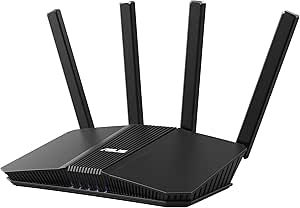 | Best Compact Wi-Fi 7 Option | Wi-Fi standard: Wi-Fi 7 (802.11be) | Frequency bands: Dual-band, 2.4 GHz and 5 GHz | Maximum networking speed: Up to 3,600 Mbps | VIEW LATEST PRICE | See Our Full Breakdown |
| GL.iNet GL-MT6000 Flint 2 Wi-Fi 6 Gaming Router |  | Best for Fast VPN Wi-Fi | Wi-Fi: Dual-band Wi-Fi 6 (802.11ax) | Advertised data rate: Up to 6 Gbps | Ports: 2 × 2.5G, 4 × 1G | VIEW LATEST PRICE | See Our Full Breakdown |
| TP-Link Omada ER707-M2 Multi-Gigabit VPN Router |  | Best for Managed Dual-WAN Setups | WAN ports: 1 × 2.5Gb WAN; 1 × 2.5Gb WAN/LAN | Additional ports: 4 × Gigabit WAN/LAN; 1 × Gigabit SFP WAN/LAN; 1 × USB 2.0 | VPN protocols: IPsec, OpenVPN, L2TP, and PPTP | VIEW LATEST PRICE | See Our Full Breakdown |
| TP-Link Omada ER706W AX3000 Wi-Fi 6 VPN Router | 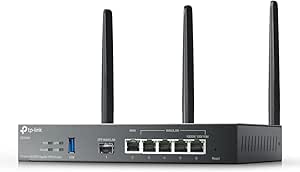 | Best All-in-One Omada Option | Wi-Fi: Dual-band Wi-Fi 6 (802.11ax), AX3000 | Wireless speeds: Up to 2,402 Mbps on 5 GHz and 574 Mbps on 2.4 GHz | WAN support: Load balancing across up to 5 WAN ports | VIEW LATEST PRICE | See Our Full Breakdown |
| VPN router with dual WAN | Ports | VPN protocols |
|---|---|---|
| ASUS RT-BE88U WiFi 7 Dual-Band | 1 × 10G SFP+, 1 × 10G WAN/LAN, 4 × 2.5G, 4 × 1G | — |
| GL.iNet GL-BE9300 Flint 3 Tri- | Five 2.5G ports | — |
| TP-Link ER605 Wired Gigabit VP | Five Gigabit Ethernet ports; one USB WAN port | — |
| GL.iNet GL-MT5000 Brume 3 Wire | Three 2.5GbE | WireGuard and OpenVPN |
| ASUS RT-BE58U Dual-Band WiFi 7 | One 2.5G and four 1G | — |
| GL.iNet GL-MT6000 Flint 2 Wi-F | 2 × 2.5G, 4 × 1G | WireGuard and OpenVPN |
| TP-Link Omada ER707-M2 Multi-G | — | IPsec, OpenVPN, L2TP, and PPTP |
| TP-Link Omada ER706W AX3000 Wi | 1 × Gigabit SFP; 5 × Gigabit RJ45; 1 × USB 3.0 | SSL, IPsec, GRE, WireGuard, PPTP, L2TP, and OpenVPN |
More Details on Our Top Picks
ASUS RT-BE88U WiFi 7 Dual-Band Router
The RT-BE88U is my strongest fit for buyers who want Wi-Fi 7, VPN support, and substantial wired capacity in one router. Its 10G WAN/LAN connection, 10G SFP+ port, and four 2.5G ports give a fast multi-WAN setup room to grow, while AiMesh can extend coverage later. Compared with the TP-Link ER605, it adds built-in Wi-Fi and much faster wired interfaces, though the ER605 explicitly supports up to three WAN connections and is a clearer choice when WAN flexibility is the priority. The tradeoff here is that the RT-BE88U is dual-band, not tri-band, and its listed details don’t specify dual-WAN load balancing or failover. I’d choose it for a high-capacity home network where VPN capability matters, but verify the firmware’s WAN configuration before buying specifically for dual WAN.
Pros:- Wi-Fi 7 with a stated maximum wireless rate of 7,200 Mbps
- 10G SFP+, 10G WAN/LAN, and four 2.5G ports support fast wired devices and uplinks
- VPN support, AiMesh, parental controls, and AiProtection Pro are included
Cons:- Dual-band design lacks a dedicated third band
- Provided product details do not confirm dual-WAN failover or load balancing
- Advanced configuration may require ASUSWRT or the app
Best for: Households with Wi-Fi 7 devices, multi-gigabit wired equipment, and a need for VPN capability alongside a possible multi-WAN setup.
Not ideal for: Buyers who need confirmed dual-WAN failover or load balancing out of the box, or who want a dedicated third Wi-Fi band.
- Wi-Fi generation:Wi-Fi 7
- Frequency bands:Dual-band
- Maximum wireless speed:Up to 7,200 Mbps
- Wired network capacity:Up to 34 Gbps
- Ports:1 × 10G SFP+, 1 × 10G WAN/LAN, 4 × 2.5G, 4 × 1G
- Processor:Quad-core 2.6 GHz 64-bit
- Mesh compatibility:AiMesh
- Coverage:3,000 sq ft
Our verdict“Choose the RT-BE88U for a feature-rich Wi-Fi 7 network with strong wired capacity, but confirm its dual-WAN behavior if that is your main requirement.”
GL.iNet GL-BE9300 Flint 3 Tri-Band Wi-Fi 7 Router
The Flint 3 puts VPN throughput and tri-band Wi-Fi 7 ahead of raw wired-port variety. Its listed WireGuard and OpenVPN speeds reach 680 Mbps, and five 2.5G ports give it more multi-gigabit connections than the ASUS RT-BE58U, whose supplied specs list one 2.5G port. That makes the Flint 3 a better match for a home with several wired multi-gig devices and VPN traffic, while its 6 GHz band can help compatible devices avoid crowding on the older bands. The main limitation for this roundup is that the product data does not state dual-WAN failover or load balancing; five ports alone do not establish either feature. Coverage is listed at up to 2,000 square feet, and actual VPN speeds depend on the service and network conditions. I’d shortlist it for VPN-capable Wi-Fi, then confirm WAN options before purchase.
Pros:- Tri-band Wi-Fi 7 includes 6 GHz
- Listed WireGuard and OpenVPN VPN speeds reach 680 Mbps
- Five 2.5G ports allow several multi-gig wired connections
- Supports AdGuard Home and parental controls
Cons:- Provided product details do not specify dual-WAN failover or load balancing
- Listed coverage is up to 2,000 square feet
- Actual VPN throughput varies with the provider, service, and network conditions
Best for: Wi-Fi 7 households that want stated WireGuard or OpenVPN throughput, a 6 GHz band, and multiple 2.5G wired connections.
Not ideal for: Buyers whose deciding requirement is documented dual-WAN failover or load balancing, or who need coverage beyond the listed 2,000 square feet.
- Wi-Fi standard:Wi-Fi 7
- Frequency bands:Tri-band, including 6 GHz
- Maximum wireless speed:Up to 9 Gbps
- Ports:Five 2.5G ports
- VPN speed:Up to 680 Mbps for WireGuard and OpenVPN
- Coverage:Up to 2,000 sq ft
- Device capacity:More than 100 devices
- Memory and storage:1 GB DDR4 RAM; 8 GB eMMC
Our verdict“Pick the Flint 3 for tri-band Wi-Fi 7 and stated VPN performance, after confirming that its WAN configuration meets your dual-WAN plan.”
TP-Link ER605 Wired Gigabit VPN Router
The ER605 earns its place here for the clearest multi-WAN feature set in this group: it supports up to three WAN connections, load balancing, and USB WAN backup with a compatible cellular modem. That makes it a more direct dual-WAN candidate than the ASUS RT-BE88U, whose supplied data lists VPN support but does not specify WAN failover or balancing. It also supports multiple VPN protocols and firewall filtering, giving small offices a practical wired gateway. The tradeoff is substantial: this is a wired-only Gigabit router, so you’ll need a separate access point for Wi-Fi, and its ports don’t match the multi-gig capacity of the GL.iNet GL-MT5000. USB backup also depends on modem compatibility. I’d choose the ER605 when WAN redundancy and straightforward wired routing matter more than Wi-Fi 7 or multi-gig speeds.
Pros:- Supports up to three WAN connections and load balancing
- USB WAN backup works with compatible 4G/3G modems
- Supports IPsec, OpenVPN, L2TP, and PPTP connections
- Firewall and filtering features suit wired office networks
Cons:- No built-in Wi-Fi
- Gigabit Ethernet lacks the multi-gig ports offered by the GL.iNet GL-MT5000
- USB WAN backup depends on compatible modem hardware
Best for: Small offices and home offices that need multiple WAN links, load balancing, or cellular backup and already have separate Wi-Fi equipment.
Not ideal for: Buyers who want an all-in-one Wi-Fi router, multi-gigabit Ethernet, or higher-speed VPN throughput than the listed Gigabit ports can support.
- Ports:Five Gigabit Ethernet ports; one USB WAN port
- WAN support:Up to three WAN connections
- VPN connections:Up to 20 IPsec, 16 OpenVPN, 16 L2TP, and 16 PPTP
- Ethernet bandwidth:10/100/1000 Mbps
- Maximum upstream data transfer rate:4,000 Mbps
- Dimensions:6.22 × 3.98 × 0.98 inches
- Weight:12.64 ounces
- Warranty:5-year manufacturer warranty
Our verdict“Choose the ER605 when documented multi-WAN options matter more than built-in Wi-Fi or multi-gigabit ports.”
GL.iNet GL-MT5000 Brume 3 Wired VPN Security Gateway
The Brume 3 is the specialist choice for buyers who want fast wired VPN routing with multi-WAN failover, rather than an all-in-one wireless router. Its stated hardware-accelerated VPN throughput reaches 1,100 Mbps, ahead of the Flint 3’s listed 680 Mbps, and its three 2.5GbE ports give wired connections more headroom than the ER605’s Gigabit ports. OpenWrt, VPN traffic obfuscation, and deep packet inspection add room for a more tailored security setup. Those strengths come with a clear tradeoff: there is no Wi-Fi, so you’ll need a separate access point, and advanced OpenWrt configuration may suit network enthusiasts better than plug-and-play buyers. The product data specifies multi-WAN failover, but not load balancing. I’d pick it for a wired VPN gateway where failover and VPN speed matter more than built-in wireless.
Pros:- Hardware-accelerated WireGuard and OpenVPN throughput is listed up to 1,100 Mbps
- Three 2.5GbE ports and multi-WAN failover support
- OpenWrt allows plugin use and network customization
- Includes VPN obfuscation and deep packet inspection
Cons:- Wired-only design requires separate Wi-Fi equipment
- Advanced configuration may be demanding for beginners
- Product details specify failover but do not confirm WAN load balancing
Best for: Network-conscious home offices and small teams that need multi-WAN failover, multi-gig wired ports, and hardware-accelerated VPN.
Not ideal for: Buyers seeking one box with Wi-Fi, or anyone who wants a simple setup without configuring advanced networking features.
- Connectivity:Wired Ethernet; no Wi-Fi
- Ports:Three 2.5GbE
- WAN feature:Multi-WAN failover support
- VPN protocols:WireGuard and OpenVPN
- Maximum VPN throughput:Up to 1,100 Mbps
- Operating system:OpenWrt
- Memory and storage:1 GB DDR4 RAM; 8 GB eMMC
- Expansion:USB 3.0 Type-C
Our verdict“Choose the Brume 3 for a configurable, multi-WAN VPN gateway with 2.5GbE ports, provided you already have or plan to add Wi-Fi.”
ASUS RT-BE58U Dual-Band WiFi 7 Router
The RT-BE58U is the lighter-duty ASUS choice for buyers who want Wi-Fi 7, VPN support, and familiar home-router features without the RT-BE88U’s extensive wired hardware. It offers a 2.5G port, mobile tethering, AiProtection Pro, and mesh support, making it a sensible fit for a smaller home network. Compared with the GL.iNet Flint 3, it has fewer multi-gig ports and no listed VPN throughput figure, while its dual-band setup lacks the Flint’s 6 GHz band. The key dual-WAN caveat is that the supplied product data does not confirm WAN failover or load balancing; mobile tethering is useful as a backup path, but it is not the same as documented dual-WAN behavior. I’d favor it for everyday Wi-Fi 7 and VPN features, not as a first choice for a demanding multi-WAN gateway.
Pros:- Wi-Fi 7 supports a stated maximum networking speed of 3,600 Mbps
- Includes VPN support, AiProtection Pro, and parental controls
- Mobile tethering offers another connectivity option
- Mesh support and Multi-Link Operation support flexible home coverage
Cons:- Product details do not confirm dual-WAN failover or load balancing
- Dual-band design has no 6 GHz band
- Only one 2.5G port is listed, and no VPN throughput figure is provided
Best for: Smaller households that want Wi-Fi 7, mesh expansion, parental controls, and mobile tethering in a simpler router.
Not ideal for: Buyers who need confirmed dual-WAN failover or load balancing, tri-band Wi-Fi, or several multi-gig wired connections.
- Wi-Fi standard:Wi-Fi 7 (802.11be)
- Frequency bands:Dual-band, 2.4 GHz and 5 GHz
- Maximum networking speed:Up to 3,600 Mbps
- Band speeds:2.4 GHz: 688 Mbps; 5 GHz: 2,882 Mbps
- Bandwidth:Up to 160 MHz
- Ports:One 2.5G and four 1G
- Coverage:Up to 2,000 sq ft
- Features:VPN, mesh support, Multi-Link Operation, mobile tethering, parental controls
Our verdict“Pick the RT-BE58U for everyday Wi-Fi 7 features and mobile tethering, but choose a more explicitly multi-WAN-focused gateway for redundancy.”
GL.iNet GL-MT6000 Flint 2 Wi-Fi 6 Gaming Router
The Flint 2 pairs dual-band Wi-Fi 6 with WireGuard and OpenVPN, making it a strong fit for households that want VPN protection on wireless devices without adding a separate access point. Its stated VPN throughput reaches 900 Mbps with WireGuard, and two 2.5G ports give faster wired connections room to grow. Compared with the wired TP-Link Omada ER707-M2, the Flint 2 brings Wi-Fi and a simpler home-network role, while the ER707-M2 offers more WAN choices and centralized Omada management. The tradeoff is that the product details do not specify dual-WAN load balancing, so buyers needing clearly documented WAN failover or balancing should check the router’s firmware capabilities before choosing it. Plan on updating firmware during setup, and treat advertised speeds as dependent on your ISP and VPN provider.
Pros:- Supports WireGuard and OpenVPN, with stated VPN speeds up to 900 Mbps and 880 Mbps respectively
- Two 2.5G ports plus four Gigabit ports provide flexible wired connectivity
- Wi-Fi 6 and stated support for over 100 devices suit busy connected homes
- AdGuard Home support adds network-level filtering options
Cons:- The supplied product details do not specify dual-WAN load balancing or failover
- Firmware update is recommended during initial setup
- Actual VPN and wireless speeds depend on the network, ISP, and VPN service
Best for: Households seeking Wi-Fi 6, strong stated VPN throughput, and wired 2.5G connections in one router.
Not ideal for: Buyers who require explicitly documented dual-WAN load balancing or a wired business gateway with centralized management.
- Wi-Fi:Dual-band Wi-Fi 6 (802.11ax)
- Advertised data rate:Up to 6 Gbps
- Ports:2 × 2.5G, 4 × 1G
- VPN protocols:WireGuard and OpenVPN
- VPN speeds:Up to 900 Mbps with WireGuard; up to 880 Mbps with OpenVPN
- Memory and storage:1 GB DDR4 RAM; 8 GB eMMC
- Security:WPA3; AdGuard Home support
- Device capacity:Designed for over 100 connected devices
Our verdict“Choose the Flint 2 for VPN-capable Wi-Fi and fast wired ports, but verify its WAN-management features if dual-WAN is a firm requirement.”
TP-Link Omada ER707-M2 Multi-Gigabit VPN Router
For a wired network where WAN flexibility matters more than built-in wireless, the Omada ER707-M2 is the most directly aligned pick here: it has two 2.5Gb WAN ports, additional configurable WAN/LAN ports, and an SFP WAN/LAN connection. Omada cloud management is useful for people overseeing a small office or several network devices from one interface. Its high stated session and client capacities also make it a more business-oriented choice than the Wi-Fi-equipped GL.iNet Flint 2. That specialization comes with a clear compromise: there is no stated Wi-Fi capability, so wireless access requires a separate access point. USB-based LTE backup also needs a separate dongle. I’d favor this model when WAN configuration and centralized administration lead the decision, not when a single box needs to provide home Wi-Fi.
Pros:- Two 2.5Gb WAN ports support multi-gigabit WAN connections
- Additional Gigabit WAN/LAN ports and an SFP WAN/LAN port allow flexible configurations
- Centralized management through Omada cloud
- Supports multiple VPN types and states capacity of up to 500,000 concurrent sessions
Cons:- No Wi-Fi capability is stated, so wireless access requires a separate access point
- USB LTE backup requires a separate LTE dongle
- Its range of network and VPN settings may be more than a basic home setup needs
Best for: Small offices and technically confident users who need dual 2.5Gb WAN connectivity, configurable ports, and centralized Omada management.
Not ideal for: Households looking for an all-in-one wireless router or buyers who want LTE backup without sourcing a compatible USB dongle.
- WAN ports:1 × 2.5Gb WAN; 1 × 2.5Gb WAN/LAN
- Additional ports:4 × Gigabit WAN/LAN; 1 × Gigabit SFP WAN/LAN; 1 × USB 2.0
- VPN protocols:IPsec, OpenVPN, L2TP, and PPTP
- VPN connection capacity:Up to 100 IPsec, 66 OpenVPN, 60 L2TP, and 60 PPTP connections
- Concurrent sessions:Up to 500,000
- Client capacity:Up to 1,000+
- Data transfer rate:2,500 Mbps
- Management:Centralized Omada cloud management
- Dimensions and weight:12.9 × 9.5 × 3.1 in; 1.1 kg
Our verdict“Pick the ER707-M2 when wired dual-WAN flexibility and Omada management matter more than built-in Wi-Fi.”
TP-Link Omada ER706W AX3000 Wi-Fi 6 VPN Router
The Omada ER706W suits buyers who want wireless access and multi-WAN features in one device, without stepping up to the wired-only layout of the ER707-M2. It supports load balancing across up to five WAN ports, multiple VPN protocols, and Wi-Fi 6, while Omada Mesh and centralized management can help keep a wider network organized. Its USB 3.0 port adds options for storage sharing or LTE backup with a compatible dongle. The limitation is its Gigabit RJ45 connectivity: unlike the ER707-M2’s 2.5Gb WAN ports, the ER706W does not offer the same stated multi-gigabit WAN link. Its listed security is WPA2 rather than WPA3, also a step behind the Flint 2 on that spec. This is the better match for integrated Wi-Fi and flexible WAN balancing, not maximum wired WAN speed.
Pros:- Supports load balancing across up to five WAN ports
- Wi-Fi 6 is built in, unlike the wired-only Omada ER707-M2
- Broad VPN protocol support, including WireGuard, OpenVPN, and IPsec
- Omada Mesh, centralized management, and USB 3.0 expand network and backup options
Cons:- Gigabit RJ45 ports do not match the ER707-M2’s stated 2.5Gb WAN connectivity
- LTE backup requires a compatible USB dongle
- Listed wireless security is WPA2 rather than WPA3
Best for: Small businesses or homes that want Wi-Fi 6, VPN support, and multi-WAN load balancing with Omada management in one unit.
Not ideal for: Users who need 2.5Gb WAN ports, WPA3, or LTE backup without buying a compatible USB dongle.
- Wi-Fi:Dual-band Wi-Fi 6 (802.11ax), AX3000
- Wireless speeds:Up to 2,402 Mbps on 5 GHz and 574 Mbps on 2.4 GHz
- WAN support:Load balancing across up to 5 WAN ports
- Ports:1 × Gigabit SFP; 5 × Gigabit RJ45; 1 × USB 3.0
- VPN protocols:SSL, IPsec, GRE, WireGuard, PPTP, L2TP, and OpenVPN
- Memory:512 MB RAM
- Antennas:3 fixed antennas
- Security:WPA2
- Management and mesh:Centralized Omada management and Omada Mesh support
Our verdict“Choose the ER706W if you want Omada-managed Wi-Fi and multi-WAN load balancing in one router and can work within Gigabit Ethernet limits.”

How We Picked
I ranked these eight models by how well their stated design and feature sets fit the specific job of combining VPN routing with two WAN connections. I gave priority to clear WAN flexibility, useful VPN options, port capacity, and the ability to fit a real home or small-office setup. I also weighed whether Wi-Fi is built in, how much network knowledge setup may call for, and whether the product’s role is clear enough for a buyer to choose confidently.
The order favors the ASUS RT-BE88U as a broad all-in-one choice, then places more specialized options according to their likely fit rather than treating every Wi-Fi 7 label as an advantage. Wired gateways and Omada models rank well for buyers who need deliberate WAN and network controls, but less well for people expecting a simple wireless replacement. I do not treat advertised Wi-Fi speed as a proxy for encrypted VPN speed; buyers should verify the manufacturer’s details for the VPN protocol, WAN configuration, and throughput they plan to use.
| VPN router with dual WAN | VPN protocols |
|---|---|
| ASUS RT-BE88U WiFi 7 Dual-Band | — |
| GL.iNet GL-BE9300 Flint 3 Tri- | — |
| TP-Link ER605 Wired Gigabit VP | — |
| GL.iNet GL-MT5000 Brume 3 Wire | WireGuard and OpenVPN |
| ASUS RT-BE58U Dual-Band WiFi 7 | — |
| GL.iNet GL-MT6000 Flint 2 Wi-F | WireGuard and OpenVPN |
| TP-Link Omada ER707-M2 Multi-G | IPsec, OpenVPN, L2TP, and PPTP |
| TP-Link Omada ER706W AX3000 Wi | SSL, IPsec, GRE, WireGuard, PPTP, L2TP, and OpenVPN |
Factors to Consider When Choosing Best VPN Router With Dual WAN
Before choosing a model, I’d settle how you want the two internet links and the VPN to work together. The right design depends on your failover needs, wireless layout, actual VPN workload, and tolerance for network setup—not just the newest Wi-Fi standard.
Decide Whether You Need Failover, Load Balancing, or Both
Failover and load balancing solve different problems. Failover shifts traffic to a second connection when the primary link stops working, making it the clearer choice for continuity. Load balancing distributes sessions across connections, which can help multiple users share available capacity, but it usually does not make one download or call run at the combined speed of both links. Check how a router detects outages: a modem can remain online while its ISP connection is down, so link detection behavior matters. Also confirm whether VPN tunnels reconnect automatically after a WAN change. Buying on the phrase “dual WAN” alone can leave you with a feature that does not match the outage or traffic pattern you meant to address.
Match VPN Throughput to Your Internet Plan
Encrypted throughput can be much lower than ordinary routing throughput. The router must process VPN traffic, and results vary by protocol, settings, and the remote VPN service. A fast Wi-Fi radio does not guarantee that a router can handle a high-speed VPN connection at the same rate. Look for performance information tied to the VPN protocol you expect to use, and leave room for multiple users and other network tasks. If only a few devices need a VPN, routing selected devices through a tunnel may be a better fit than forcing every connection through it. This can avoid slowing services that do not need VPN protection.
Choose an All-in-One Router or a Separate Gateway
An all-in-one router saves space and setup steps, while a dedicated VPN gateway can make network roles easier to separate. Models such as the Brume 3 are wired gateways, so buyers need a separate access point or wireless router for Wi-Fi. That extra device adds cost, cabling, and another interface to manage, but it can also let you upgrade wireless coverage without replacing the VPN gateway. Check whether your existing router can be placed in access-point mode or whether its routing features will conflict with the new gateway. Avoid buying a wired model expecting it to broadcast Wi-Fi.
Check Port Speeds Across the Whole Network
Multi-gigabit ports only help when the rest of the path can use them. Compare the router’s WAN and LAN port speeds with your modem, switch, access point, and subscribed connection. A single gigabit link elsewhere can cap the practical speed even when the router has faster ports. Count how many wired devices need direct connections and whether a separate switch is required. For a home with ordinary broadband and few wired devices, dependable gigabit ports may be a better fit than paying for unused headroom. For a faster service or a growing office network, port capacity can prevent an early replacement.
Account for Setup and Ongoing Maintenance
Dual WAN adds decisions that a basic router does not require. Expect to configure link priority, health checks, routing behavior, and possibly VPN policies for each connection. A web interface that exposes these choices clearly can matter more than a long feature list if you are new to network management. Check how firmware updates are delivered and whether the manufacturer documents the VPN and WAN settings you plan to use. If you need advanced rules but do not want to maintain them, favor a system with the right controls and a manageable interface rather than the most configurable device. Keep a note of your ISP settings so a replacement or reset is easier to handle.
Plan for VPN Failure and ISP Outages
A second WAN connection does not automatically protect every VPN session. When the primary ISP or VPN tunnel fails, devices may reconnect over a different route unless the router’s policies prevent that behavior. Decide whether your priority is staying online or keeping traffic inside the VPN; those goals can conflict during a tunnel outage. Ask whether the router supports a kill switch or policy-based routing for the devices that need it, and test the intended failover behavior after setup. A cellular backup can be useful, but data limits, latency, and modem compatibility affect its practical value. Planning for these cases before purchase helps avoid surprises during the outage the second WAN was meant to handle.
Frequently Asked Questions
Does dual WAN make two internet connections act like one faster connection?
Usually not for a single device or download. Load balancing can distribute separate connections or sessions across two ISPs, which may improve how a household or office uses its combined available capacity. A single session generally stays on one route unless a specialized bonding service is involved. Failover has a different purpose: it moves traffic to the backup line when the primary one becomes unavailable. Check what the router’s dual-WAN mode supports and whether your VPN setup works with that mode before buying.
Can I keep my current Wi-Fi router and add a wired VPN gateway?
Often, yes, but the network layout matters. A wired gateway such as the Brume 3 can sit between the modem and your existing router, with the existing device set to access-point mode when possible. If both devices perform routing and firewall duties, you may create double NAT or make port forwarding and device discovery harder. Some setups instead place only selected devices behind the VPN gateway, but that requires suitable routing support. Check both devices’ operating modes and decide which one will handle DHCP, firewall rules, and Wi-Fi before connecting them.
Will a VPN router keep every device on the VPN when the connection drops?
Not automatically. The answer depends on whether the router has a kill switch or routing policy that blocks traffic when the VPN tunnel is unavailable. If dual-WAN failover sends traffic through a second ISP, that traffic may use the regular internet unless the VPN reconnects or rules block it. This is a key distinction between prioritizing uptime and prioritizing tunnel-only traffic. Check the router’s documented behavior for both VPN failure and WAN failover, then test those conditions with a non-sensitive device after setup.
Should I choose Wi-Fi 7 or a wired router for a VPN setup?
Choose based on where the network bottleneck and management needs sit. A Wi-Fi 7 router such as the RT-BE88U is a sensible direction when you want wireless access and routing in one unit, provided your devices can use its wireless features. A wired model such as the ER707-M2 or Brume 3 suits a network with separate access points or a stronger need for wired WAN and VPN controls. Neither wireless generation nor port speed alone tells you how fast encrypted traffic will run. Compare VPN throughput information, WAN features, and the devices you already own before choosing.
What should I prioritize if my backup internet is cellular?
Check compatibility and the cost of keeping the backup link active. Confirm whether the router accepts your cellular modem or requires a separate gateway, and whether it can detect an outage that calls for switching to that connection. Cellular data limits, signal quality, latency, and carrier restrictions can matter more than the router’s advertised maximum port speed. Decide which devices should use the backup link and whether their VPN tunnels can reconnect over it. For a backup used only during outages, clear failover controls may be more useful than load balancing features you rarely need.
Conclusion
For the best overall all-in-one fit, I’d start with the ASUS RT-BE88U, especially if Wi-Fi 7 and a broad set of router features matter alongside VPN and dual-WAN capability. For a wired multi-gigabit network, the TP-Link Omada ER707-M2 is the more targeted choice; for a dedicated VPN gateway, consider the GL.iNet GL-MT5000 Brume 3 and pair it with Wi-Fi equipment. Buyers seeking value should compare the TP-Link ER605 with their actual port-speed and management needs rather than paying for capacity they will not use. For a beginner, an all-in-one option such as the ASUS RT-BE58U may be easier to place in a home network than a separate wired gateway, but check its VPN and WAN features against your exact requirements. If your priority is gaming-oriented Wi-Fi, look at the GL.iNet GL-MT6000 Flint 2; if you want Wi-Fi 7 with tri-band design, compare the GL.iNet GL-BE9300 Flint 3. The best pick is the one whose VPN behavior, WAN modes, and network layout match your connection—not simply the model with the newest wireless label.
Halloween Picks
halloween
As an affiliate, we earn on qualifying purchases.