
The GL.iNet GL-MT6000 Flint 2 is a dual-band Wi-Fi 6 router aimed at homes that want capable wired networking and built-in VPN options without moving to a business-focused system. Its strongest case is the combination of two 2.5G ports and WireGuard and OpenVPN support; its main drawback is that advertised wireless and VPN rates are not guarantees of the speeds a household will see. For people who will use those ports or VPN features, it looks like a well-equipped mid-range choice. If you mainly need a basic Wi-Fi upgrade, much of its appeal may go unused.

Get privacy and security gear delivered free with Prime
- Fast, free delivery on millions of items
- Prime Video, Amazon Music and more included
- Member-only deals all year
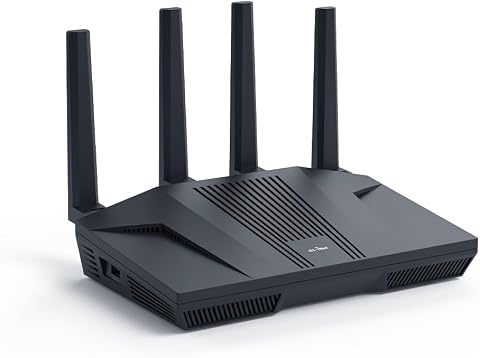
GL.iNet GL-MT6000 Flint 2 Wi-Fi 6 Gaming Router
- ✔ Wi-Fi standard: Wi-Fi 6 (802.11ax)
- ✔ Wireless bands: Dual-band
- ✔ Advertised data rate: Up to 6 Gbps
Why This Product Stands Out
Why the Flint 2 stands out
The Flint 2 is more distinctive for its wired and VPN flexibility than for Wi-Fi 6 alone. Wi-Fi 6 is common across modern routers, but two 2.5G Ethernet ports give this model more room for multi-gig internet service or fast local connections than a typical router limited to gigabit ports. That makes its hardware a better fit for users who are planning around their wired network as well as their wireless coverage.
Its support for WireGuard and OpenVPN, along with AdGuard Home, also gives it a more configurable profile than a basic home router. These options matter to people who want network-wide VPN coverage or filtering controls, but they add little value to someone who will use default Wi-Fi for phones, televisions, and casual browsing. In its Wi-Fi 6 segment, the Flint 2 is a feature-rich option; buyers seeking the latest wireless generation should compare it with the GL.iNet Flint 3 Wi-Fi 7 instead.
Key Features and What They Mean
Features and what they mean in practice
Wi-Fi 6 on two bands gives compatible devices a current wireless standard without the extra band or Wi-Fi 7 capability of newer premium models. That is a sensible fit for homes with a mix of phones, computers, streaming devices, and consoles, especially when the goal is an upgrade from older Wi-Fi. The stated up to 6 Gbps describes an advertised aggregate rate; it should not be read as a single-device speed or an expected internet speed.
The two 2.5G ports are the clearest practical differentiator. They can connect to compatible multi-gig service or equipment, while four 1G ports handle common wired devices. Their benefit depends on the rest of the setup: a gigabit internet plan and gigabit-only devices will not use the extra port capacity, though a faster NAS or future service could make it useful.
Router support for WireGuard and OpenVPN can simplify VPN coverage across a home network, including devices where installing a VPN app is inconvenient. The listed maximums are up to 900 Mbps for WireGuard and 880 Mbps for OpenVPN, but those are not guaranteed rates. Encryption overhead, the VPN server, the ISP, and the router’s configuration can all affect throughput. Buyers with demanding VPN use should treat those figures as useful reference points rather than a promise.
AdGuard Home offers a way to apply filtering at the network level, which may reduce the need to configure every device independently. The router also includes guest and access point modes: a guest network can keep visitor access separate from the main connection, while access point mode can suit a setup where another router already handles routing. These are helpful options for specific households, rather than reasons on their own to replace a working router.
The Flint 2 lists 1 GB of DDR4 RAM, 8 GB of eMMC storage, WPA3, QoS, and support for more than 100 connected devices. Together, these specifications point to a router built for a fairly involved home network, but the device count is a stated capacity, not a guarantee that every device will have strong, fast Wi-Fi at once. Range and performance still depend on the home layout, interference, and connected hardware.
Performance and Real-World Use
Expected day-to-day performance
For ordinary browsing, video calls, and streaming, the Flint 2’s Wi-Fi 6 support should suit a broad range of current devices. The dual-band design is a familiar home-router arrangement, but performance will vary with placement, walls, neighboring networks, and the abilities of each client. The product description gives no coverage measurements, so buyers should not use its aggregate speed figure to predict whether one router will cover a particular house.
Wired use is easier to plan around: four 1G ports cover common equipment, and the two 2.5G ports leave room for faster links when both ends support them. A household that has no multi-gig service or local network equipment may not notice much difference from a conventional gigabit router. For VPN use, the listed rates suggest serious throughput ambitions, while the actual result will depend on the selected protocol and VPN service.
Setup includes a recommended initial firmware update, so buyers should allow time to update before relying on the router. The available product facts do not establish a particular setup difficulty or long-term reliability record. Its extra modes and network tools may be appealing to people comfortable adjusting router settings; those who prefer a minimal setup may find a simpler model easier to manage.
Who Should Buy This
The Flint 2 makes the most sense for someone upgrading a home network who has a reason to use its 2.5G ports, such as multi-gig internet, compatible wired equipment, or a fast local storage connection. It also suits households that want VPN coverage managed at the router, network-level AdGuard Home filtering, and room for many connected devices. If you want Wi-Fi 6 and know you will use at least one of those advanced capabilities, its breadth of features is more persuasive than a basic router’s simpler spec sheet.
Who Should Skip This
Skip it if your priority is the lowest-cost way to provide ordinary Wi-Fi for a few devices, since the multi-gig ports and VPN tools may sit unused. Buyers who want a tri-band Wi-Fi 7 router for newer wireless hardware should compare the GL.iNet GL-BE9300 Flint 3. Those focused on a managed networking setup could consider the TP-Link Omada ER706W, while someone who needs a wired VPN gateway and does not need router Wi-Fi may find the GL.iNet Brume 3 a closer match.
Value for Money
Value depends on whether its less common features solve a real need. The Flint 2 presents a strong mid-range proposition for a Wi-Fi 6 router with dual 2.5G ports, VPN protocol support, and AdGuard Home. That combination is more compelling than Wi-Fi 6 by itself, particularly for a home with multi-gig equipment or a plan to use router-level VPN. The available information does not include a verified current price, so a precise price comparison is not possible. Before buying, compare its cost with a standard gigabit Wi-Fi 6 router if you do not need multi-gig connections, or with the Flint 3 if Wi-Fi 7 and tri-band capability matter more. It is worth the added feature set only when you expect to use it.
GL.iNet GL-MT6000 Flint 2 Wi-Fi 6 Gaming Router
Why the Flint 2 stands out The Flint 2 is more distinctive for its wired and VPN flexibility than for Wi-Fi 6 alone. Wi-Fi 6 is common across modern routers, but two 2.5G Ethernet ports give this model more room for multi-gig internet service or fast local connections than a typical router limited to gigabit ports.
Pros:
- Two 2.5G ports support faster-than-gigabit wired connections, which can help when the internet plan, modem, NAS, or other equipment supports multi-gig speeds.
- WireGuard and OpenVPN support let buyers route traffic through a VPN at the router level, potentially covering devices that do not offer convenient VPN apps.
- AdGuard Home support adds a network-level option for filtering unwanted content, so compatible settings can apply across connected devices rather than requiring separate setup on each one.
- Four additional 1G ports provide wired connections for everyday devices such as TVs, consoles, and desktop computers without relying on Wi-Fi.
- Wi-Fi 6, WPA3, and support for over 100 connected devices give busy households a modern baseline for many client devices, with guest and access point modes for flexible placement.
Cons:
- Dual-band Wi-Fi 6 lacks the extra band found on tri-band models, which may matter in households with demanding wireless traffic or a preference for newer Wi-Fi 7 hardware.
- The advertised rate of up to 6 Gbps is a combined headline figure, not a promise of that speed to one device; client capability, distance, interference, and internet service all matter.
- VPN throughput figures of up to 900 Mbps with WireGuard and 880 Mbps with OpenVPN are stated maximums, and the VPN provider and connection conditions can reduce actual throughput.
- A firmware update is recommended during initial setup, adding a setup step before the router is ready for normal use.
Best for: Households that want Wi-Fi 6, faster-than-gigabit wired connections, and router-level VPN or AdGuard Home support.
Not ideal for: Buyers seeking Wi-Fi 7, a tri-band system, or a simple low-cost router without advanced network features.
Bottom line: The GL.iNet Flint 2 is a worthwhile mid-range Wi-Fi 6 option for households that can use its two 2.5G ports, router-level VPN support, or AdGuard Home.
Frequently Asked Questions
Does the Flint 2 deliver 6 Gbps to one device?
No. Up to 6 Gbps is an advertised aggregate wireless rate, not a guaranteed single-device speed. Actual results depend on the device, signal conditions, router placement, and network service.
Can I use a VPN with the Flint 2?
Yes. It supports WireGuard and OpenVPN, with stated maximum VPN speeds of up to 900 Mbps and 880 Mbps respectively. Those figures can vary with the VPN service, configuration, and connection.
Who benefits from the two 2.5G ports?
They are useful if your internet service or wired equipment supports multi-gig connections. With only gigabit service and gigabit devices, the additional port speed may not change everyday performance.
Is a firmware update needed during setup?
A firmware update is recommended during initial setup. Plan to check for and install updates before depending on the router for everyday use.
Final Thoughts
The GL.iNet Flint 2 is a worthwhile mid-range Wi-Fi 6 option for households that can use its two 2.5G ports, router-level VPN support, or AdGuard Home. Its wired connections and network tools make it more capable than a basic home router, while its dual-band Wi-Fi 6 design keeps it short of the latest tri-band Wi-Fi 7 choices. Buy it if those specific capabilities fit your network and you are comfortable updating firmware during setup. Choose a simpler router for basic Wi-Fi, or the Flint 3 if next-generation wireless is the priority.
Halloween Picks
halloween
As an affiliate, we earn on qualifying purchases.