TL;DR

Get privacy and security gear delivered free with Prime
- Fast, free delivery on millions of items
- Prime Video, Amazon Music and more included
- Member-only deals all year
VPNs encrypt traffic but don’t verify trustworthiness. Modern secure remote access adds identity checks, device posture, and continuous monitoring, making remote work safer and more precise.
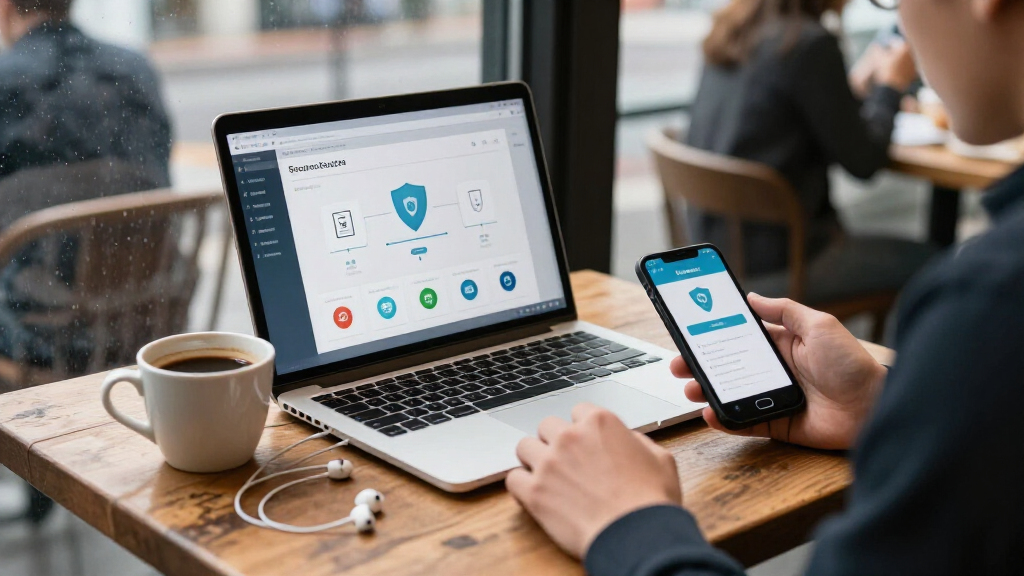
Imagine your favorite coffee shop, the rich aroma of roasted beans filling the air, the hum of conversations blending with the clatter of cups. Now, picture trying to work from that cozy corner on a public Wi-Fi. You’re protected by a VPN, right? But what if that’s just one piece of a much larger puzzle? Secure remote access today isn’t just about encrypting traffic; it’s about verifying who’s asking for access, from what device, and under what circumstances.
In a world where cyber threats evolve faster than ever, organizations need more than a simple tunnel. They need a layered approach—one that confirms identities, checks device health, and adapts to changing risks. This article explores what secure remote access truly means beyond VPNs, offering concrete examples and practical tips to keep your digital doors locked tight without locking out your team.
VPNs encrypt traffic but do not verify trustworthiness; layered controls are essential.
Identity verification with MFA and risk checks significantly reduces account compromise risks.
Device posture checks ensure endpoints are secure before granting access, limiting vulnerabilities.
Applying least privilege and application-specific access minimizes attack surfaces and containment risks.
Continuous monitoring and real-time reassessment are vital to adapt to changing threats and device states.
Why Relying Only on VPNs Leaves You Exposed
VPNs have been the backbone of remote work security for decades. They create an encrypted tunnel, shielding your data from prying eyes. But encryption isn’t the same as trust. A VPN doesn’t verify if the person behind the device is authorized or if the device itself is secure.
Picture this: an employee’s laptop gets stolen. The thief uses the VPN credentials, which the employee reused from a breach, to access internal systems. The VPN encrypts traffic, yes, but it doesn’t stop the thief from reaching sensitive data. That’s the core issue—VPNs focus on connection, not trust.
Research from security experts shows that over 70% of data breaches involve stolen or compromised credentials. Relying solely on VPNs means trusting that the connection is safe, but the real weak link is often the user or device. Without additional checks, VPNs become a broad, all-access pass that can be exploited.
So, what’s missing? Context. Who is requesting access? From where? On what device? These questions matter more than ever in today’s distributed, cloud-first landscape.
multi-factor authentication security key
As an affiliate, we earn on qualifying purchases.
As an affiliate, we earn on qualifying purchases.
How Modern Secure Access Checks Identity, Not Just Connection
Secure remote access today starts with **identity verification**. It’s no longer enough to assume someone is who they say they are based on a password. Multi-factor authentication (MFA), single sign-on (SSO), and risk-based checks add layers of certainty.
For example, imagine an employee logging in from a new country. The system prompts for MFA—perhaps a biometric scan or a hardware token. Even if someone stole their password, they’d still need that second factor to get in.
Organizations are also adopting **risk-based authentication**, which evaluates the login context—such as device reputation, location, or behavior. If a login attempt looks suspicious, it can trigger additional verification or block access altogether.
According to industry studies, MFA can prevent up to 99.9% of account compromise attacks. But it’s not foolproof—attackers are evolving. That’s why continuous assessment of user behavior and session activity is critical.
Think of it like a bouncer at a club: they check your ID, monitor your behavior inside, and decide if you’re really who you claim to be. Modern access controls do the same, but digitally.
As an affiliate, we earn on qualifying purchases.
Device Posture Checks: Are Your Devices Really Safe?
Device security is the second pillar of modern remote access. Knowing who’s connecting isn’t enough if their device is vulnerable. Think of your device as a car: a key unlocks the door, but if the brakes are out, you’re still at risk.
Organizations now check whether devices are managed, encrypted, up-to-date, and free of malware before granting access. For example, a remote worker’s laptop might need to have the latest security patches, disk encryption enabled, and no suspicious software.
Let’s say an employee’s phone is jailbroken or rooted. That device could be more vulnerable to malware or data leaks. The system can flag this and block access or require remediation.
Some companies use endpoint management tools that assess device health in real-time. If a device falls out of compliance during a session—say, it gets infected or the OS becomes outdated—the system can revoke access or prompt for re-authentication.
This approach is like a security guard checking IDs and inspecting vehicles at a gate—not just trusting the badge but verifying the vehicle’s condition.
zero trust network access solution
As an affiliate, we earn on qualifying purchases.
As an affiliate, we earn on qualifying purchases.
Least Privilege and Application-Level Access: Giving Users Only What They Need
Imagine giving someone a master key to your house. It’s convenient but risky. The same applies in digital security. The principle of **least privilege** limits access to only what’s necessary for a user’s role.
Instead of granting broad network access via VPN, organizations now connect users directly to specific applications. For instance, a finance team member might access only the accounting software, not the entire internal network.
This method reduces the attack surface. Even if an attacker gains access, they’re limited to a few apps, not the entire system. Plus, it simplifies monitoring and incident response.
One real-world example: a hospital’s staff can access patient records through a secure portal, but can’t browse other internal systems. If their account is compromised, the damage is contained.
Implementing application-level access often involves tools like zero trust network access (ZTNA), which authenticates and authorizes each request based on identity, device, and context.
As an affiliate, we earn on qualifying purchases.
Continuous Monitoring and Reassessment: Staying Ahead of Changing Risks
Secure remote access isn’t a set-it-and-forget-it deal. It requires ongoing vigilance. Continuous monitoring tracks user activity, device health, and behavioral anomalies in real-time.
For example, if a user suddenly uploads large amounts of data from an unusual location, the system can flag this as suspicious. It might trigger a security alert or revoke access immediately.
Similarly, if a device falls out of compliance—say, it misses security patches—the system can restrict or terminate its access during an active session. This dynamic approach helps prevent lateral movement and insider threats.
Leading organizations adopt Security Information and Event Management (SIEM) tools that aggregate logs, analyze patterns, and generate alerts. This proactive stance makes breaches less likely to escalate.
Think of it like a security camera system that doesn’t just record but actively detects unusual activity and responds automatically. That’s the power of continuous assessment.
The Future of Remote Access: Blending Zero Trust, SASE, and AI
The landscape of secure remote access is shifting rapidly. New architectures like Zero Trust, SASE (Secure Access Service Edge), and AI-driven security are shaping the future. These approaches aim to make access more granular, adaptable, and resilient.
Zero trust emphasizes verifying each access request, regardless of location, and continuously reassessing trust levels. SASE combines networking and security into a cloud-native platform, simplifying management and scaling for distributed workforces.
For example, a global corporation might use SASE to deliver secure access to cloud apps, while AI detects anomalous behavior across thousands of endpoints, flagging potential threats before they escalate.
These technologies are not just buzzwords—they’re practical tools. According to industry reports, organizations adopting SASE and zero trust see a 30-50% reduction in security incidents within the first year.
In practice, this means a user logging in from a coffee shop might be granted access to only a specific SaaS app, with AI continuously analyzing their activity for signs of compromise, all managed through a unified platform.
Frequently Asked Questions
Is a VPN still secure enough for remote work?
A VPN can be secure if configured properly, with strong encryption, MFA, and segmentation. However, it alone doesn’t verify trust or limit access, so layering additional controls is recommended for better security.
What is the difference between a VPN and ZTNA?
A VPN connects your device to an entire network, granting broad access. ZTNA, on the other hand, provides access only to specific applications based on identity and context, reducing exposure and improving security.
Does zero trust mean nobody is trusted?
It’s more about verifying every request rather than trusting default. Zero trust grants access only after confirming identity, device health, and risk factors, continuously reevaluating trust levels.
Can ZTNA replace a VPN completely?
Not always. Some legacy systems or network-dependent workflows still require VPN access. However, for cloud apps and modern infrastructure, ZTNA offers a more secure, flexible alternative.
How should organizations measure the success of their remote access strategy?
Key metrics include adoption rates of MFA and device checks, time to revoke compromised access, incident detection rates, user experience scores, and application availability during remote work.
Conclusion
Moving beyond VPNs isn’t just a technical upgrade—it’s a fundamental shift toward smarter, safer access. By layering identity checks, device health, and continuous monitoring, organizations can create a digital environment that adapts to threats without slowing down work.
Think of remote access as a security guard who not only checks IDs at the door but also keeps watch inside, ready to respond. That’s the future—practical, resilient, and built for today’s distributed world.
Fall Picks
fall essentials
As an affiliate, we earn on qualifying purchases.