
This checklist is for anyone choosing practical tools for account security, device privacy, and safer data handling. It covers a range of use cases, from adding a physical security key to reducing exposure when you use a public charging port or work on a laptop in shared spaces.

Get privacy and security gear delivered free — and shop member deals
- Fast, free delivery on millions of items
- Access to Prime Big Deal Days deals on October 6–7
- Prime Video, Amazon Music and more included
The sections are organized by what each tool is meant to address: account access, USB connections, wallet contents, screen visibility, portable storage, and signal isolation. The named picks are starting points for comparison, not a claim that one option suits every person or device.
Before buying, check the product name and specifications against your own ports, screen dimensions, accounts, and storage needs. Treat labels such as “privacy,” “encrypted,” and “RFID blocking” as prompts to verify how a product works and what it supports; do not assume a label guarantees protection in every situation.
Hardware Security Key
A hardware security key can add a physical step to account sign-in, so it is worth checking whether your important services support the key’s authentication method. The listed pick, Yubico YubiKey Bio C (FIDO Edition) – USB-C Biometric Security Key, combines a USB-C connection with biometric identification in its product name. Confirm that the services and devices you plan to use support the relevant FIDO features before choosing it.
A common mistake is buying a key without planning for recovery and backup access. Check each account’s recovery options, and consider whether you need a second registered key or another supported sign-in method. Also check that your computer or other intended device has a compatible USB-C port; an adapter may affect convenience and should not be assumed to work in every setup. Make sure the biometric approach suits your preferences, too. If you do not want biometric sign-in, compare other security-key types rather than choosing based on the connector alone.
Think through daily use: where the key will be stored, whether you will carry it, and how you will regain access if it is lost. A key is most useful when it fits a repeatable account-security routine, not when it is purchased without checking service compatibility or recovery steps.
What to look for:
- Support for the sign-in methods used by your accounts
- USB-C compatibility with your intended devices
- Biometric sign-in that fits your preferences
- Account recovery steps and a backup access plan
- A practical way to carry and store the key
Yubico YubiKey Bio C (FIDO Edition) – USB-C Biometric Security Key

The YubiKey Bio C offers passwordless multi-factor authentication using biometric fingerprint verification and PIN fallback. Compatible with multiple operating systems and major online services, it is durable, tamper-resistant, water-resistant, and requires no batteries or network connectivity.
Pros:
- Biometric fingerprint authentication for enhanced security
- Compatible with major OS and online services like Google and Microsoft
- Durable, water-resistant, and tamper-resistant design
- No batteries or network required for operation
Cons:
- Limited to FIDO protocols, no OTP generation
- Requires USB-C port, may not be compatible with older devices
- Higher price point compared to non-biometric security keys
Best for: People whose accounts support the relevant FIDO features and who want a biometric USB-C key
Not ideal for: Anyone whose devices or services do not support the key’s connection or authentication features
Bottom line: Verify account support, device compatibility, and recovery options before adding this key to your sign-in routine.
USB Data Blocker
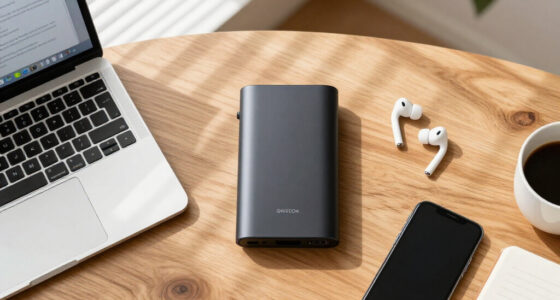
A USB data blocker is intended for situations where you want to connect a device to a USB charging point while limiting the connection’s data function. The listed pick is the OFFGRID USB-C Data Blocker, 2-Pack. Before choosing it, check that the connector type matches both your device and the charging setup you expect to use; the product name identifies USB-C, but your other equipment may use a different connection.
A frequent buying mistake is treating a data blocker as a complete security solution. It is a connection accessory, not a substitute for device security, careful charging choices, or software updates. Check the maker’s description for how the blocker handles charging and data, and confirm it suits the devices you plan to connect. If you rely on a cable or case that changes the connector arrangement, test the combination at home before depending on it while traveling.
The two-pack format may be convenient if you want one blocker in a travel kit and another in a regular bag, but consider how you will label and store them so they are available when needed. Keep in mind that a blocker can also prevent data functions you intended to use. For syncing, file transfers, or other data tasks, remove it and use a connection you trust. The useful purchase decision is about matching the port and the intended use, not assuming every USB connection has the same requirements.
What to look for:
- USB-C connector compatibility with your devices and cables
- Clear product guidance on charging and data functions
- Fit with your usual charging setup
- A storage plan that keeps the blockers accessible
- Awareness of when a data connection is needed instead
OFFGRID USB-C Data Blocker, 2-Pack

This compact USB-C adapter allows charging while blocking data transfer, helping protect connected devices at public charging stations. It has a metal enclosure and is designed for USB-C phones, tablets, and laptops.
Pros:
- Blocks data transfer while charging
- Compact and lightweight for travel
- Metal exterior
- Compatible with USB-C phones, tablets, and laptops
Cons:
- No USB power plug included
- Listed output voltage is 5 V
Best for: People who want USB-C data blockers available for charging setups
Not ideal for: Anyone who needs the connected USB port for routine data transfer
Bottom line: Check connector fit and the intended charging behavior, and remember that blocking data is only one part of device safety.
RFID Blocking Wallet
A wallet is an everyday carry item, so check its layout and dimensions alongside its stated RFID-blocking feature. The listed pick is Full-Grain Leather Wallet for Men, Slim Bifold RFID Blocking Wallet wi; the supplied product name is truncated, so verify the complete listing and specifications before buying. Do not infer capacity, measurements, or construction details that are not clearly stated in the full product information.
A common mistake is choosing a wallet by its security label alone. First check whether the bifold layout and slim profile suit what you actually carry, including cards, identification, and any folded bills. Compare the listed dimensions with your pocket or bag, and look for clear information about the number and arrangement of card slots. If the listing does not explain how the RFID-blocking feature is intended to work, seek that detail rather than treating the wording as proof of protection for every card or situation.
Also consider daily comfort and access: a wallet that is too full may no longer feel slim, while a layout that makes frequently used cards difficult to reach may frustrate you. Review the full product details, including care guidance and material description, before deciding whether it fits your routine. The best choice is one that balances usable organization and a verified feature description with a size you will comfortably carry.
What to look for:
- The complete, untruncated product listing and specifications
- Wallet dimensions that suit your pocket or bag
- Card-slot layout and stated capacity
- Clear explanation of the RFID-blocking feature
- Material and care details in the full listing
Full-Grain Leather Wallet for Men, Slim Bifold RFID Blocking Wallet with Cash Po
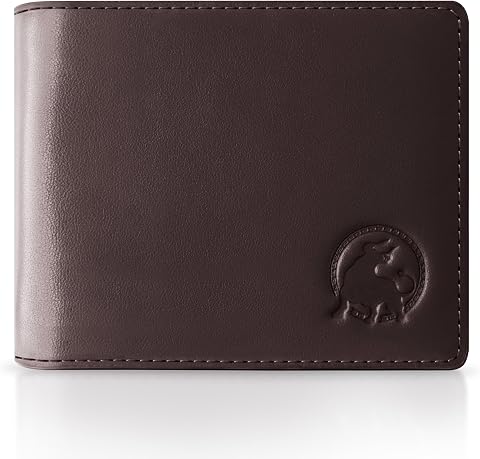
This handcrafted men’s wallet is made from Italian full-grain leather with a suede interior, offering durability and a refined look. It features RFID-blocking technology, multiple card slots, and cash pockets in a slim profile designed for everyday use.
Pros:
- Made from high-quality full-grain leather that develops a natural patina
- RFID-blocking for added security
- Slim profile with ample storage for cards and cash
- Hand-finished edges for a refined look
Cons:
- Premium materials may require special care
- Limited color options
- May be slightly expensive for some budgets
Best for: Shoppers looking for a slim bifold with a clearly described RFID feature
Not ideal for: Anyone who cannot verify the truncated listing’s dimensions and layout
Bottom line: Confirm the full product details and everyday fit before relying on the RFID-blocking label.
Laptop Privacy Screen
A laptop privacy filter can be useful when screen visibility matters in shared settings, but fit is essential. The listed pick is the 3M Gold Frameless Privacy Filter for 14-Inch Widescreen Laptop. Check your laptop’s actual display dimensions and aspect ratio rather than relying only on the device’s advertised size. A 14-inch screen name does not, by itself, confirm that a particular filter matches every laptop in that category.
Common mistakes include overlooking the screen shape, bezel arrangement, or attachment approach. Compare the filter’s stated measurements with the visible display area, and check how it is meant to sit on your specific laptop. “Frameless” appears in the product name, but you should still review the full listing for installation and removal details. Also consider whether you frequently share your screen with colleagues or need broad viewing angles for collaborative work; a privacy filter may not suit every viewing situation.
Before purchase, check whether the filter is intended for the laptop’s display type and whether it can stay in place during your typical use. If you move between private work and presentations, think about how easy it is to remove or reposition according to the product instructions. Choose based on measured fit and your viewing habits, not just the screen-size label. A correctly matched filter is more likely to serve its intended role without becoming an everyday inconvenience.
What to look for:
- Exact display measurements and aspect-ratio compatibility
- Fit with the laptop’s visible screen area and bezel
- Installation and removal guidance
- Compatibility with your display type
- Suitability for both private work and shared viewing
3M Gold Frameless Privacy Filter for 14-Inch Widescreen Laptop

This privacy filter keeps your personal information secure from prying eyes while maintaining clear visibility for the user. It features a reversible design with a vivid gold or black side and uses an optically clear adhesive for easy application.
Pros:
- Provides high-level privacy protection
- Reversible design offers two color options
- Clear visibility for the user
Cons:
- May slightly reduce screen brightness
- Requires careful application to avoid bubbles
Best for: Laptop users whose measured display matches the filter specifications
Not ideal for: Anyone unsure of the laptop’s screen dimensions or aspect ratio
Bottom line: Measure the display and review attachment details before choosing this 14-inch widescreen filter.
Encrypted USB Flash Drive
A hardware-encrypted USB drive is a choice to investigate when you need portable storage and want the drive itself to provide an access-control step. The listed pick is the Apricorn 2TB Aegis Padlock USB 3.0 Hardware Encrypted External Hard Dr. The supplied name is truncated, so confirm the full product listing, capacity, connection, and operating instructions rather than assuming details that are missing from the title.
A common buying mistake is focusing on encryption while overlooking compatibility and recovery. Check whether the drive works with the computers you intend to use, what USB connection it requires, and how its access controls are set up. Read the manufacturer’s guidance about password setup and recovery; do not assume forgotten credentials can be recovered without consequences. Confirm that the stated capacity suits your files, and decide whether you will also keep another copy of important data in a separate, secure location.
Consider how the drive will be used: frequent transfers, occasional backup, or moving files between devices may lead to different compatibility needs. Make sure you understand the workflow before placing important data on it, and test access with noncritical files first. Encryption does not replace a backup plan or careful handling. A sensible purchase decision combines verified device support, clear access instructions, and a data-backup routine that you can maintain.
What to look for:
- The complete product name and current specifications
- Compatibility with your computers and operating systems
- Connection requirements for your intended devices
- Clear setup, access, and recovery instructions
- A separate backup plan for important files
Apricorn 2TB Aegis Padlock USB 3.0 Hardware Encrypted External Hard Drive

The Apricorn Aegis Padlock 3.0 is a portable external hard drive with hardware-based AES 256-bit encryption, designed for secure data storage. It features a simple PIN access system, rugged aluminum construction, and high-speed USB 3.0 connectivity, making it ideal for secure data transport and storage.
Pros:
- High-level security with hardware AES 256-bit encryption
- Simple PIN access with keypad for secure authentication
- Rugged, compact design suitable for travel
- Fast USB 3.0 data transfer speeds
Cons:
- Limited to 5400 rpm rotational speed, which may be slower than higher RPM drives
- No included software for management or recovery
- Requires physical PIN entry, which may be inconvenient for some users
Best for: People who need portable storage with hardware encryption
Not ideal for: Anyone who has not checked device support or credential-recovery implications
Bottom line: Confirm the full listing and test the access workflow before storing important files on the drive.
Portable Faraday Bag
No specific product is named for this slot, so treat it as advice for comparing options rather than a recommendation for a particular bag. A portable Faraday bag is generally considered by shoppers seeking to isolate a device from wireless signals, but intended results depend on the product, the device, and how the bag is used. Read the maker’s description carefully and avoid assuming that every bag blocks every signal under all conditions.
A common mistake is choosing by exterior size alone. Check the internal dimensions against the device you plan to store, including any case or accessories you intend to leave on it. Review closure instructions and whether the bag is designed for your intended device category. If you need to access the device regularly, consider how the isolation process fits your routine and how you will confirm that the device is fully enclosed according to the instructions.
Look for clear guidance on supported uses, materials, care, and closure, and compare claims cautiously. Do not rely on an unverified product description for a high-stakes security need. If the device must remain reachable for calls, tracking, or alerts, isolation may conflict with that requirement. Decide first what you need the bag to do, then choose a product with specific, understandable usage guidance and a size that fits your device.
What to look for:
- Internal dimensions that fit the device and any case
- Clear instructions for closing and using the bag
- Specific description of intended device and signal use
- Care and material guidance from the manufacturer
- Whether isolation conflicts with calls, tracking, or alerts
Build your checklist in a need-first order: start with account access and recovery if sign-in security is your priority, then consider the device accessories that match your regular charging and travel habits. Next, check everyday items such as a wallet or screen filter for fit, and choose encrypted storage or a Faraday bag only after confirming your compatibility and use requirements. You do not need every category; prioritize the gaps that matter in your routine.
Before checking out, revisit the full product specifications, confirm dimensions and connectors, and make a plan for setup, recovery, or backups where relevant. A carefully matched tool is more useful than a collection of features you cannot use or verify. Take it one step at a time, and choose the options that fit your devices and habits.
Halloween Picks
halloween
As an affiliate, we earn on qualifying purchases.