
When choosing a privacy-focused USB flash drive, security features like hardware encryption and cross-platform compatibility are key. The Kingston IronKey Vault Privacy 50 stands out as the best overall due to its robust encryption and reliability. For those seeking portable Linux environments, options like Tails Linux Bootable USB provide privacy through anonymity tools, though they come with a steeper learning curve. The main tradeoffs in this category include balancing security features and ease of use, along with storage capacity and price. Keep reading for a detailed breakdown of the top choices and what makes each unique.
Key Takeaways
- Hardware encryption, especially AES-256, remains the gold standard for protecting data on privacy-focused USB drives.
- Cross-platform compatibility is vital for users who switch between Windows, Mac, and Linux, impacting ease of use.
- Bootable Linux options offer greater privacy through anonymity tools but often require more technical knowledge.
- Higher capacity drives tend to come with a premium price, but they’re essential for large data sets or backups.
- The best drives combine security with durability, ensuring data protection even in rough conditions.
| Ubuntu Linux Bootable USB for PC Desktop & Server |  | Best for Versatile Linux Boot & System Recovery | Memory Storage Capacity: 8 GB | Hardware Interface: USB | Additional Features: Dual-connector, Live-boot ready, Plug-and-play, Professional grade, USB-C Compatible | VIEW LATEST PRICE | See Our Full Breakdown |
| INNÔPLUS 256-bit Encrypted USB Flash Drive 64GB – USB 3.0, Password Protected, Cross-Platform Compatibility |  | Best for Military-Grade Hardware Encryption on Portable Drives | Memory Storage Capacity: 64 GB | Hardware Interface: USB 3.0 | Write Speed: 160 MB/s | VIEW LATEST PRICE | See Our Full Breakdown |
| Kingston IronKey Vault Privacy 50 USB 32GB Flash Drive |  | Best for Certified Military-Grade Data Security | Capacity: 32GB | Encryption: XTS-AES 256-bit | Certification: FIPS 197 | VIEW LATEST PRICE | See Our Full Breakdown |
| Tails Linux Bootable USB for Private Live Use on PC |  | Best for Anonymity & Privacy via Live Linux Environment | Compatibility: USB-A & USB-C, UEFI & Legacy BIOS | Features: No persistent storage, customizable, updates via ISO | Security: Routes traffic through Tor, leaves no trace | VIEW LATEST PRICE | See Our Full Breakdown |
| 3-in-1 Bootable USB Flash Drive for Kali Linux 2025, Tails 6.19, CAINE 13 (32GB) |  | Best for Multi-Environment Security & Privacy Training | Memory Storage Capacity: 32 GB | Hardware Interface: USB Type A | Write Speed: 400 MB/s | VIEW LATEST PRICE | See Our Full Breakdown |
| Aiibe 16GB USB 3.0 Flash Drive – Black |  | Best Compact and Portable for Everyday Privacy | Memory Storage Capacity: 16 GB | Hardware Interface: USB 3.0 | Write Speed: 20MB/s | VIEW LATEST PRICE | See Our Full Breakdown |
| Kingston IronKey Vault Privacy 50 128GB Encrypted USB | 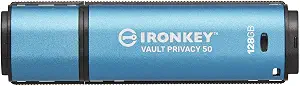 | Best High-Security USB for Sensitive Data | Memory Storage Capacity: 128 GB | Hardware Interface: USB 3.2 Gen 1 | Encryption: AES 256-bit | VIEW LATEST PRICE | See Our Full Breakdown |
| Linux Tails OS for Anonymous Internet Access with No Censorship – Bootable Live USB Drive with 50+ Preinstalled Tools |  | Best for Anonymous Browsing and Censorship Circumvention | Memory Storage Capacity: 8 GB | Hardware Interface: USB | Additional Features: Anonymity, LED Indicator, Security Focused | VIEW LATEST PRICE | See Our Full Breakdown |
| Kingston IronKey Vault Privacy 50 USB-A 512GB Encrypted Flash Drive |  | Best for Large-Scale Business Secure Storage | Memory Storage Capacity: 512 GB | Hardware Interface: USB 3.2 Gen 1 | Write Speed: approximately 300 MB/s | VIEW LATEST PRICE | See Our Full Breakdown |
| Linux 8-in-1 Multi-Boot USB OS Collection Set for PC – 32GB USB Flash Drive |  | Best for Multi-Distribution Linux Boot and Customization | Memory Storage Capacity: 16 GB | Hardware Interface: USB | Additional Features: Dual-connector, Live-boot ready | VIEW LATEST PRICE | See Our Full Breakdown |
More Details on Our Top Picks
Ubuntu Linux Bootable USB for PC Desktop & Server
This USB stands out for its compatibility across both modern and legacy PCs, making it ideal for users who need a reliable Linux environment on a wide range of hardware. Unlike the Tails Linux USB, which emphasizes anonymity and privacy, this drive is more suited for system installation and troubleshooting, with the added benefit of dual-architecture support (amd64 and arm64). Its plug-and-play design and live-boot capability simplify Linux deployment, but the limited 8GB capacity restricts storing large files or additional tools. While easy for beginners to use, it requires some technical knowledge for customization or troubleshooting, and durability details are sparse. Overall, this is a flexible option for those who value system recovery and Linux versatility over raw security or large storage needs.
Pros:- Compatible with most modern and legacy PCs and laptops
- Includes both amd64 and arm64 editions for versatile use
- Easy to customize and upgrade with step-by-step instructions
- Suitable for beginners and IT professionals for various tasks
Cons:- Limited storage capacity for large files or additional tools
- Requires some technical knowledge to customize or troubleshoot
- No detailed information on durability or long-term reliability
Best for: IT professionals or advanced users needing flexible Linux live environments and system recovery tools.
Not ideal for: Casual users seeking high storage capacity or dedicated privacy-focused security, as it lacks encryption and has limited space.
- Memory Storage Capacity:8 GB
- Hardware Interface:USB
- Additional Features:Dual-connector, Live-boot ready, Plug-and-play, Professional grade, USB-C Compatible
- Write Speed:25 MB/s
- Read Speed:450 MB/s
- Connectivity Technology:USB
- Type:USB Flash Drive
- Color:Beige
- Item Dimensions:2.5″D x 0.5″W x 0.5″H
Bottom line: This USB is ideal for Linux users who need flexibility and system recovery capabilities across different hardware types.
INNÔPLUS 256-bit Encrypted USB Flash Drive 64GB – USB 3.0, Password Protected, Cross-Platform Compatibility
Compared with the Kingston IronKey Vault Privacy 50, which emphasizes high encryption standards, the INNÔPLUS drive offers similarly robust security with hardware-based 256-bit AES encryption. Its broad compatibility across Windows, Mac, Linux, and embedded systems makes it a versatile choice for users needing secure file transfers without dedicated software, unlike some encrypted drives that require specific apps. The zinc alloy shell enhances durability, but its 64GB capacity could be limiting for users with large data needs, and it lacks additional security features like biometric access or multi-factor authentication. Transfer speeds are impressive with USB 3.0, yet the focus on hardware encryption and portability makes this an excellent option for security-conscious users who prioritize hardware-based protection over capacity.
Pros:- High-level military-grade hardware encryption
- Fast transfer speeds with USB 3.0 interface
- Compatible with multiple operating systems without additional software
- Sturdy zinc alloy shell resistant to scratches and rust
Cons:- Limited storage capacity for large files
- No mention of additional security features like biometric access
- Potential data loss if incorrect password is entered multiple times
Best for: Professionals handling sensitive data across multiple platforms who need high-level hardware encryption.
Not ideal for: Users with large storage requirements or those seeking biometric security features, as capacity and security options are limited.
- Memory Storage Capacity:64 GB
- Hardware Interface:USB 3.0
- Write Speed:160 MB/s
- Read Speed:480 MB/s
- Connectivity Technology:USB Type A
- Material:Zinc alloy
Bottom line: This encrypted USB is perfect for security-focused professionals needing cross-platform compatibility with hardware-based protection.
Kingston IronKey Vault Privacy 50 USB 32GB Flash Drive
This drive earns its place as the best privacy-focused option with FIPS 197 certification and XTS-AES 256-bit encryption, surpassing many generic drives in security features. Unlike the INNÔPLUS, which emphasizes hardware encryption, this model offers comprehensive security with multiple password modes and protection against Brute Force and BadUSB attacks. Its high-speed transfer (up to 250MB/s read) makes it suitable for quick data access, but the 32GB capacity may be limiting for users with larger storage needs. Its higher price reflects its security specialization, which can be a drawback for budget-conscious buyers. For those needing certified, military-grade security and fast transfers, this drive makes a compelling choice, though it sacrifices capacity and affordability.
Pros:- High-level encryption with FIPS 197 certification
- Fast data transfer speeds
- Multiple password protection options
- Protection against Brute Force and BadUSB attacks
Cons:- Limited to 32GB capacity
- More expensive than standard options
- Requires understanding of security features for proper use
Best for: Security-conscious professionals or government agencies requiring certified encryption and attack protection.
Not ideal for: Users needing large storage capacity or casual use, as capacity and cost are significant considerations.
- Capacity:32GB
- Encryption:XTS-AES 256-bit
- Certification:FIPS 197
- Read Speed:up to 250MB/s
- Write Speed:up to 180MB/s
Bottom line: Ideal for security-sensitive environments where certified encryption and fast transfer speeds are critical, despite limited storage.
Tails Linux Bootable USB for Private Live Use on PC
This drive is tailored for users needing maximum privacy, routing traffic through Tor and leaving no trace of activity, a step above the general-purpose Linux boot drives like Ubuntu. Its support for both USB-A and USB-C ports, along with customizable ISO options, makes it highly adaptable for privacy-focused browsing and secure communication. However, the complexity of setup and updates requires some technical expertise, and the lack of persistent storage limits use to temporary sessions. Unlike the Kali Linux multi-boot drive, which offers a suite of security tools, Tails focuses solely on anonymity and privacy. For those comfortable with technical configuration, this drive offers a robust environment for private online activity.
Pros:- Supports both USB-A and USB-C connections
- Highly customizable with additional ISO images
- Routes traffic through Tor and leaves no trace
- Ideal for privacy-focused browsing and communication
Cons:- Requires technical knowledge to customize and update
- No persistent storage for saving files between sessions
- Dependent on compatible hardware for optimal performance
Best for: Privacy advocates and journalists needing secure, anonymous browsing without leaving traces.
Not ideal for: Users seeking persistent storage or a simple plug-and-play experience, as customization and technical knowledge are necessary.
- Compatibility:USB-A & USB-C, UEFI & Legacy BIOS
- Features:No persistent storage, customizable, updates via ISO
- Security:Routes traffic through Tor, leaves no trace
- Use Case:Privacy-focused browsing, secure communication
Bottom line: This USB is best suited for users who prioritize online anonymity and are comfortable handling technical setup and updates.
3-in-1 Bootable USB Flash Drive for Kali Linux 2025, Tails 6.19, CAINE 13 (32GB)
This multi-boot USB provides a versatile platform for security professionals and students, combining Kali Linux, Tails OS, and CAINE in one 32GB device. Compared to dedicated drives like the Tails or Ubuntu USB, it offers multiple environments for learning and testing, whether for penetration testing or privacy preservation. Its ability to support both live sessions and installations broadens its use cases, but its 32GB capacity limits space for additional tools or large files. Unlike the encrypted drives, this option focuses on multi-OS flexibility, which can be complex for less experienced users. It’s best suited for those with some technical background seeking a single device for diverse security tasks.
Pros:- Includes three popular Linux environments for versatile use
- Supports both live sessions and permanent installations
- Compatible with most PC brands and supports legacy BIOS and UEFI
- Ideal for security training and digital privacy learning
Cons:- Not compatible with Macs, Chromebooks, or ARM-based systems
- Requires technical knowledge to use effectively
- No retail box, only USB drive and printed guide
Best for: IT students, security professionals, or enthusiasts needing a multi-boot environment for training and testing.
Not ideal for: Casual users or those seeking straightforward, encrypted storage, as setup complexity and capacity are limiting factors.
- Memory Storage Capacity:32 GB
- Hardware Interface:USB Type A
- Write Speed:400 MB/s
- Compatible Devices:Desktop, Laptop
- Color:Silver
Bottom line: This multi-boot USB is well-suited for users who need flexible security environments for learning and testing, despite its limited capacity and complexity.
Aiibe 16GB USB 3.0 Flash Drive – Black
The Aiibe 16GB USB 3.0 Flash Drive stands out for its speed and portability, making it ideal for quick, everyday data transfers. Its read speeds up to 80MB/s are impressive for such a small capacity, but compared with larger drives like the Kingston IronKey Vault Privacy 50 128GB, it falls short on storage size. Though its sleek swivel design with a keychain loop enhances portability, it offers no additional security features—making it less suited for sensitive data. Its compatibility with USB 2.0/1.1 devices ensures broad usability, but the limited capacity and absence of physical security mean it’s best for casual privacy needs. This pick makes the most sense for users needing fast, portable storage for non-sensitive files.
Pros:- Fast data transfer speeds up to 80MB/s
- Compact, swivel design with a keychain loop
- Backwards compatible with USB 2.0/1.1
Cons:- Limited to 16GB storage capacity, insufficient for large files
- No built-in security or encryption features
Best for: Individuals who need quick, portable storage for sensitive but small data sets and prioritize speed over security.
Not ideal for: Users handling highly sensitive information or requiring large storage, as it lacks encryption and has limited capacity.
- Memory Storage Capacity:16 GB
- Hardware Interface:USB 3.0
- Write Speed:20MB/s
- Read Speed:80MB/s
- Connectivity Technology:USB
- Compatible Devices:Desktop, Laptop, Macintosh, Tablet, TV, Car, Audio, Speakers, Windows, Linux, MacOS
Bottom line: A solid choice for users seeking quick, portable storage for small, non-sensitive files on the go.
Kingston IronKey Vault Privacy 50 128GB Encrypted USB
The Kingston IronKey Vault Privacy 50 128GB is tailored for security-conscious users, offering FIPS 197 certified AES 256-bit hardware encryption and multiple advanced protections like BadUSB attack defense. Its read speeds reach 250MB/s, making it suitable for fast large file transfers, but compared to the 512GB version, it provides less storage, limiting its use for extensive data backups. While its robust security features are unmatched in this roundup, the premium price and USB Type A interface may be barriers for casual users or those preferring USB-C. This drive is ideal for professionals needing to safeguard high-value or confidential data securely. If you prioritize top-tier security over capacity, this is the best choice.
Pros:- FIPS 197 certified AES 256-bit hardware encryption
- Fast read speeds up to 250MB/s
- Protection against BadUSB attacks and brute-force attempts
- Multi-password options for flexible security
Cons:- Higher cost compared to basic drives
- Limited to 128GB capacity in this model
- Requires USB Type A port, not USB-C
Best for: Professionals and organizations requiring portable, encrypted storage of sensitive information with fast access speeds.
Not ideal for: Casual users or those needing large storage capacities at a lower cost, as it is both expensive and limited to 128GB.
- Memory Storage Capacity:128 GB
- Hardware Interface:USB 3.2 Gen 1
- Encryption:AES 256-bit
- Read Speed:250 MB/s
- Write Speed:180 MB/s
- Color:Blue
Bottom line: This drive is best suited for security-focused users needing fast, encrypted storage for sensitive data.
Linux Tails OS for Anonymous Internet Access with No Censorship – Bootable Live USB Drive with 50+ Preinstalled Tools
The Linux Tails OS Live USB is designed for users needing online anonymity and censorship resistance, with its ability to run directly from USB without leaving traces. Its preinstalled suite of over 50 privacy tools makes it a powerful option for privacy advocates, but its 8GB capacity limits storage of large files or additional tools. Compared to the multi-boot Linux set, Tails is specialized for secure browsing, which may require technical setup and familiarity with Linux. Its performance depends on the quality of the USB device, and setup can be complex for beginners. This is best for users who prioritize online anonymity over storage space or file transfer speeds. If you seek secure, censorship-resistant browsing, this is an ideal pick.
Pros:- Supports anonymous internet browsing and censorship circumvention
- Leaves no traces on the host system
- Includes over 50 privacy-focused tools
- Compatible with most PCs supporting UEFI and BIOS
Cons:- Requires technical knowledge to set up and use effectively
- Limited storage capacity for additional files
- Performance varies with USB quality
Best for: Privacy-focused users needing secure, anonymous online access and willing to handle technical setup.
Not ideal for: Casual users or those seeking large storage for files, as the 8GB limit constrains data storage and transfer capacity.
- Memory Storage Capacity:8 GB
- Hardware Interface:USB
- Additional Features:Anonymity, LED Indicator, Security Focused
- Write Speed:25 MB/s
- Read Speed:35 MB/s
- Color:Purple
Bottom line: Best for privacy enthusiasts seeking a dedicated, secure environment for anonymous browsing, despite the technical complexity.
Kingston IronKey Vault Privacy 50 USB-A 512GB Encrypted Flash Drive
The Kingston IronKey Vault Privacy 50 512GB offers massive capacity combined with enterprise-grade security, including FIPS 197 certified AES 256-bit hardware encryption and protection against BadUSB and brute-force attacks. Its read speeds of 310MB/s make large file transfers swift, but its USB-A only interface and high price tag may limit appeal for casual or consumer-grade users. Designed for demanding business environments, its dual read-only and multi-password features provide layered security, but overkill for simple personal backup. If your priority is high-capacity, high-security storage for sensitive corporate data, this is the best option. For lighter needs, its cost and interface limitations may be a drawback.
Pros:- High-capacity 512GB storage for large files
- FIPS 197 certified AES 256-bit hardware encryption
- Protection against BadUSB and brute-force attacks
- Multi-password and write-protect options
Cons:- Limited to USB-A interface, not USB-C
- Premium price point
- Primarily designed for business use, overkill for casual users
Best for: Business professionals and organizations needing large, encrypted storage with top-tier security features.
Not ideal for: Casual users or those seeking USB-C compatibility or more affordable options, as it is both expensive and limited to USB-A.
- Memory Storage Capacity:512 GB
- Hardware Interface:USB 3.2 Gen 1
- Write Speed:approximately 300 MB/s
- Read Speed:310 MB/s
- Water Resistance:Yes
- Encryption:XTS-AES 256-bit
Bottom line: Ideal for organizations requiring large, secure, and encrypted portable storage for sensitive data, with enterprise-level protections.
Linux 8-in-1 Multi-Boot USB OS Collection Set for PC – 32GB USB Flash Drive
The Linux 8-in-1 Multi-Boot USB serves users who want a versatile, multi-OS environment, supporting popular Linux distributions like Ubuntu, Fedora, and Tails. Its support for both live boot and installation, along with customizable ISO management, makes it ideal for tech-savvy users or those testing multiple distros. Compared with the Tails USB, which emphasizes anonymity, this drive offers broader flexibility but with some setup complexity. Its 32GB capacity, however, is somewhat inconsistent with the listed specs, and the technical setup might be daunting for less experienced users. This drive is perfect for Linux enthusiasts or professionals needing a portable, multi-boot Linux toolkit. If you value flexibility and multiple OS support over plug-and-play simplicity, this is the best choice.
Pros:- Supports multiple Linux distributions in one device
- Compatible with USB-A and USB-C ports
- Fast read speeds up to 450MB/s
- Fully customizable ISO management
Cons:- Capacity listed as 16GB, conflicting with 32GB description
- Setup process can be technical for beginners
- Limited warranty details provided
Best for: Linux users and IT professionals needing a portable multi-OS solution for testing, installation, or recovery tasks.
Not ideal for: Casual users or those seeking simple, ready-to-use portable systems, due to setup complexity and capacity limitations.
- Memory Storage Capacity:16 GB
- Hardware Interface:USB
- Additional Features:Dual-connector, Live-boot ready
- Write Speed:100 MB/s
- Read Speed:450 MB/s
- Color:Beige
Bottom line: Best suited for Linux enthusiasts or IT professionals needing a flexible, multi-boot portable OS environment, despite setup complexity.

How We Picked
The products in this roundup were evaluated based on a combination of security features, ease of use, build quality, and versatility. Hardware encryption, particularly AES-256, was a primary criterion because it ensures data remains protected even if the drive is lost or stolen. Cross-platform compatibility was also crucial, as many users require drives that work seamlessly across different operating systems. Cost and capacity were considered to balance value with storage needs. The ranking reflects how well each drive balances these factors, with a preference for drives that combine strong security with user-friendly features.Factors to Consider When Choosing Privacy-focused USB Flash Drives
Selecting a privacy-focused USB flash drive involves more than just encryption. It’s important to consider compatibility, ease of use, and build quality to ensure your data remains secure and accessible when needed. Understanding the tradeoffs between security features and user experience can help you avoid common pitfalls. Here are key factors to keep in mind before making your purchase.Encryption Standards and Security Features
Hardware encryption, especially AES-256, is essential for robust data protection. Look for drives that specify hardware-based encryption rather than software solutions, as they offer better security and performance. Some drives also include features like PIN protection, biometric access, or self-destruct options, which add layers of security. Remember, a drive with weak encryption can be easily compromised, so prioritize well-established security standards.
Cross-Platform Compatibility and Usability
If you work across Windows, Mac, and Linux, ensure the drive supports multiple file systems or comes with compatible software. Drives designed solely for one platform might require reformatting or additional software, which can complicate usage. User-friendly encryption management and straightforward setup are equally important, especially if you’re not highly technical. Consider drives that offer plug-and-play functionality to reduce potential compatibility hassles.
Build Quality and Durability
A secure drive should withstand physical wear and tear, especially if you carry it everywhere. Features like water resistance, shockproof casing, and metal construction are valuable. While a rugged build raises the price, it minimizes the risk of data loss due to physical damage. Keep in mind that more durable drives often come with slightly larger footprints, so find a balance that fits your portability needs.
Capacity and Price Considerations
Higher capacity drives tend to cost more but are necessary for large files, backups, or multiple encrypted partitions. Smaller drives are more affordable but may require frequent data management. Think about your typical data volume and future needs—buying slightly more capacity than you currently require can save you money long-term. Beware of extremely cheap drives that might compromise security or build quality to cut costs.
Additional Features and Software
Some drives include management software for easier encryption setup and recovery options. Others offer features like biometric access or anti-tamper mechanisms, which can enhance security but might add complexity. Be cautious with drives that rely solely on proprietary software, as this can limit flexibility or create compatibility issues. Focus on drives that provide clear, transparent security features and reliable support.
Frequently Asked Questions
Can I use a regular USB drive for privacy purposes?
While you technically can, regular USB drives lack the necessary encryption and security features to protect sensitive data effectively. They are vulnerable if lost or stolen, exposing your files to unauthorized access. Investing in a dedicated privacy-focused drive with hardware encryption significantly reduces this risk, providing peace of mind for sensitive information.
Are encrypted USB drives compatible with all operating systems?
Most modern encrypted drives support Windows, Mac, and Linux, but compatibility can vary based on the encryption method and accompanying software. Some drives come with cross-platform software or require reformatting for full compatibility. Always check the manufacturer’s specifications and reviews to verify seamless operation across your devices before purchasing.
Is hardware encryption enough to guarantee data security?
Hardware encryption is a significant security layer, but it isn’t foolproof. Physical security measures, strong passwords, and biometric access can further protect your data. Also, keep firmware and security software up to date to patch vulnerabilities. Relying solely on hardware encryption without additional security practices leaves your data exposed to other types of threats.
What capacity should I choose for a privacy-focused USB drive?
Your choice depends on your data needs. If you handle large files or backups, a 128GB or larger drive is advisable. For smaller, sensitive files, 64GB or less might suffice, offering a more affordable option. Consider future storage requirements as well, so you don’t need to upgrade frequently. Higher capacity drives often come with a higher price tag but provide greater flexibility.
Are there risks in using bootable Linux drives for privacy?
Bootable Linux drives can enhance privacy by allowing anonymous internet access and avoiding tracking, but they require some technical know-how to set up and use securely. If misconfigured, they might still leave traces or expose vulnerabilities. For non-technical users, dedicated encrypted drives with simple PIN or biometric access may provide a safer, more straightforward alternative.
Conclusion
For most users seeking overall security and ease of use, the Kingston IronKey Vault Privacy 50 offers the best combination of encryption, durability, and cross-platform support, making it ideal as the best overall choice. Those who prioritize budget-friendly options and still want good protection might prefer the INNÔPLUS 256-bit Encrypted USB. For individuals needing high-capacity drives, the Kingston IronKey Vault Privacy 50 512GB provides ample space with strong security features. Beginners or less technical users should consider drives with straightforward encryption and user interfaces, while advanced users might opt for bootable Linux USBs like Tails or Kali for maximum privacy and flexibility.