
TL;DR

Get privacy and security gear delivered free with Prime
- Fast, free delivery on millions of items
- Prime Video, Amazon Music and more included
- Member-only deals all year
A network closet can become a risk register in practice when teams use it to spot and track issues tied to the equipment, access, power, cooling, and records that support network services. Recording each condition with its affected service, likely impact, existing controls, accountable owner, and follow-up action turns a hidden facilities problem into work the organization can prioritize and verify.
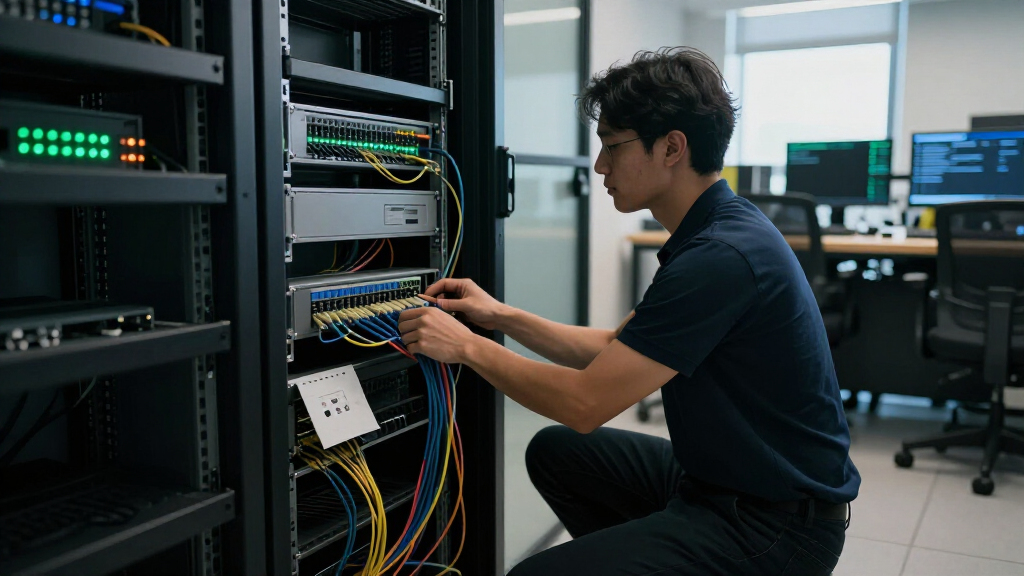
A closet door swings open, and warm air rolls past a rack of blinking lights. One cable has no label; a box of spare supplies sits near the equipment. That small room may support phones, payment terminals, building systems, or the connection to an entire branch office.
That is why a network closet can look like a small facilities issue and still belong in risk management. Heat, power, water, access, and missing records can affect whether services stay available, whether equipment is protected, and how quickly a team can restore operations.
This guide shows you how to turn observations into useful risk-register entries, coordinate IT and facilities work, and choose follow-up that fits the site. A closet does not need to look perfect to be managed well. The goal is to make credible problems visible, assign an owner, and check that fixes work.
Treat the closet as part of risk management when its equipment supports important services.
Write register entries that connect an observed condition to an affected service, consequence, control, owner, and verifiable action.
Check access, heat, power, water exposure, fire and electrical conditions, and equipment records as site-specific prompts.
Give each risk one accountable owner, even when IT, security, and facilities share the work.
Review after relevant changes or incidents, and verify that completed fixes work in practice.
FIELD GUIDE / INFRASTRUCTURE RISK
Why a Network Closet Can Become a Risk Register
A small room can support phones, payment terminals, building systems, or an entire branch connection. Make hidden conditions visible by linking each observation to the service at stake, an accountable owner, and a fix that can be verified.
01 / WHY IT MATTERS
A small room, a broad responsibility
Network closets can affect availability, physical security, safety, auditability, and recovery. Start with the services the equipment supports—not how tidy the room looks. Impact depends on the site, alternatives, and time needed to diagnose a problem.
AVAILABILITY
Keep services running
Heat, dust, water, power loss, or overloaded equipment can interrupt connections that people and systems depend on.
SECURITY
Control physical access
Unlocked doors, shared keys, exposed console ports, or undocumented devices can create paths to the network.
SAFETY & FACILITIES
Protect the space
Blocked airflow, overloaded power strips, tangled cabling, and nearby storage can complicate inspection and maintenance.
AUDITABILITY
Show that controls work
Missing access records, unclear ownership, or incomplete inventories make it harder to verify protections.
RECOVERY
Restore with less delay
Unknown connections, undocumented configurations, and untested backups can slow diagnosis and restoration.
CONNECTED RISKS
Look for the overlap
A blocked vent can hinder inspection; unclear cabling can lengthen recovery. One condition may have several consequences.
02 / THE REGISTER ENTRY
Turn an observation into an action
“Closet messy” does not tell the next person what matters or what to do. Record a clear condition, its service context, and a follow-up that someone can verify.
Example entry: “Branch closet temperature alert has no named recipient; possible delayed response to overheating; owner: facilities; IT to confirm receipt of a test notification by Friday.”
03 / FIRST LOOK
Check the conditions that matter at this site
These are practical prompts for assessment—not proof that a site is unsafe or out of compliance. Prioritize credible service consequences and conditions you can actually observe.
- 01AccessIs the door secured appropriately? Who is authorized to enter, and are access records available?
- 02Temperature & airflowAre vents clear, room conditions suitable, and alerts monitored by the right people?
- 03PowerAre connections understood? Is there a documented response if power fails?
- 04Water & surroundingsLook for leaks, nearby plumbing, stored items, or blocked paths; context varies by room.
- 05Fire & electrical conditionsNote visible concerns for qualified staff to assess against site requirements.
- 06Inventory & ownershipCan someone identify each device, its purpose, support contact, and dependencies?
04 / OWNERSHIP & FOLLOW-UP
Shared work still needs one owner
Network equipment depends on building power, cooling, fire protection, and controlled access. IT, security, and facilities may all contribute, but one named person should track the risk to closure.
MAKE THE HANDOFF CLEAR
Name roles and actions
Facilities might inspect a cooling unit while IT tests alert delivery. The accountable owner records the due date and checks the evidence, such as a successful test or maintenance note.
VERIFY IN PRACTICE
Close the loop
Review after building work, equipment changes, or incidents. Confirm that the fix works under the conditions it is meant to address.
Why a network closet can affect more than the network
A network closet can affect service availability, physical security, safety, and recovery because it often holds equipment that connects people and systems across a site. Its impact depends on what the equipment supports, how many alternatives exist, and how quickly staff can diagnose a problem. A small room can carry a large responsibility.
Consider a clinic where a switch in a locked-looking but unlatched closet connects reception computers and phones. A staff member notices the room is unusually warm, but nobody knows whether to call IT or facilities. If the switch overheats, both the symptom and the unclear handoff can lengthen the disruption.
The risks overlap. A blocked vent can make equipment harder to inspect; loose storage can obstruct access; and undocumented cabling can slow recovery after a power interruption. One condition can create several consequences, so a register should capture the relationship between the observed issue and the service at stake.
Start with what the closet supports, not how tidy it looks. If the room serves a warehouse’s scanners, note the operational effect of losing those connections. If it supports only a small lab, the impact may be narrower. That context helps you prioritize without treating every imperfection as an emergency.
As an affiliate, we earn on qualifying purchases.
What to record so a closet risk leads to action
A useful closet entry records the condition, affected service, consequence, likelihood, impact, existing controls, owner, and next action. Those details help another person understand why the issue matters and what should happen next. A note such as “closet messy” does neither.
Imagine finding a temperature alert that no one receives because its notification list is out of date. The equipment may still be working, but the control cannot help if nobody sees the warning. Record what you observed, which equipment or service depends on it, and who will verify that alerts reach the right person.
- Describe the condition: Write an observable fact, such as “temperature alert has no named recipient.”
- Name the affected asset or service: Identify the switch, site, or business function at a level appropriate for the register.
- Explain the consequence: For example, a missed warning could delay response to overheating.
- Rate likelihood and impact: Use your organization’s agreed scale and explain the reasoning briefly.
- List existing controls: Note monitoring, access procedures, spare equipment, or other protections already in place.
- Assign an owner and action: Set a due date and a way to verify the change.
A shared register might say “Branch closet temperature alert; owner: facilities; IT to confirm receipt of test notification by Friday.” Keep sensitive connection details in an approved inventory with limited access. Clear ownership and verifiable follow-up make the entry useful after the walk-through ends.
As an affiliate, we earn on qualifying purchases.
Which closet conditions deserve your first look
The first closet checks should focus on unauthorized access, heat, power, water, fire and electrical conditions, and missing equipment records. These are practical prompts for assessment, not proof that a site is unsafe or out of compliance. What deserves attention first depends on the equipment, the building, and the services involved.
For instance, a closet beside a janitor’s sink deserves a different water-exposure check from a dry interior room. A site with one power circuit and no documented recovery plan may need a resilience discussion before the team spends time replacing cable labels. Start with credible consequences and the conditions you can actually observe.
- Access: Is the door secured appropriately, and do you know who is authorized to enter?
- Temperature and airflow: Are vents clear, alerts monitored, and room conditions suitable for the equipment?
- Power: Are connections known, and is there a documented response if power fails?
- Water and surroundings: Are there signs of leaks, nearby plumbing, stored items, or blocked paths?
- Inventory and ownership: Can someone identify equipment, its purpose, support contact, and dependencies?
A quick visual check might find a carton covering an air intake and a cable that staff cannot identify. Record both as observations and ask the relevant teams to assess them. Prioritize by likely service impact, not by which problem is easiest to photograph.
As an affiliate, we earn on qualifying purchases.
How clear ownership prevents small problems from lingering
A closet risk needs one accountable owner even when several teams contribute to the fix. Network equipment depends on building power, cooling, fire protection, and controlled access, so IT, security, and facilities may all have a part. Shared work still needs a clear person to track completion.
Picture a small office where IT owns a switch, facilities manages the cooling unit, and building security holds the access records. A staff member spots a temperature warning but does not know who should act. If the register names a single owner to coordinate the response, that person can bring in the right colleagues and close the loop.
Keep responsibilities specific. Facilities might inspect the cooling unit, while IT confirms the alert reaches an on-call contact. The accountable owner records the due date and checks evidence, such as a successful alert test or a completed maintenance note. “Team to review” is not an owner; it describes a meeting that may never happen.
For a small facilities team, a lightweight arrangement can work: name an IT contact for equipment, a facilities contact for room conditions, and one risk owner who tracks outstanding actions. Review the handoff after building work, equipment changes, or an incident. That simple rhythm keeps a closet from falling between organizational boundaries.
network equipment record keeping software
As an affiliate, we earn on qualifying purchases.
As an affiliate, we earn on qualifying purchases.
How an inventory and access record speed recovery
A current inventory and access record help your team identify what belongs in the closet, who supports it, and who may enter. During an outage, those basics reduce guesswork. They also make routine maintenance and incident review easier to manage.
Suppose a branch switch loses power after a building interruption. Staff find two unlabeled devices and a patch panel with no useful notes. An inventory that records equipment identity, location, purpose, support owner, and power or network dependencies gives responders a starting point, even if it does not contain every configuration detail.
Access records answer a different question: who was permitted to enter, and when? A key shared informally across shifts may make that difficult to establish. Badge access or another controlled method may be appropriate depending on the site, the threat model, policy, and privacy rules. Cameras are not a substitute for sensible access management and records.
Keep the detail proportionate. Broadly sharing sensitive connection maps can create its own exposure, so store technical specifics where authorized staff can reach them. Useful records are accurate, findable, and maintained; a polished spreadsheet that nobody can locate during an outage does little for recovery.
How to rate a risk without turning every flaw into a crisis
A risk rating helps you compare issues by how plausible an event is and how serious its effect could be. It is a decision aid, not a prediction or a verdict on the organization. Describe the assumptions behind the rating so a colleague can challenge or update them.
For example, a closet with a minor dust buildup may have low immediate impact if it is checked regularly and serves a noncritical lab. A similar room supporting the only network path for a busy distribution site may deserve more attention, especially if heat alerts are not monitored. The same visible condition can mean different things in different settings.
Ratings also have limits. A tidy room can still contain a single point of failure, while a visually untidy room may have safe, documented arrangements that simply need maintenance. Avoid using a checklist score as proof that a site complies with local rules. For fire, electrical, and industry requirements, consult current local codes and organizational policy.
Record the reason behind a decision, the controls already in place, and what would change the rating. Context makes ratings useful: “medium because this is the sole connection for the branch” tells a clearer story than a bare number. Revisit the entry when equipment, staffing, building conditions, or service importance changes.
When to review the closet and verify completed fixes
Review a network closet on a schedule that fits its criticality, site conditions, and your organization’s requirements, then revisit it after relevant changes or incidents. There is no universal inspection interval that suits every room. A rarely used closet in a stable office may need a different rhythm from equipment in a warm warehouse.
Suppose contractors complete ceiling work above a branch closet. Even if the equipment still works, dust, a shifted vent, or changed access arrangements may warrant a fresh look. The same applies after a leak, a power interruption, an equipment swap, or a change in who maintains the building.
Verification should match the action. If someone updates a temperature alert, test that the right person receives it. If IT labels cables, have a colleague confirm the labels match the approved documentation. If access is restricted, check that the authorized list and the actual process agree. Closed means checked, not merely that someone changed the register’s status.
Keep the review proportionate and useful. A short walk-through with facilities and IT can uncover a blocked vent, an outdated equipment list, or an unclear after-hours contact. Record new observations and assign follow-up while the details are fresh. The point is a dependable routine, not a perfect room or a pile of paperwork.
Frequently Asked Questions
Is a network closet the same as a server room?
Not always. A network closet is often a smaller site-level space for network or telecommunications equipment, while server rooms may house a broader set of systems. Names and functions vary, so record what your specific room supports.
What should you check first?
Start with controlled access, heat and airflow, power resilience, signs of water exposure, fire and electrical conditions, and whether equipment and connections are documented. Prioritize based on the services at that site and the consequences of disruption.
How often should you inspect a network closet?
Set an interval based on equipment criticality, building conditions, policy, and applicable requirements; there is no single schedule for every site. Also review after equipment changes, building work, incidents, or changes to access and ownership.
Who should own a closet risk?
IT, cybersecurity, facilities, and business continuity staff may all contribute, but each entry should name one accountable owner. That person tracks the action, coordinates other teams, and verifies completion.
Do you need badge access or cameras?
That depends on the location, threat model, policy, and privacy rules. Choose access controls that fit the site and keep suitable records; cameras do not replace sound access management.
What belongs in a network equipment inventory?
Record each item’s identity, location, purpose, support owner, relevant power and network dependencies, and maintenance or lifecycle details. Store sensitive connection information with access limited to people who need it.
Conclusion
Put the network closet on your risk register when a condition there could disrupt a service, expose equipment, create a safety concern, or slow recovery. Describe what you found, name the affected service, assign one owner, and verify the fix. That small habit turns a hidden room into manageable work—and helps keep the quiet hum of the network going.
Halloween Picks
halloween
As an affiliate, we earn on qualifying purchases.