
The best NAS for ransomware protection pairs recoverable snapshots with a backup plan that malware on your network cannot easily erase. My best overall pick is the Synology DS925+, a balanced four-bay option for buyers who want a practical base for protected shared storage. The Synology DS1825+ stands out for larger teams needing room to scale, while the UGREEN DXP4800 Plus is a capable alternative for buyers comparing four-bay platforms. The main tradeoffs are storage capacity, ease of administration, ecosystem preferences, and how much protection depends on your own backup setup. Read on for the full breakdown and the checks I would make before choosing.

Get privacy and security gear delivered free with Prime
- Fast, free delivery on millions of items
- Prime Video, Amazon Music and more included
- Member-only deals all year
Key Takeaways
- Synology DS925+ takes the overall spot because a four-bay format balances room for multiple drives with a manageable footprint; ransomware recovery still depends on configuring snapshots and separate backups.
- The Synology DS1825+ is the scale-up choice for teams with growing storage needs, but its larger capacity does not replace isolated backup copies or careful access controls.
- The UGREEN DXP4800 Plus offers a four-bay alternative, while the DXP4800 GT and Pro variants target buyers who prioritize different performance and power-user needs; compare software recovery tools alongside hardware.
- The two-bay Synology DS225+ is easier to size for a small home setup, but offers less drive-bay flexibility than the four-bay DS425+ and DS925+.
- Across all ten models, bay count, processor, and RAM describe capability—not ransomware resilience by themselves. Snapshot retention, off-device backups, account security, and recovery practice determine how much data can be restored.
| Synology DS925+ 4-Bay DiskStation (Diskless) |  | Best Overall for Layered Protection | Drive bays: 4 | Maximum drives with expansion: 9 | M.2 NVMe slots: 2 | VIEW LATEST PRICE | See Our Full Breakdown |
| TERRAMASTER F4-212 4-Bay NAS Quad Core CPU, 2GB RAM (Diskless) | 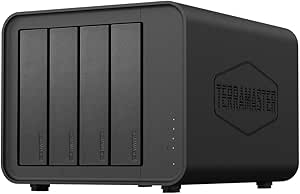 | Best Value for Basic Home Backups | Drive bays: 4 | Processor: ARM v8 quad-core, 1.7 GHz | Memory: 2GB, not upgradeable | VIEW LATEST PRICE | See Our Full Breakdown |
| Synology DS225+ Private Cloud Media Server – 2-Bay Diskless NAS with Intel CPU for Hardware Transcoding |  | Best for Beginners and Compact Backup Setups | Drive bays: 2 | Storage capacity: Up to 40TB | Transfer speed: Up to 282 MB/s | VIEW LATEST PRICE | See Our Full Breakdown |
| Asustor Lockerstor 6 Gen2+ AS6706T v2 6-Bay NAS Storage for Content Creators |  | Best for High-Capacity Creative Workflows | Processor: Intel Celeron N5105 quad-core | Memory: 8GB DDR4 | Drive bays: 6, HDD and SSD | VIEW LATEST PRICE | See Our Full Breakdown |
| UGREEN NAS DXP4800 GT 4-Bay for Creators, Tech Enthusiasts and Office Teams |  | Best for Power Users and Local Security Workflows | Processor: AMD Ryzen Embedded R2514, 4 cores, 8 threads, up to 3.70 GHz | Memory: 8GB DDR4; expandable to 64GB | Drive bays: 4 SATA bays; up to 2 bays compatible with U.2 NVMe SSDs | VIEW LATEST PRICE | See Our Full Breakdown |
| UGREEN DXP4800 Plus 4-Bay NAS |  | Best for Fast Local Snapshots and Small Teams | Drive bays: 4 | Maximum stated capacity: 144 TB | Processor: Intel 5-core | VIEW LATEST PRICE | See Our Full Breakdown |
| UGREEN AI NAS iDX6011 Pro 64GB 6-Bay for SMBs, IT Teams & Growing Business |  | Best for IT Teams Building a Private Recovery Platform | Drive bays: 6 SATA bays | M.2 slots: 2 | Maximum stated capacity: 208 TB | VIEW LATEST PRICE | See Our Full Breakdown |
| Synology DS425+ Private Cloud Media Server – Stream, Back Up & Share Files (4-Bay Diskless NAS) |  | Best for Clearly Specified Snapshot and Access Controls | Drive bays: 4 | Maximum stated storage volume: 80 TB | Network: 2.5GbE | VIEW LATEST PRICE | See Our Full Breakdown |
| UGREEN NAS DXP4800 Pro 4-Bay for IT Professionals, Developers & Power Users |  | Best for Virtualized Workloads Alongside File Protection | Drive bays: 4 | Maximum stated capacity: 144 TB | Processor: Intel Core i3-1315U | VIEW LATEST PRICE | See Our Full Breakdown |
| Synology DS1825+ Enterprise Video Production & Storage – Scale to 360TB, 25GbE Speed & Mission-Critical Reliability (8-Bay Diskless NAS) |  | Best for Large Production Archives and Recovery Scale | Drive bays: 8 | Maximum stated capacity: 360 TB with expansion units | Network upgrade options: 10GbE or 25GbE cards | VIEW LATEST PRICE | See Our Full Breakdown |
| NAS for ransomware protection | Drive bays | Network | Dimensions | Processor |
|---|---|---|---|---|
| Synology DS925+ 4-Bay DiskStat | 4 | Dual 2.5GbE | 8.78 × 7.83 × 6.54 in | — |
| TERRAMASTER F4-212 4-Bay NAS Q | 4 | — | 8.74 × 7.05 × 6.06 in | ARM v8 quad-core, 1.7 GHz |
| Synology DS225+ Private Cloud | 2 | — | 9.14 × 4.25 × 6.5 in | — |
| Asustor Lockerstor 6 Gen2+ AS6 | 6, HDD and SSD | Dual 5GbE; 10GbE upgrade ready | 13 × 12 × 13 in | Intel Celeron N5105 quad-core |
| UGREEN NAS DXP4800 GT 4-Bay fo | 4 SATA bays; up to 2 bays compatible with U.2 NVMe SSDs | Dual 10GbE | Not specified in the supplied product details | AMD Ryzen Embedded R2514, 4 cores, 8 threads, up to 3.70 GHz |
| UGREEN DXP4800 Plus 4-Bay NAS | 4 | 1× 10GbE and 1× 2.5GbE | — | Intel 5-core |
| UGREEN AI NAS iDX6011 Pro 64GB | 6 SATA bays | 2× 10GbE | — | Intel Core Ultra 7 255H, 16 cores |
| Synology DS425+ Private Cloud | 4 | 2.5GbE | — | — |
| UGREEN NAS DXP4800 Pro 4-Bay f | 4 | 10GbE and 2.5GbE | — | Intel Core i3-1315U |
| Synology DS1825+ Enterprise Vi | 8 | — | 13.5 × 9.57 × 6.54 inches | — |
More Details on Our Top Picks
Synology DS925+ 4-Bay DiskStation (Diskless)
I’d put the DS925+ first for buyers who want ransomware defenses built around a mature backup and file-management platform, rather than raw speed alone. Synology’s DiskStation Manager includes backup tools and snapshot capabilities, giving users options to recover files after accidental changes or an attack. Its four bays can grow to nine with an expansion unit, which leaves room to keep more backup versions or separate workloads as a home office grows. Dual 2.5GbE ports also make frequent backups less of a bottleneck than on the TERRAMASTER F4-212. The tradeoff is that it arrives diskless, and the higher-end feature set may be more than a basic household needs. I’d choose the DS225+ instead for a smaller, simpler two-drive setup.
Pros:- DSM provides integrated tools for backup and snapshot-based recovery workflows.
- Four bays expand to nine with an optional expansion unit, supporting growth in storage and retained copies.
- Dual 2.5GbE ports can speed up routine backups compared with basic gigabit networking.
- Two M.2 NVMe slots support cache acceleration for frequently accessed data.
Cons:- Diskless configuration requires buying compatible drives separately and setting up storage protection.
- Expansion hardware and the more capable platform may be unnecessary for basic home storage.
- The listed throughput is sequential, so it does not guarantee the same speed for every backup or workload.
Best for: Home offices and small teams seeking a scalable NAS with Synology backup and snapshot tools for restoring files after ransomware or user error.
Not ideal for: First-time buyers seeking the lowest-complexity, lowest-cost way to store a few household files, or anyone who wants a ready-to-use system with drives included.
- Drive bays:4
- Maximum drives with expansion:9
- M.2 NVMe slots:2
- Network:Dual 2.5GbE
- Sequential throughput:522 MB/s read, 565 MB/s write
- Dimensions:8.78 × 7.83 × 6.54 in
- Weight:2,260 g
- Warranty:3-year limited hardware warranty
Our verdict“Choose the DS925+ if you want a scalable Synology platform for layered backup and recovery, and accept the extra setup and drive costs.”
TERRAMASTER F4-212 4-Bay NAS Quad Core CPU, 2GB RAM (Diskless)
The TERRAMASTER F4-212 is the practical entry point here for households that want four drive bays and several backup options without stepping up to the more capable Synology DS925+. Its TOS 7 system supports apps including Duple Backup, TSSS, TFM Backup, and CloudSync, while user and folder permissions help limit who can reach shared files. That matters for ransomware risk: backups are useful only if access is managed and recovery copies are kept appropriately. The F4-212 also supports common file-sharing protocols and has a guided setup mode aimed at home users. Its fixed 2GB RAM, however, limits room for heavier apps and multitasking, and the supplied details do not establish snapshot protection. I’d pick the DS225+ for a more explicitly described snapshot-based protection setup.
Pros:- Four drive bays allow storage capacity and drive redundancy to be configured around household needs.
- Multiple backup applications offer choices for local and cloud-related backup workflows.
- Supports SMB, NFS, SFTP/FTP, AFP, iSCSI, and WebDAV for varied devices and services.
- Guided installation and a default home mode make initial setup approachable.
Cons:- The 2GB RAM is not upgradeable, limiting headroom for additional applications and heavier workloads.
- The provided product details do not specify snapshot-based ransomware recovery.
- Diskless design means buyers must supply drives and configure a suitable redundancy and backup plan.
Best for: Budget-conscious households or small offices that need a four-bay storage base, straightforward file sharing, and app-based backups for everyday files.
Not ideal for: Teams handling sensitive business data that need clearly specified snapshot recovery features, or users planning to run demanding apps and multiple services.
- Drive bays:4
- Processor:ARM v8 quad-core, 1.7 GHz
- Memory:2GB, not upgradeable
- Drive compatibility:3.5-inch and 2.5-inch SATA HDDs; 2.5-inch SATA SSDs
- Maximum per-bay HDD capacity:Up to 22TB
- File services:SMB, NFS, SFTP/FTP, AFP, iSCSI, WebDAV
- Dimensions:8.74 × 7.05 × 6.06 in
- Weight:4.6 lb
Our verdict“Choose the F4-212 for affordable four-bay home storage and basic backup needs, but look to the DS925+ or DS225+ for a better-documented recovery feature set.”
Synology DS225+ Private Cloud Media Server – 2-Bay Diskless NAS with Intel CPU for Hardware Transcoding
For a small household or solo professional, the DS225+ brings Synology’s backup and snapshot approach into a compact two-bay system. Those features can provide more recovery choices than simply relying on RAID, which does not by itself restore files encrypted or deleted by ransomware. Its automated backups and support for up to 30 IP cameras also suit buyers who want one device for personal files and surveillance footage. Compared with the four-bay DS925+, the DS225+ takes up less space and asks less of a small setup, but it has less room to grow and less flexibility for separate storage pools. The diskless configuration also means setup includes selecting drives and a RAID arrangement. I’d favor the DS925+ when capacity growth and additional bays matter more than compactness.
Pros:- Snapshots and automated backups provide recovery options beyond RAID redundancy.
- Two-bay design is compact for a desk or small home network.
- Intel hardware transcoding supports 4K media streaming workloads.
- Surveillance support accommodates up to 30 IP cameras.
Cons:- Two drive bays limit capacity and storage-layout flexibility compared with the DS925+.
- Diskless setup requires separate drive purchases and configuration.
- The stated transfer speed does not describe performance for every backup or mixed workload.
Best for: Individuals, couples, and small home offices seeking a compact Synology NAS for file backups, private-cloud access, and snapshot-supported recovery.
Not ideal for: Growing teams, large media libraries, or buyers who need several drive bays for higher capacity and more flexible storage arrangements.
- Drive bays:2
- Storage capacity:Up to 40TB
- Transfer speed:Up to 282 MB/s
- Processor feature:Intel CPU with hardware transcoding
- Surveillance support:Up to 30 IP cameras
- Dimensions:9.14 × 4.25 × 6.5 in
- Weight:1,300 g
- Warranty:3 years
Our verdict“Choose the DS225+ for a compact Synology backup and snapshot system, but step up to the DS925+ if you expect storage needs to grow.”
Asustor Lockerstor 6 Gen2+ AS6706T v2 6-Bay NAS Storage for Content Creators
The Lockerstor 6 Gen2+ AS6706T v2 suits creators who need to keep large working libraries available while building a separate backup routine around them. Six bays and four M.2 NVMe slots offer more room for a mix of bulk HDD storage and faster cache than the four-bay Synology DS925+. Dual 5GbE ports also target teams moving large video files across a wired network. For ransomware protection, that capacity is useful only when paired with protected backup copies and recovery practices; the supplied details do not name snapshot or backup tools, so I would verify the available software before relying on it as the main recovery platform. Its footprint and diskless format make it less appealing for a small home setup. The DS925+ is the safer fit for buyers prioritizing a specified Synology backup ecosystem.
Pros:- Six bays provide more capacity options than the DS925+ and DS225+.
- Four M.2 NVMe slots allow cache expansion for frequently accessed creative files.
- Dual 5GbE ports suit demanding file transfers on compatible network equipment.
- 8GB DDR4 memory and a quad-core processor support multitasking and virtualization.
Cons:- The provided product details do not specify backup or snapshot features for ransomware recovery.
- Diskless configuration requires separate drive purchases and a recovery plan.
- Large listed dimensions make it a poor match for compact desks or small living spaces.
Best for: Video creators and small production teams needing six-drive capacity, fast network access, and room for NVMe cache alongside a dedicated backup plan.
Not ideal for: Home users with limited desk space, or organizations that want clearly specified snapshot and ransomware-recovery software before purchase.
- Processor:Intel Celeron N5105 quad-core
- Memory:8GB DDR4
- Drive bays:6, HDD and SSD
- M.2 slots:4 × M.2 NVMe
- Network:Dual 5GbE; 10GbE upgrade ready
- Dimensions:13 × 12 × 13 in
- Weight:4,400 g
- Warranty:3-year manufacturer warranty
Our verdict“Choose the Lockerstor for high-throughput creative storage when you can confirm its recovery software and maintain separate protected backups.”
UGREEN NAS DXP4800 GT 4-Bay for Creators, Tech Enthusiasts and Office Teams
The UGREEN DXP4800 GT is the performance-focused pick for buyers who want a NAS to handle backups alongside containers, virtual machines, media work, or camera footage. Its Ryzen processor, expandable memory, and dual 10GbE ports give it much more workload headroom than the TERRAMASTER F4-212, while local account mode lets users keep access limited to the LAN. Security Manager, permissions, and encrypted connections add useful controls, and local surveillance storage can reduce dependence on cloud services. For ransomware protection, though, these controls are not a substitute for recoverable, isolated backups. The listing describes RAID redundancy but does not clearly specify snapshot recovery, and the preinstalled RAM is non-ECC. I’d choose the Synology DS925+ if documented backup and snapshot tools are the priority over processing and network speed.
Pros:- Dual 10GbE ports support high-speed transfers on compatible networks.
- 8GB RAM is expandable to 64GB for heavier apps and multitasking.
- Local account mode, permissions, and encrypted connections support controlled local access.
- Built-in surveillance functions and SD-card backup offer useful creator and small-office workflows.
Cons:- Provided details do not clearly establish snapshot-based ransomware recovery.
- Preinstalled memory is non-ECC; compatible ECC RAM must be installed separately for error correction.
- Diskless setup and advanced capabilities require drive selection and more hands-on configuration.
Best for: Tech-savvy creators and small office administrators who want local file storage, fast transfers, Docker or virtual-machine workloads, and camera recording in one system.
Not ideal for: Buyers who want a simple NAS with clearly specified snapshot recovery, or users unwilling to configure security, backups, and optional ECC memory themselves.
- Processor:AMD Ryzen Embedded R2514, 4 cores, 8 threads, up to 3.70 GHz
- Memory:8GB DDR4; expandable to 64GB
- Drive bays:4 SATA bays; up to 2 bays compatible with U.2 NVMe SSDs
- M.2 storage:2 M.2 SSD slots
- Network:Dual 10GbE
- Maximum stated capacity:Up to 144TB
- Dimensions:Not specified in the supplied product details
- Weight:6.61 kg
Our verdict“Choose the DXP4800 GT for fast, versatile local workflows if you will configure and verify a separate ransomware recovery plan.”
UGREEN DXP4800 Plus 4-Bay NAS
I’d shortlist the DXP4800 Plus for a small office that wants ransomware recovery options without giving up speed for creative or virtual-machine workloads. Its four bays support up to 144 TB, while the 10GbE and 2.5GbE ports can keep large shared files moving; snapshots and separate backups still need to be configured as part of a recovery plan. Compared with the Synology DS425+, this UGREEN has stronger listed compute and network hardware, but the Synology’s product details more explicitly call out snapshot technology, granular access controls, and audit logs. That makes the DS425+ the clearer choice for buyers prioritizing documented protection features. The Plus’s 8 GB DDR5 RAM and Docker/VM support add flexibility, but drives are sold separately, it has no Wi-Fi, and actual transfer speed depends on the whole setup.
Pros:- Four drive bays support up to 144 TB of stated capacity, providing room for shared files and backup copies.
- 10GbE and 2.5GbE ports support high-bandwidth wired access for large project files.
- Intel 5-core CPU and 8 GB DDR5 RAM support multitasking, Docker, and virtual machines.
- 128 GB SSD cache and USB connectivity offer additional options for responsive access and transfers.
Cons:- Drives are sold separately, so usable capacity and redundancy depend on the drives and storage layout selected.
- The supplied product details do not specify snapshot retention, immutable backups, or ransomware recovery controls.
- Wired Ethernet only; transfer speeds vary with the network, disks, and workload.
Best for: Small creative teams or offices that need a fast four-bay file server for shared projects, virtualization, and a separately planned snapshot-and-backup routine.
Not ideal for: Organizations that need clearly specified snapshot controls, audit logging, or a turnkey ransomware recovery workflow; the supplied details do not spell out those protections.
- Drive bays:4
- Maximum stated capacity:144 TB
- Processor:Intel 5-core
- Memory:8 GB DDR5
- Network:1× 10GbE and 1× 2.5GbE
- SSD cache:128 GB
- Video output:4K HDMI
- Drive interface:Serial ATA
Our verdict“Choose the DXP4800 Plus for fast team storage and flexible workloads, but choose a model with more explicitly documented snapshot controls if recovery features lead your decision.”
UGREEN AI NAS iDX6011 Pro 64GB 6-Bay for SMBs, IT Teams & Growing Business
The iDX6011 Pro is the most workstation-like option here: six SATA bays, two M.2 slots, 64 GB LPDDR5X memory, and an Intel Core Ultra 7 are aimed at businesses running storage alongside virtual machines, containers, and other local services. For ransomware planning, the useful distinction is its stated support for snapshots, backup, permissions, and device management in UGOS Pro, giving IT staff more components to include in a recovery design. Compared with the Synology DS1825+, it offers a detailed high-performance platform and built-in dual 10GbE, while the Synology is the more clearly described route to expansion capacity and high-availability features. The tradeoff is complexity: this is more system than a small office needs, and the description does not specify immutable snapshot behavior or recovery-point guarantees.
Pros:- Six SATA bays and two M.2 slots support a flexible storage and cache configuration.
- UGOS Pro lists snapshots, backup, permissions, sync, and security tools for centralized administration.
- Dual 10GbE and dual Thunderbolt 4 provide high-speed wired connectivity options.
- Intel Core Ultra 7 and 64 GB LPDDR5X memory suit virtualization, containers, and local AI workloads.
Cons:- The advanced hardware and services bring greater setup and administration demands than a basic backup NAS.
- The supplied details do not confirm immutable snapshots, snapshot retention limits, or ransomware recovery guarantees.
- The listed 208 TB capacity is a maximum figure; usable space depends on drive choices and RAID configuration.
Best for: IT teams at growing businesses that can administer permissions, snapshots, backups, and local virtualized services on a single high-capacity NAS.
Not ideal for: Home users and small offices seeking simple file backup, or organizations that require specified immutable snapshots and tested recovery-point targets.
- Drive bays:6 SATA bays
- M.2 slots:2
- Maximum stated capacity:208 TB
- Processor:Intel Core Ultra 7 255H, 16 cores
- Memory:64 GB LPDDR5X
- Network:2× 10GbE
- High-speed workstation links:2× Thunderbolt 4
- Additional connectivity:OCuLink, SD 4.0, 8K HDMI
Our verdict“Pick the iDX6011 Pro when an IT team will actively manage its snapshots, backups, and permissions; skip it if you want a simpler, explicitly documented recovery setup.”
Synology DS425+ Private Cloud Media Server – Stream, Back Up & Share Files (4-Bay Diskless NAS)
For a ransomware-focused shortlist, I favor the DS425+ because its description directly names snapshot technology, automated backups, granular access controls, and audit logs—features buyers can evaluate as parts of a recovery plan rather than infer from raw performance. It also supports shared files and media for multiple users, with 2.5GbE networking and stated transfer speeds of 278 MB/s. Compared with the UGREEN DXP4800 Plus, the Synology presents a clearer protection story in the supplied product details, while the UGREEN advertises faster 10GbE and more powerful listed compute. That difference favors the DS425+ for a team prioritizing administration and data-protection controls over virtualization headroom. It remains a four-bay, diskless system, and the description does not say snapshots are immutable; RAID redundancy alone is not a substitute for an independent backup.
Pros:- Product details explicitly list snapshot technology and automated backups for recovery planning.
- Granular access controls and audit logs help administrators manage and review file access.
- Four bays provide room to configure storage redundancy and separate data sets.
- Built-in 2.5GbE supports faster wired access than standard gigabit networking.
Cons:- The 2.5GbE connection is slower than the 10GbE networking offered by the UGREEN DXP4800 Plus and iDX6011 Pro.
- Diskless design means drives must be selected and installed separately.
- The supplied details do not confirm immutable snapshots or guarantee that backups are isolated from compromised accounts.
Best for: Small businesses or households that want a four-bay NAS with named snapshot, backup, access-control, and audit-log capabilities.
Not ideal for: Creative teams needing 10GbE or heavy virtualization, and buyers who require confirmed immutable snapshots or a complete off-site backup service in the box.
- Drive bays:4
- Maximum stated storage volume:80 TB
- Network:2.5GbE
- Stated transfer speed:278 MB/s
- Protection features:RAID redundancy, automated backups, snapshot technology
- Access management:Granular access controls and audit logs
- Surveillance support:Up to 30 IP cameras
- Operating system:Synology DiskStation Manager (DSM)
Our verdict“Choose the DS425+ if clearly named snapshots, automated backup, and access controls matter more than 10GbE speed or high-end compute.”
UGREEN NAS DXP4800 Pro 4-Bay for IT Professionals, Developers & Power Users
I’d place the DXP4800 Pro above the DXP4800 Plus for developers and IT professionals who need compute headroom as well as network speed. Its Intel Core i3-1315U, support for up to 96 GB DDR5 RAM, and Docker and VM support make it a more capable base for running services beside shared storage. The listed 10GbE and 2.5GbE ports can also help keep team access responsive. That does not make it a stronger ransomware recovery choice by default: the supplied description does not detail snapshots, backup isolation, or recovery controls. Compared with the Synology DS425+, the Pro offers more listed compute and faster networking, while the Synology more clearly names snapshots, automated backups, permissions, and audit logs. The Pro’s four bays also limit physical expansion, and drives are not included.
Pros:- Intel Core i3-1315U and memory support up to 96 GB DDR5 suit demanding containers and virtual machines.
- 10GbE and 2.5GbE networking support high-speed wired access.
- Four bays offer stated storage capacity up to 144 TB, subject to drive configuration.
- Tool-free drive trays and an aluminum chassis ease drive servicing.
Cons:- Product details do not specify snapshot controls, immutable backups, or ransomware recovery procedures.
- Four drive bays constrain expansion compared with the six-bay iDX6011 Pro and eight-bay DS1825+.
- Diskless configuration requires a separate drive purchase, and heavy workloads may increase fan noise.
Best for: Developers and small IT teams that need a four-bay NAS for VMs or Docker, plus the capacity to build a separate, deliberate backup and snapshot plan.
Not ideal for: Buyers whose first requirement is a clearly specified ransomware recovery workflow, or teams likely to outgrow four drive bays.
- Drive bays:4
- Maximum stated capacity:144 TB
- Processor:Intel Core i3-1315U
- Memory support:Up to 96 GB DDR5
- Network:10GbE and 2.5GbE
- Drive interface:Serial ATA
- Stated data transfer rate:Up to 1,250 MB/s
- Chassis:Aluminum unibody
Our verdict“Choose the DXP4800 Pro for a compact, high-compute development NAS, but favor the DS425+ if documented snapshots and access controls matter more.”
Synology DS1825+ Enterprise Video Production & Storage – Scale to 360TB, 25GbE Speed & Mission-Critical Reliability (8-Bay Diskless NAS)
The DS1825+ is the capacity-first pick for production teams that need room to keep large working sets and backup data on a managed platform. Its eight bays can scale to a stated 360 TB with expansion units, and DSM provides file sharing, synchronization, backup, and surveillance functions. The listing also describes high-availability clustering and automated failover, which address service continuity; those are distinct from restoring files encrypted by ransomware, so I would pair them with protected backups and verify the available snapshot options. Compared with the Synology DS425+, this model offers substantially more expansion potential and network upgrade options, while the smaller DS425+ directly lists snapshots, granular access controls, and audit logs. The DS1825+ suits larger workflows, but its scale and add-on networking make planning and administration more involved.
Pros:- Eight bays and expansion-unit support offer a stated path to 360 TB of storage.
- Optional 10GbE or 25GbE network cards can suit large production-file workflows.
- High-availability clustering and automated failover support service continuity.
- DSM supports file sharing, synchronization, backup, and surveillance workloads.
Cons:- Diskless design and optional network upgrades require additional configuration and equipment.
- Failover is not the same as recovery from encrypted or corrupted files; a separate protected backup plan remains necessary.
- The supplied description does not detail immutable snapshots, audit logs, or recovery-point targets.
Best for: Video production, broadcast, and media teams that need expandable shared storage and have IT staff to manage backups, access, and recovery.
Not ideal for: Home users or small offices with modest data needs, and buyers expecting high-availability failover alone to restore ransomware-encrypted files.
- Drive bays:8
- Maximum stated capacity:360 TB with expansion units
- Network upgrade options:10GbE or 25GbE cards
- Stated transfer speed:2,239 MB/s
- Availability features:High-availability clustering and automated failover
- Operating system:Synology DiskStation Manager (DSM)
- Dimensions:13.5 × 9.57 × 6.54 inches
- Expansion:Supports expansion units
Our verdict“Pick the DS1825+ for a staffed production environment that needs scalable storage and continuity features, not as a stand-alone ransomware recovery solution.”
How We Picked
I ranked these NAS devices around ransomware recovery rather than raw storage specifications. The key questions were whether a buyer can build a useful snapshot and backup routine, how much capacity and expansion flexibility the chassis offers, and whether the platform appears suited to home, creator, or business administration. I also weighed usability, maintenance demands, and the consequences of relying on one device or one software ecosystem.
The Synology DS925+ leads as a balanced four-bay starting point, while the DS1825+ is placed for scale rather than simplicity. UGREEN’s four-bay models offer distinct hardware-focused alternatives, and the DS225+ makes more sense for smaller installations than for buyers planning rapid growth. The TERRAMASTER F4-212 and higher-capacity business-oriented models remain relevant for specific budgets or workloads, but no product earns a strong ransomware position from its processor or drive count alone. I did not treat any NAS as ransomware-proof: protections depend on setup, software support, and backups outside the NAS.
| NAS for ransomware protection | Processor |
|---|---|
| Synology DS925+ 4-Bay DiskStat | — |
| TERRAMASTER F4-212 4-Bay NAS Q | ARM v8 quad-core, 1.7 GHz |
| Synology DS225+ Private Cloud | — |
| Asustor Lockerstor 6 Gen2+ AS6 | Intel Celeron N5105 quad-core |
| UGREEN NAS DXP4800 GT 4-Bay fo | AMD Ryzen Embedded R2514, 4 cores, 8 threads, up to 3.70 GHz |
| UGREEN DXP4800 Plus 4-Bay NAS | Intel 5-core |
| UGREEN AI NAS iDX6011 Pro 64GB | Intel Core Ultra 7 255H, 16 cores |
| Synology DS425+ Private Cloud | — |
| UGREEN NAS DXP4800 Pro 4-Bay f | Intel Core i3-1315U |
| Synology DS1825+ Enterprise Vi | — |
Factors to Consider When Choosing Best NAS For Ransomware Protection
Choosing a NAS for ransomware protection means planning for what happens after an account or computer is compromised. I would compare recovery options and backup independence before paying for extra speed or capacity.
Separate snapshots from backups
Snapshots can provide quick recovery points, but they may remain accessible to an administrator account or to the NAS itself. A separate backup copy on another device or service gives you another recovery path if the NAS is damaged, stolen, or compromised. Avoid treating a second folder or volume in the same chassis as a full substitute for an off-device copy. Check how snapshots are scheduled, retained, and protected from deletion, then test restoring a file. The practical tradeoff is convenience versus independence: local snapshots are fast, while separated copies add resilience but require more storage, planning, and monitoring.
Size drive bays for recovery history, not just current files
Drive redundancy can keep a NAS available after some drive failures, but it does not undo encrypted or deleted files. More bays can make it easier to combine usable capacity with room for growth and local backup versions, though they also add drive, power, and administration needs. Buyers often size only for today’s data and later discover that snapshots and retained backups need more space than expected. Estimate your current data, annual growth, and the number of recovery points you want to keep. A compact two-bay model can suit a small library, while a four- or six-bay chassis may fit a team with broader retention needs.
Limit who and what can change recovery data
Ransomware can use the permissions of a compromised user, so shared folders and administrative accounts need deliberate access rules. Give everyday accounts only the access they need, reserve administrator credentials for management, and use multifactor authentication when supported. Disable services and remote access paths you do not use, and keep the NAS software and connected computers patched. A NAS with capable hardware cannot compensate for a broadly shared admin password or unnecessary internet exposure. Before buying, check whether the management tools fit your household or IT team’s ability to maintain these settings over time.
Plan a backup destination outside the NAS
A recovery plan should include a copy that is not continuously writable from the same accounts and devices that use the NAS. Options include a rotated external drive, another NAS at a separate site, or a cloud backup service; each brings different cost, speed, and maintenance demands. A local USB copy may restore quickly, but it should not stay connected and exposed all the time. Off-site storage helps with theft, fire, and site-wide incidents, though large restores can take longer. Choose a destination you can actually maintain, and verify that it supports the retention and restore process you need.
Check restore speed and recovery workload
Backup completion is only half the job: you also need to know how long recovery will take and who can perform it. Network ports and processor performance can help with large transfers, but the restore path, backup destination, and amount of data matter just as much. A small business may need to restore shared folders quickly, while a home user may accept a slower recovery for a media archive. Write down which data is most important and set realistic recovery targets before choosing a faster or larger model. Run a trial restore so the process is familiar before an incident.
Account for software support and long-term upkeep
Ransomware defenses rely on software that receives updates and on an owner who applies them. Compare how each vendor handles security updates, snapshot management, alerts, and backup configuration, rather than assuming similar hardware means similar recovery workflows. A feature-rich platform can offer more control but may demand more administration; a simpler setup can be easier to maintain but may offer fewer choices. Confirm that your chosen backup tools support the NAS and the computers or services sending data to it. Also plan for drive replacement, periodic restore tests, and a named person responsible for checking alerts.
Frequently Asked Questions
Does RAID protect a NAS from ransomware?
No. RAID can keep data available after certain drive failures, but it usually mirrors or distributes changes, including file encryption and deletion. A NAS may remain online while every redundant copy contains the damaged files. Use snapshots and a separate backup destination to create recovery paths that can preserve earlier versions. Test a restore rather than assuming the storage layout alone provides protection.
Is a four-bay NAS a better choice than a two-bay model for ransomware recovery?
Not automatically. A four-bay system can provide more capacity flexibility and room to retain local snapshots, but it still needs a backup copy outside the device. A two-bay NAS may be enough for a small home setup with modest data and a separate backup drive or service. Compare usable capacity after drive redundancy, expected growth, and backup retention—not just the number of slots. Choose the larger chassis when its extra capacity supports a plan you will actually maintain.
Can snapshots replace an off-site or offline backup?
Snapshots are valuable for rolling back files, but they may be reachable through the same NAS accounts and management environment as the affected data. An attacker with sufficient access could target them, and snapshots on the NAS cannot protect against device loss or site damage. Keep at least one additional copy separated from routine access, such as a rotated drive or an off-site backup. The right mix depends on how much data you can afford to lose and how quickly you need to restore it.
Should I choose a higher-performance NAS for better ransomware protection?
Only if performance supports your backup and recovery workload. Faster networking or processing can shorten transfers for large data sets, but it does not block ransomware or preserve clean versions by itself. A faster NAS may be worthwhile for a team with tight restore windows, while a home user may gain more from reliable snapshots, careful permissions, and an independent backup. Consider the full restore path, including the destination and network, before paying for speed. A test restore will reveal bottlenecks more clearly than a specification sheet.
How often should I test my NAS backup recovery?
Test restores on a regular schedule and whenever you make a significant change to the NAS, backup software, or storage plan. Start with individual files, then confirm that you can restore a larger folder or a representative system of data. Check that the restored files open correctly and that the recovery steps are available to the person who would handle an incident. Keep a written record of the backup location, credentials process, and restore instructions in a secure place. A backup that has never been restored remains an unverified assumption.
Conclusion
For most buyers, I recommend the Synology DS925+ as the best overall balance of four-bay flexibility and manageable scale, provided you set up snapshots and independent backups. The TERRAMASTER F4-212 is the best value-oriented option for buyers whose needs are modest and who are comfortable checking that its software and backup workflow fit their recovery plan. Beginners should look first at the Synology DS225+ for a smaller setup, or the DS425+ if they want more drive-bay room. For a premium, growing-team choice, the Synology DS1825+ offers a larger platform; creators and power users should compare the UGREEN DXP4800 GT, Plus, and Pro against their workload and administration preferences. Choose the UGREEN AI NAS iDX6011 Pro or Asustor Lockerstor 6 Gen2+ AS6706T v2 when their six-bay, business, or creator-oriented fit matches your needs, but prioritize recoverable snapshots, restricted access, and a separate backup over headline hardware.
Halloween Picks
halloween
As an affiliate, we earn on qualifying purchases.