Portable password manager security keys range from simple FIDO2 authenticators to hardware devices that store and fill passwords. My best overall pick is the Yubico YubiKey 5C NFC for its combination of USB-C, NFC, and broad authentication support; the OnlyKey Duo stands out for people who want a hardware password manager with both USB connector types. For a compact, straightforward FIDO2 option, the Thetis Nano-C is another strong fit. The main tradeoffs are password storage versus login authentication, device compatibility, and whether you want one key or a backup pair. Read on for the full comparison and guidance on choosing a key that fits your devices and routine.

Get privacy and security gear delivered free — and shop member deals
- Fast, free delivery on millions of items
- Access to Prime Big Deal Days deals on October 6–7
- Prime Video, Amazon Music and more included
Key Takeaways
- Authentication keys and password managers solve different problems. Most picks here add a second factor or passkey capability; OnlyKey and PasswordPocket-style devices focus more directly on keeping or entering passwords.
- Connector choice can matter more than extra features. USB-C models suit many newer phones and laptops, while USB-A models and dual-connector designs can better serve older computers.
- NFC adds phone convenience, but not every buyer needs it. It matters most when a phone supports compatible security-key sign-in and the buyer wants to avoid adapters.
- A backup plan separates a convenient key from a resilient setup. Thetis‘ two-key pack offers a ready spare, while single-key buyers need another recovery method or a separately enrolled key.
- Special-purpose features bring tradeoffs. A built-in password manager, fingerprint reader, or flash storage may suit a particular workflow, but can add setup steps or limitations absent from simpler FIDO2 keys.
| Thetis Nano-A FIDO2 USB-A Security Key |  | Best for Compact USB-A Setups | Connector: USB Type-A | Standards: FIDO and FIDO2 | FIDO2 passkey slots: 200 | VIEW LATEST PRICE | See Our Full Breakdown |
| OnlyKey Duo USB-C and USB-A Security Key |  | Best for Password Manager Functions | Connectivity: USB-C and USB-A | Authentication methods: FIDO2/U2F, Yubico OTP, TOTP, challenge-response | Credential function: Enters saved login credentials with a button press | VIEW LATEST PRICE | See Our Full Breakdown |
| Hirsch SecureKey USB-C NFC Security Key |  | Best for Broad Protocol Support | Connectivity: USB-C, NFC | Supported protocols: FIDO2, U2F, WebAuthn, HOTP, PIV | Certification: FIDO Alliance-certified | VIEW LATEST PRICE | See Our Full Breakdown |
| Thetis Nano-C FIDO2 USB-C Security Key |  | Best Compact USB-C Pick | Interface: USB Type-C | Standards: FIDO, FIDO2, WebAuthn, CTAP2 | FIDO2 passkey slots: 200 | VIEW LATEST PRICE | See Our Full Breakdown |
| Thetis Pro-C FIDO2 Security Key with USB-C and NFC |  | Best for Cable-Free Mobile Access | Authentication: FIDO2, TOTP/HOTP | Connectivity: USB-C, NFC | Compatible devices: Windows, macOS, Linux, Chrome OS, Android, iPhone | VIEW LATEST PRICE | See Our Full Breakdown |
| Thetis FIDO2 USB-A Security Keys, 2-Pack |  | Best Spare-Key Bundle | Brand: Thetis | Model: MB000516 | Pack quantity: 2 keys | VIEW LATEST PRICE | See Our Full Breakdown |
| Kensington VeriMark NFC+ USB-C Security Key |  | Best for Rugged USB-C and NFC Carry | Model number: K64739WW | Connectivity: USB-C, NFC | Authentication standards: FIDO CTAP 2.1, backward compatible with CTAP 2 | VIEW LATEST PRICE | See Our Full Breakdown |
| Thetis Pro-C FIDO2 Level 2 Security Key with USB-C and NFC |  | Best for Passkeys Plus One-Time Codes | Authentication: FIDO2 Level 2, TOTP/HOTP | Interfaces: USB-C, NFC | FIDO2 passkey slots: 200 | VIEW LATEST PRICE | See Our Full Breakdown |
| Yubico YubiKey 5C NFC Security Key |  | Best for Broad Protocol Support | Model: YubiKey 5C NFC | Connectivity: USB-C, NFC | Supported protocols: FIDO2/WebAuthn, FIDO U2F, Yubico OTP, OATH-TOTP/HOTP, PIV, OpenPGP | VIEW LATEST PRICE | See Our Full Breakdown |
| Thetis Pro FIDO2 Security Key with USB-A, USB-C, and NFC |  | Best for Mixed-Port Devices | Brand: Thetis | Model: Thetis PRO FIDO2 Key (flip-x) | Authentication: FIDO2 | VIEW LATEST PRICE | See Our Full Breakdown |
| Atlancube PasswordPocket Offline Hardware Password Keeper with Bluetooth Auto-Fill |  | Best for Large Offline Credential Storage | Brand and model: Atlancube CP001 | Credential capacity: Up to 1,000 logins | Storage capacity: 8 MB | VIEW LATEST PRICE | See Our Full Breakdown |
| SecuX PUFido Drive Clife USB-C Security Key with 1 GB Flash Drive |  | Best for Combining Authentication and File Carry | Brand and model: SecuX PUFido Drive Clife Key | Authentication standards: FIDO2 and U2F | Interface: USB Type-C | VIEW LATEST PRICE | See Our Full Breakdown |
| Yubico Security Key C NFC | | Best Compact Dedicated FIDO Key | Brand and model: Yubico 100957 | Connections: USB-C and NFC | Authentication standards: FIDO2/WebAuthn and FIDO U2F | VIEW LATEST PRICE | See Our Full Breakdown |
| OnlyKey FIDO2/U2F Security Key and Hardware Password Manager | 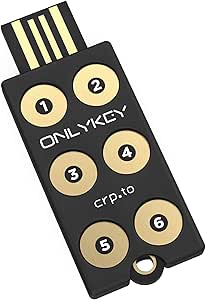 | Best for Multi-Protocol Password Management | Brand and model: OnlyKey CPT-OKY-002 | Hardware interface: USB Type-A | Flash memory type: NAND | VIEW LATEST PRICE | See Our Full Breakdown |
| portable password manager security key | Dimensions | Connectivity |
|---|---|---|
| Thetis Nano-A FIDO2 USB-A Secu | 0.75 × 0.74 × 0.25 in | — |
| OnlyKey Duo USB-C and USB-A Se | 1 × 0.29 × 0.58 in | USB-C and USB-A |
| Hirsch SecureKey USB-C NFC Sec | — | USB-C, NFC |
| Thetis Nano-C FIDO2 USB-C Secu | 0.73 × 0.60 × 0.30 in | — |
| Thetis Pro-C FIDO2 Security Ke | 2.1 × 0.63 × 0.38 in | USB-C, NFC |
| Thetis FIDO2 USB-A Security Ke | 0.3 × 0.6 × 0.3 in | — |
| Kensington VeriMark NFC+ USB-C | 2.01 × 0.63 × 0.2 in | USB-C, NFC |
| Thetis Pro-C FIDO2 Level 2 Sec | 0.63 × 3.3 × 0.4 in | — |
| Yubico YubiKey 5C NFC Security | 0.15 × 0.7 × 1.77 in | USB-C, NFC |
| Thetis Pro FIDO2 Security Key | 2.9 × 0.72 × 0.5 in | USB-A, USB-C, NFC |
| Atlancube PasswordPocket Offli | — | Bluetooth |
| SecuX PUFido Drive Clife USB-C | — | — |
| Yubico Security Key C NFC | 0.1 × 1.8 × 0.7 inches | — |
| OnlyKey FIDO2/U2F Security Key | — | — |
More Details on Our Top Picks
Thetis Nano-A FIDO2 USB-A Security Key
For a laptop or desktop that still has USB-A, the Thetis Nano-A packs passwordless FIDO2 sign-in into a tiny key that can stay on a keychain or remain plugged in. Its 200 FIDO2 passkey slots and 50 OATH-TOTP slots give it more room for account credentials and one-time codes than a basic sign-in-only key. Compared with the USB-C Thetis Nano-C, this version suits older ports rather than newer devices; both offer the same listed slot counts. The tradeoff is the connector: it cannot plug directly into USB-C-only hardware, and each website must support the authentication method you want to use. I’d pick it for a USB-A-centered password-manager setup, not as a universal key for a mixed-port device collection.
Pros:- Compact dimensions suit keychain carry or leaving the key plugged in.
- FIDO2 passkey support enables passwordless sign-in on compatible services.
- Provides 200 FIDO2 passkey slots and 50 OATH-TOTP slots.
- Listed compatibility includes PC, Mac, Android, and other devices with USB-A ports.
Cons:- USB-A connector limits direct use with USB-C-only devices.
- Passkey and authentication support depends on each website or service.
Best for: People managing many compatible accounts on laptops or desktops with USB-A ports who want a small key for daily carry or plug-in use.
Not ideal for: USB-C-only device owners or buyers who need one key to connect directly across newer phones and computers.
- Connector:USB Type-A
- Standards:FIDO and FIDO2
- FIDO2 passkey slots:200
- OATH-TOTP slots:50
- Dimensions:0.75 × 0.74 × 0.25 in
- Compatible platforms:PC, Mac, Android, and other devices with USB-A ports
Our verdict“Choose the Nano-A if USB-A is your main port and you want a compact key with both passkey and TOTP capacity.”
OnlyKey Duo USB-C and USB-A Security Key
The OnlyKey Duo is the clearest fit here for buyers who want more than a sign-in key: it combines hardware authentication with stored login credentials that can be entered with a button press. Its USB-C and USB-A connections and support for FIDO2/U2F, TOTP, Yubico OTP, and challenge-response cover a broader set of listed methods than the passkey-focused Thetis Nano-A. A PIN lock and secure erasure after ten failed unlock attempts add a defined response to repeated guessing, while the waterproof, tamper-resistant construction suits portable use. That breadth brings added complexity, and the product data lists the enclosure material as “Papier,” which is unclear. Choose it for credential entry and varied authentication methods; skip it if you only need straightforward FIDO2 passkeys.
Pros:- Combines saved credential entry with multiple two-factor authentication methods.
- USB-C and USB-A connectivity supports laptops with either connector.
- Supports Windows, macOS, Linux, and Chromebook.
- PIN protection, waterproofing, tamper resistance, and data erasure after ten failed unlock attempts.
Cons:- The listed enclosure material, “Papier,” is unclear and may be inaccurate.
- Its range of authentication and password-management functions may be more involved than a basic FIDO2 key.
- Listed compatibility focuses on laptops rather than a broad range of mobile devices.
Best for: Security-conscious laptop users who want a portable device for saved login entry as well as several two-factor authentication methods.
Not ideal for: Buyers seeking a simple passkey-only key, or anyone who needs clearer verified enclosure-material details before purchase.
- Connectivity:USB-C and USB-A
- Authentication methods:FIDO2/U2F, Yubico OTP, TOTP, challenge-response
- Credential function:Enters saved login credentials with a button press
- Operating systems:Windows, macOS, Linux, Chromebook
- Device protection:PIN lock; secure data erasure after 10 failed unlock attempts
- Water resistance:Waterproof
- Dimensions:1 × 0.29 × 0.58 in
- Weight:0.01 kg
Our verdict“Pick the OnlyKey Duo if you want a hardware password manager and authentication key in one device, rather than a simpler passkey key like the Thetis Nano-A.”
Hirsch SecureKey USB-C NFC Security Key
The Hirsch SecureKey stands apart from the compact Thetis Nano-C by pairing USB-C and NFC with a wider listed protocol set: FIDO2, U2F, WebAuthn, HOTP, and PIV. That range may suit buyers whose work or account setup calls for more than passkey sign-in, while NFC gives compatible phones a way to connect without occupying a USB port. Its listed compatibility spans desktop and mobile operating systems, including iOS and Android. SecureKey Manager also provides FIDO2 PIN and device management. The tradeoff is that broad protocol support does not make every service compatible; services still need to accept the relevant standard. This key also uses USB-C rather than offering the USB-A option found on the OnlyKey Duo, and a second key is recommended for backup.
Pros:- Combines USB-C and NFC connections for compatible computers and mobile devices.
- Supports FIDO2, U2F, WebAuthn, HOTP, and PIV.
- Listed compatibility includes Windows, macOS, Linux, ChromeOS, Android, and iOS.
- SecureKey Manager supports FIDO2 PIN and device management.
Cons:- Compatible services must support the protocol being used.
- Does not list USB-A connectivity.
- A second key is recommended as a backup.
Best for: People who need USB-C and NFC access across desktop and mobile devices, plus support for protocols such as PIV and HOTP.
Not ideal for: USB-A-only computer users, or buyers who want a complete password manager that stores and enters login credentials like the OnlyKey Duo.
- Connectivity:USB-C, NFC
- Supported protocols:FIDO2, U2F, WebAuthn, HOTP, PIV
- Certification:FIDO Alliance-certified
- Management software:SecureKey Manager for FIDO2 PIN and device management
- Compatibility:Windows, macOS, Linux, ChromeOS, Android, iOS
- Weight:0.563 oz
- Color:White
- Manufacturer part number:905602
Our verdict“Choose the Hirsch SecureKey for USB-C and NFC flexibility with a broader protocol mix than the passkey-focused Thetis Nano-C.”
Thetis Nano-C FIDO2 USB-C Security Key
For a USB-C device owner who wants a small key without NFC, the Thetis Nano-C keeps the same useful credential capacity as the Nano-A: 200 FIDO2 passkey slots and 50 OATH-TOTP slots. Its compact body is suited to keychain carry or leaving connected to a compatible port. Compared with the Hirsch SecureKey, the Nano-C offers listed passkey and TOTP capacity in a smaller stated form factor, while the Hirsch adds NFC and protocols such as PIV. The Nano-C’s simpler connection makes most sense when USB-C is already convenient and those extra options are not needed. Service support varies, and Windows Hello sign-in has a specific requirement: Enterprise edition with Entra ID. It also does not support ID Austria.
Pros:- Small dimensions suit keychain carry or staying connected to a USB-C port.
- Offers 200 FIDO2 passkey slots and 50 OATH-TOTP slots.
- Supports FIDO2, WebAuthn, and CTAP2 standards.
- Listed operating-system compatibility includes Windows, macOS, iOS, Android, Linux, and Chrome OS.
Cons:- No NFC connection is listed, unlike the Hirsch SecureKey and Thetis Pro-C.
- Passkey support depends on the website or service.
- Windows Hello login requires Enterprise edition with Entra ID, and ID Austria is not supported.
Best for: USB-C laptop and mobile-device owners who want a compact key with substantial passkey and OATH-TOTP slot capacity.
Not ideal for: Buyers who need NFC, USB-A, ID Austria support, or Windows Hello outside the stated Enterprise edition with Entra ID setup.
- Interface:USB Type-C
- Standards:FIDO, FIDO2, WebAuthn, CTAP2
- FIDO2 passkey slots:200
- OATH-TOTP slots:50
- Dimensions:0.73 × 0.60 × 0.30 in
- Compatible operating systems:Windows, macOS, iOS, Android, Linux, Chrome OS
- Color:Black
- Unit count:1
Our verdict“Choose the Nano-C for compact USB-C use and high listed slot capacity; choose the Hirsch SecureKey instead if NFC or PIV support matters more.”
Thetis Pro-C FIDO2 Security Key with USB-C and NFC
The Thetis Pro-C is the most convenient fit in this group for buyers who want to move between a USB-C computer and a compatible phone: it supports USB-C and NFC, so mobile authentication need not depend on a free port. It combines FIDO2 sign-in with TOTP/HOTP codes and needs no battery or network connection, unlike a phone-based code workflow that depends on another powered device. Its rotating metal cover and keychain-friendly shape add physical protection for everyday carry. Compared with the smaller Thetis Nano-C, the Pro-C adds NFC but is larger and has no listed passkey-slot count. Check service and device support before buying; the USB-C and NFC connections still leave out devices lacking both, and the listing advises checking whether a particular service accepts hardware keys.
Pros:- USB-C and NFC allow connection to compatible computers and mobile devices.
- Supports FIDO2 passwordless authentication and TOTP/HOTP codes.
- Rotating metal cover and keychain-friendly design suit portable carry.
- Requires no battery or network connection.
Cons:- Service compatibility varies, so supported hardware keys should be checked before purchase.
- USB-C and NFC do not cover devices lacking both connection options.
- Larger than the Thetis Nano-C and no passkey-slot count is listed.
Best for: People who regularly authenticate on compatible USB-C computers and NFC-enabled phones and want one battery-free key for both.
Not ideal for: Owners of devices without USB-C or NFC, or buyers who prioritize the Nano-C’s smaller dimensions and specified passkey-slot capacity.
- Authentication:FIDO2, TOTP/HOTP
- Connectivity:USB-C, NFC
- Compatible devices:Windows, macOS, Linux, Chrome OS, Android, iPhone
- Dimensions:2.1 × 0.63 × 0.38 in
- Weight:8.53 g
- Battery required:No
- Color:Black
- Model:MB000477
Our verdict“Pick the Pro-C over the Nano-C if NFC phone access matters more to you than the smallest body or a stated passkey-slot count.”
Thetis FIDO2 USB-A Security Keys, 2-Pack
I’d pick this two-pack for buyers who want a primary key and a ready-to-register backup without juggling different connectors. Both keys support FIDO2 passkeys and work without batteries or a network connection, while the rotating metal cover protects each USB-A plug on a keychain. Compared with the Thetis Pro FIDO2 Security Key with USB-A, USB-C, and NFC, this pair gives you a second physical key but lacks its cross-device connection options. That means it suits desktops and laptops with USB-A ports better than a phone-centered setup. There’s no NFC, and Windows Hello use is limited to supported Windows Enterprise editions with Entra ID. I’d also check that your services support the key’s authentication methods before relying on it as your only account recovery route.
Pros:- Two FIDO2 keys make it practical to keep a separately stored backup.
- Supports passkeys and hardware-based MFA for compatible services.
- Rotating metal covers protect the USB-A connectors during carry.
- Operates without batteries or a network connection.
Cons:- No NFC support for tap-based mobile authentication.
- USB-A connectors limit direct use with many newer phones and USB-C-only devices.
- Windows Hello requires a supported Windows Enterprise edition with Entra ID.
Best for: USB-A laptop and desktop owners who want to register a separate backup key for compatible passkey services.
Not ideal for: People who mainly sign in on phones or use USB-C-only devices; this pair has no NFC or USB-C connection.
- Brand:Thetis
- Model:MB000516
- Pack quantity:2 keys
- Hardware interface:USB 2.0, USB Type-A
- FIDO2 passkey slots:200
- OATH slots:50
- Weight:8.53 g
- Dimensions:0.3 × 0.6 × 0.3 in
Our verdict“Choose this pair if your main devices have USB-A ports and you want a matching backup key; skip it for phone-first or USB-C-only use.”
Kensington VeriMark NFC+ USB-C Security Key
The Kensington VeriMark NFC+ is a strong fit for people who want one compact key that can move between USB-C computers and NFC-capable mobile devices. Its IP68 water and dust resistance gives it a practical advantage for daily keychain carry over the Thetis USB-A two-pack, whose listed design emphasizes a covered connector rather than a resistance rating. It supports FIDO2 passwordless sign-in and passkeys across Windows, macOS, iOS, Android, and ChromeOS, so it’s more flexible for mixed-device households than a USB-A-only key. The tradeoff is that the product data does not list the broader protocol range found on the Yubico YubiKey 5C NFC, and advanced management may require optional software. I’d choose it for durable everyday authentication, not for buyers who need a large set of specialized authentication protocols.
Pros:- USB-C and NFC support both direct connection and compatible mobile tap authentication.
- IP68 rating adds water and dust resistance for keychain carry.
- FIDO2 Level 2 certification supports phishing-resistant authentication.
- Compatibility includes Windows, macOS, iOS, Android, and ChromeOS.
Cons:- Advanced management features may require optional software.
- The supplied specifications list fewer authentication protocols than the Yubico YubiKey 5C NFC.
- USB-C use still depends on having a compatible port; NFC availability varies by device and service.
Best for: USB-C and NFC users who carry a security key daily and want water and dust resistance across several operating systems.
Not ideal for: Administrators or security-focused users who need multiple listed protocols such as PIV, OpenPGP, or OATH in one key.
- Model number:K64739WW
- Connectivity:USB-C, NFC
- Authentication standards:FIDO CTAP 2.1, backward compatible with CTAP 2
- Certification:FIDO2 Level 2
- Compatibility:Windows, macOS, iOS, Android, ChromeOS
- Water and dust resistance:IP68
- Dimensions:2.01 × 0.63 × 0.2 in
- Weight:0.176 oz
Our verdict“Pick the VeriMark NFC+ for a rugged, compact USB-C/NFC key across common platforms, but choose a broader-protocol model if specialized authentication matters.”
Thetis Pro-C FIDO2 Level 2 Security Key with USB-C and NFC
I’d shortlist the Thetis Pro-C for buyers who want both FIDO2 passkeys and OATH one-time passwords in a battery-free key. USB-C covers direct connection to compatible computers and phones, while NFC offers another route on supported mobile devices. Its 200 passkey slots and 50 OATH slots give it more listed credential capacity than the Yubico YubiKey 5C NFC, which lists 100 passkey slots, though the Yubico supports a wider range of named protocols. The Pro-C’s rotating metal cover and keyring hole are useful for portable carry, but the TOTP/HOTP functions require the companion authenticator app; they are not a replacement for checking each service’s support. Buyers who only need FIDO2 may find the added OATH capability unnecessary.
Pros:- Supports FIDO2 Level 2 authentication plus TOTP/HOTP one-time passwords.
- USB-C and NFC provide two connection options on compatible devices.
- No battery is required.
- Rotating cover and keyring hole support protected everyday carry.
Cons:- TOTP/HOTP use depends on the companion authenticator app.
- Available sign-in methods vary by service and device.
- Compared with the Yubico YubiKey 5C NFC, its listed protocol set is narrower.
Best for: People who want a portable USB-C/NFC key with both passkey authentication and OATH one-time-password support.
Not ideal for: Users who want one key to work with the widest range of specialized protocols or who prefer not to use a companion app for OATH codes.
- Authentication:FIDO2 Level 2, TOTP/HOTP
- Interfaces:USB-C, NFC
- FIDO2 passkey slots:200
- OATH slots:50
- Compatible devices:Windows, macOS, Linux, Chrome OS, Android, iPhone
- Battery:None required
- Color:Black
- Dimensions:0.63 × 3.3 × 0.4 in
Our verdict“Choose the Pro-C if OATH codes and FIDO2 passkeys in one portable key fit your setup; skip it if you need broader protocol support or app-free code handling.”
Yubico YubiKey 5C NFC Security Key
The YubiKey 5C NFC is the most versatile choice here for buyers who want more than FIDO2 passkeys from a portable security key. Alongside FIDO2/WebAuthn, it supports U2F, Yubico OTP, OATH-TOTP/HOTP, PIV, and OpenPGP, a broader listed set than the FIDO2-focused Thetis USB-A pair or Thetis Pro-C. USB-C and NFC also cover compatible computers and mobile devices, and the key needs no battery or internet connection. That range is useful for people managing varied personal or work credentials, but it adds capabilities some passkey-only buyers may never use. Its 100 passkey slots are fewer than the Pro-C’s listed 200, and a separate backup key is still sensible so a lost key doesn’t become an account-access problem.
Pros:- Supports FIDO2/WebAuthn, U2F, Yubico OTP, OATH-TOTP/HOTP, PIV, and OpenPGP.
- USB-C and NFC support connection options for compatible computers and mobile devices.
- Works without batteries or an internet connection.
- Water-resistant, crush-resistant, and keychain compatible.
Cons:- A separately registered spare key is advisable to reduce account lockout risk.
- The 100 listed passkey slots are fewer than the Thetis Pro-C’s 200.
- USB-C may not fit devices without a compatible port, and NFC support depends on the device and service.
Best for: Security-conscious users who need a portable USB-C/NFC key for passkeys and several additional authentication protocols.
Not ideal for: Passkey-only users who want a simpler feature set, or people whose devices lack USB-C and do not support NFC authentication.
- Model:YubiKey 5C NFC
- Connectivity:USB-C, NFC
- Supported protocols:FIDO2/WebAuthn, FIDO U2F, Yubico OTP, OATH-TOTP/HOTP, PIV, OpenPGP
- Passkey slots:100
- Read speed:12 MB/s
- Dimensions:0.15 × 0.7 × 1.77 in
- Color:Black
- Physical features:Water resistant, crush resistant, keychain compatible
Our verdict“Choose the YubiKey 5C NFC when protocol breadth matters more than maximum passkey-slot capacity; add a spare if account access must remain resilient.”
Thetis Pro FIDO2 Security Key with USB-A, USB-C, and NFC
For someone moving between older USB-A computers, newer USB-C devices, and NFC-capable phones, the Thetis Pro FIDO2 covers more connection types than any other key in this batch. That flexibility can spare a buyer from carrying adapters, while its rotating metal cover protects the connector and the key works without a battery or network connection. Compared with the USB-A-only Thetis two-pack, it is much easier to use across a mixed device collection, though that pair gives you a second key for backup. The main caveat is that NFC is for mobile authentication only, not macOS or Windows. ID Austria is unsupported, and Windows Hello has specific Enterprise and Entra ID requirements. I’d favor it for port variety, not for users who need seamless NFC use on every platform.
Pros:- USB-A, USB-C, and NFC cover a broad range of compatible devices.
- Battery-free operation avoids charging and battery replacement.
- Rotating metal cover helps protect the key during keychain carry.
- Supports FIDO2 authentication on compatible systems.
Cons:- NFC authentication is not supported on macOS or Windows.
- Windows Hello requires a compatible Windows Enterprise edition with Entra ID.
- Only one key is included, unlike the Thetis USB-A two-pack.
Best for: People who alternate among USB-A computers, USB-C devices, and compatible phones and want one key for those different ports.
Not ideal for: Mac and Windows users expecting NFC authentication on those systems, or buyers who need a second backup key included.
- Brand:Thetis
- Model:Thetis PRO FIDO2 Key (flip-x)
- Authentication:FIDO2
- Connectivity:USB-A, USB-C, NFC
- NFC support:Mobile authentication only
- Compatible systems:Windows, macOS, Linux, Chrome OS
- Power:No battery required
- Dimensions:2.9 × 0.72 × 0.5 in
Our verdict“Pick the Thetis Pro for mixed-port flexibility across compatible devices, but choose another option if you need desktop NFC or an included spare.”
Atlancube PasswordPocket Offline Hardware Password Keeper with Bluetooth Auto-Fill
The PasswordPocket is the most direct fit here for someone who wants a portable password vault, rather than only a key for signing in to supported accounts. It holds up to 1,000 logins and uses Bluetooth to connect to iOS or Android without internet access, so stored credentials can be available even when a network is not. Its AES-256 encryption and one-click auto-fill add convenience, but the Bluetooth pairing step makes its workflow different from the plug-in authentication of the Yubico Security Key C NFC. This is a mobile-first choice, not a broadly documented FIDO2 security key. The plastic enclosure, replaceable CR2032 battery, and dependence on a paired phone are tradeoffs; shoppers seeking phishing-resistant account authentication should favor a dedicated FIDO key instead.
Pros:- Stores up to 1,000 sets of credentials
- Works with iOS and Android without internet access
- AES-256 encryption and one-click auto-fill
- Compact, battery-powered device for mobile use
Cons:- Requires Bluetooth pairing with a mobile device
- Product information lists a data transfer rate of 1 megabit per second
- Does not list FIDO2 or U2F authentication support
Best for: iOS or Android users who want a dedicated offline device for storing and auto-filling a large number of account credentials.
Not ideal for: Buyers seeking a FIDO2/WebAuthn security key for phishing-resistant sign-in, or anyone who prefers not to pair a device over Bluetooth.
- Brand and model:Atlancube CP001
- Credential capacity:Up to 1,000 logins
- Storage capacity:8 MB
- Encryption:AES-256
- Connectivity:Bluetooth
- Compatible platforms:iOS and Android
- Power source:CR2032 battery
- Weight and enclosure:0.12 kg; plastic
Our verdict“Choose the PasswordPocket for offline mobile credential storage and auto-fill, not as a substitute for a FIDO security key.”
SecuX PUFido Drive Clife USB-C Security Key with 1 GB Flash Drive
The PUFido Drive Clife is the unusual hybrid in this group: it pairs FIDO2/U2F authentication with a 1 GB flash drive in one compact USB-C device. That makes it more useful for someone who already carries files between devices than the authentication-only Yubico Security Key C NFC. The key supports passwordless login and two-factor authentication on major operating systems, while its USB-C connection avoids needing a separate adapter on compatible ports. The extra storage is convenient, but it also puts authentication and carried files on the same item; losing it could mean replacing both functions, and account recovery still calls for a backup key. Its listed read speed and USB standard describe the drive, not the speed or strength of account authentication. Choose it for the combined job, not for a minimal, dedicated key.
Pros:- Combines FIDO2/U2F authentication with 1 GB of flash storage
- Supports passwordless login and two-factor authentication
- USB-C connector suits compatible computers and devices
- Works with Windows, macOS, Linux, iOS, and Android
Cons:- A lost device may affect both authentication access and carried files
- A backup security key is recommended to reduce account lockout risk
- USB-C only; NFC is not listed
Best for: USB-C laptop and mobile users who want a FIDO2/U2F key and a small file-carrying drive in one device.
Not ideal for: People who want a dedicated authentication key with NFC, or users who would rather keep account access and portable files on separate devices.
- Brand and model:SecuX PUFido Drive Clife Key
- Authentication standards:FIDO2 and U2F
- Interface:USB Type-C
- USB standard:USB 3.2 Gen 2×2
- Flash storage:1 GB, MLC
- Listed read speed:1 GB/s
- Compatible platforms:Windows, macOS, Linux, iOS, Android
Our verdict“Pick the PUFido Drive Clife if you want one portable USB-C device for FIDO authentication and file storage, and keep a backup key.”
Yubico Security Key C NFC
For password-manager users who need a portable second factor, the Security Key C NFC keeps the job simple: it offers FIDO2/WebAuthn and U2F through USB-C or NFC, with no battery or internet connection required. Compared with the OnlyKey FIDO2/U2F Security Key and Hardware Password Manager, it is a more focused authentication tool; it does not claim to store passwords or support a broader set of OTP methods. NFC is useful when a compatible phone has no convenient USB-C access, while the waterproof, crush-resistant construction suits everyday carry. The limits matter: One-Time Passwords are not supported, and it does not work with the Yubico Authenticator App. It is a strong match for compatible services that support FIDO sign-in, but not for buyers who need a multi-protocol token or built-in password vault.
Pros:- Supports FIDO2/WebAuthn and FIDO U2F
- Offers both USB-C and NFC connections
- Requires no battery or internet connection
- Waterproof and crush-resistant construction
Cons:- Does not support One-Time Passwords
- Not compatible with the Yubico Authenticator App
- Provides authentication, not password storage or auto-fill
Best for: People who want a small, durable USB-C/NFC FIDO key for password-manager accounts and compatible services.
Not ideal for: Buyers who need OTP codes, Yubico Authenticator App support, or a device that stores and autofills passwords.
- Brand and model:Yubico 100957
- Connections:USB-C and NFC
- Authentication standards:FIDO2/WebAuthn and FIDO U2F
- One-Time Password support:No
- Weight:0.16 ounces
- Dimensions:0.1 × 1.8 × 0.7 inches
- Firmware:5.7
- Origin:Manufactured in Sweden; programmed in the USA
Our verdict“Choose this Yubico for durable, no-battery FIDO sign-in over USB-C or NFC, provided your services do not require OTP support.”
OnlyKey FIDO2/U2F Security Key and Hardware Password Manager
OnlyKey suits buyers who want more than a sign-in key: it combines a hardware password manager with FIDO2/U2F, Yubico OTP, TOTP, and challenge-response support. That breadth gives it a different role from the Yubico Security Key C NFC, which focuses on FIDO sign-in and offers USB-C plus NFC. OnlyKey instead uses USB Type-A and lets users enter a PIN directly on the device, keeping that step off the connected computer. Its waterproof, durable design and secure erase after 10 failed PIN attempts add protection, but the erase rule can also destroy stored data if the PIN is repeatedly entered incorrectly. The Type-A connector limits use with newer ports unless an adapter is available, and buyers should plan how they will recover credentials if the device is lost or erased.
Pros:- Combines password management with FIDO2/U2F and other authentication methods
- Supports Yubico OTP, TOTP, and challenge-response
- PIN is entered directly on the device
- Waterproof, durable design with secure erase protection
Cons:- USB Type-A connection may require an adapter for newer devices
- Stored data is erased after 10 failed PIN attempts
- NFC support is not listed
Best for: Security-conscious users who want a portable password manager with several authentication methods and primarily use USB-A devices.
Not ideal for: USB-C-only device owners, or anyone who wants NFC and does not have a recovery plan for stored data.
- Brand and model:OnlyKey CPT-OKY-002
- Hardware interface:USB Type-A
- Flash memory type:NAND
- Authentication methods:FIDO2/U2F, Yubico OTP, TOTP, challenge-response
- Compatible devices:Windows, Mac OS, Linux, Chromebook
- Security features:On-device PIN; secure erase after 10 failed unlock attempts
- Construction:Waterproof, durable, tamper-resistant
- Item weight:17.01 g
Our verdict“Choose OnlyKey if you need a multi-protocol hardware password manager and can accommodate USB-A and its failed-PIN erase policy.”
How We Picked
I compared these products by how well they fit the specific job implied by the search: carrying a compact device for password-related security and access. The ranking weighs supported authentication standards, connector options, NFC availability, password-storage or autofill functions, portability, and the practical effort of setup and daily use. I also considered whether a product’s distinctive feature addresses a real need or adds complexity that many buyers can avoid.
The order favors adaptable options that can serve a broad range of password-manager and account-security workflows, then moves toward focused picks for particular devices or preferences. A key designed chiefly for FIDO2 authentication is not treated as a full password manager, and a hardware password keeper is not automatically ranked above an authenticator. I also account for backup readiness and compatibility: a feature-rich key can still be a poor fit if it does not match a buyer’s ports, phone, or recovery plan.
| portable password manager security key | Connectivity |
|---|---|
| Thetis Nano-A FIDO2 USB-A Secu | — |
| OnlyKey Duo USB-C and USB-A Se | USB-C and USB-A |
| Hirsch SecureKey USB-C NFC Sec | USB-C, NFC |
| Thetis Nano-C FIDO2 USB-C Secu | — |
| Thetis Pro-C FIDO2 Security Ke | USB-C, NFC |
| Thetis FIDO2 USB-A Security Ke | — |
| Kensington VeriMark NFC+ USB-C | USB-C, NFC |
| Thetis Pro-C FIDO2 Level 2 Sec | — |
| Yubico YubiKey 5C NFC Security | USB-C, NFC |
| Thetis Pro FIDO2 Security Key | USB-A, USB-C, NFC |
| Atlancube PasswordPocket Offli | Bluetooth |
| SecuX PUFido Drive Clife USB-C | — |
| Yubico Security Key C NFC | — |
| OnlyKey FIDO2/U2F Security Key | — |
Factors to Consider When Choosing Portable Password Manager Security Keys
Before choosing, separate the job you need the device to do from the features in its name. A security key may help authenticate to a password manager without storing your passwords, while a hardware password manager may store or enter credentials but support different sign-in methods. These distinctions affect compatibility, recovery, and day-to-day convenience more than a long feature list.
Decide Whether You Need Authentication, Password Storage, or Both
Start by checking how your password manager supports hardware keys: some use a key as a second factor, some support passkeys, and some do not treat a security key as a place to store passwords. A FIDO2 key can protect access to an account, but it does not automatically hold or autofill your vault credentials. Hardware password managers offer a different workflow, often with their own setup and unlock steps. Avoid buying based only on the phrase “password manager” in a listing; verify the exact function you expect on your devices. If your main goal is phishing-resistant sign-in, favor a compatible FIDO2 key. If you want credentials stored or entered by the device, check how that feature works before choosing an authenticator-first model.
Match the Key to Your Ports and Phone Habits
USB-C is a practical default for many current laptops and phones, but it is not universal. USB-A can be useful for older computers, and dual-connector designs reduce the need to carry adapters when switching between machines. NFC can make phone sign-ins easier, but only if the phone, operating system, app, and account flow support it. A compact key that stays on a keyring may be more useful than a feature-rich model left at home. Check whether a key’s connector shape or casing could block nearby ports, especially on crowded laptops. Choose around the devices you actually use, not every device you might own someday.
Plan for Lockout Before You Enroll a Key
A security key can become a single point of failure if it is lost, damaged, or left behind. Before enrollment, check the account’s recovery process and whether it permits multiple keys, backup codes, or another authentication method. A two-key set can make it easier to keep one spare in a separate safe place, but it only helps if the backup is enrolled and stored securely. Do not keep the sole key and its recovery details together in the same bag. For a device that stores passwords, learn how recovery works before relying on it as your only copy. A modestly simpler key with a workable backup plan can be safer in practice than a more elaborate device without one.
Check Standards and Account Support, Not Just the Brand
FIDO2 and U2F support can help a key work across supported services, but account and app implementations still differ. Confirm that the password manager and the important accounts you use accept the key in the way you intend. Some keys support extra features beyond basic sign-in, while simpler security-key models concentrate on authentication. Those extra capabilities are useful only when your services can use them. Buyers who need one key for both work and personal accounts should check any organization policies before purchasing. Compatibility checks up front can prevent a device that physically connects but cannot complete the desired login flow.
Choose Features That Earn Their Place in Your Carry Kit
Every additional capability can add a setup requirement, a learning curve, or another dependency. NFC is worthwhile for frequent phone use; multiple connectors help across mixed-age hardware; fingerprint authentication may suit buyers who want a biometric sign-in step. A flash drive built into a key can be handy, but it combines separate roles in one item, so losing or damaging it may affect more than authentication. Offline password storage and Bluetooth autofill also call for closer scrutiny of how credentials are protected, unlocked, and recovered. Pay for a feature when it removes friction in your actual routine, not simply because it appears on a spec sheet.
Think About Physical Durability and Everyday Handling
A portable key has to survive being carried, plugged in, and removed repeatedly. Consider whether you want a small keyring form, a cap or protective design, or a more substantial body that is easier to handle. Tiny keys can be easy to misplace, while larger or multi-function devices can take up more room. If you plan to leave a key attached to a bag or lanyard, check how it is secured and whether that storage method suits your security needs. Keep a spare away from the daily-carry key rather than attaching both to the same ring. The best form factor is the one you can carry consistently without making accidental loss more likely.
Frequently Asked Questions
Does a FIDO2 security key store my password-manager passwords?
Usually, no: a FIDO2 security key commonly authenticates you to an account rather than storing the passwords in your vault. Your password manager holds the credentials, while the key may provide a second factor or support passkey sign-in, depending on the service. Products marketed as hardware password managers can offer storage or autofill functions, but their workflow differs from a standard authenticator. Check your password manager’s documentation for the exact supported use before purchasing. If you want both vault access protection and physical password storage, confirm that one device actually provides both functions.
Should I buy two security keys instead of one?
Two enrolled keys can reduce the chance that a lost or damaged daily key locks you out. Keep the spare somewhere separate and secure, and add it to important accounts while you still have access to them. A two-key pack does not help if the second key is never enrolled or is stored beside the first. Some services also offer backup codes or other recovery methods, so review those options before deciding. For accounts with limited recovery, a separately stored spare is especially useful.
Is NFC worth choosing if my key already has USB-C?
NFC is useful when you regularly authenticate on a phone and the phone and service support security-key access over NFC. It can spare you from carrying an adapter or finding an available port. If you mainly sign in on a laptop with USB-C, NFC may add little to your routine. Confirm support for your specific phone and account flow rather than assuming all mobile sign-ins work the same way. Buyers with mixed phone and computer use are more likely to benefit than those who only use a laptop.
Can I use one security key with all my accounts and devices?
One key may work across many accounts, but support depends on each service, its authentication settings, and the devices you use. Connector fit is only one part of compatibility: standards such as FIDO2 or U2F and the account’s sign-in options matter too. Some workplace accounts restrict which keys or authentication methods employees can enroll. Check your password manager and the accounts you rely on before buying, then enroll a spare or configure recovery where possible. A key that works with your main email and password vault may not support every account in the same way.
Is a hardware password manager a safer choice than a standard security key?
Neither category is automatically safer for every job. A standard security key can provide strong account authentication without becoming another store of passwords, while a hardware password manager may offer local storage or autofill with its own security and recovery design. The right choice depends on which risks you want to address and how you will manage the device. Review how credentials are protected, how access is unlocked, what happens if the device is lost, and whether your services support its features. Many buyers will get a simpler setup by using a reputable password manager with a compatible security key for account protection.
Conclusion
For a flexible all-around choice, I recommend the Yubico YubiKey 5C NFC as best overall, especially for buyers who want USB-C and phone-friendly NFC in one authenticator. The Thetis FIDO2 USB-A Security Keys, 2-Pack is my best value-style pick for people who need a ready spare and use USB-A devices, while the OnlyKey Duo is the best fit for buyers seeking hardware password-management features and both connector types. Beginners who want a focused, compact FIDO2 key can start with the Thetis Nano-C, provided its connector matches their devices. For specific needs, choose a model with NFC for supported phone use, a fingerprint reader for biometric interaction, or built-in storage only when that function fits your workflow. Match the device to your password manager, confirm account support, and set up recovery before making any key your main route into important accounts.
Halloween Picks
halloween
As an affiliate, we earn on qualifying purchases.