
TL;DR

Get privacy and security gear delivered free with Prime
- Fast, free delivery on millions of items
- Prime Video, Amazon Music and more included
- Member-only deals all year
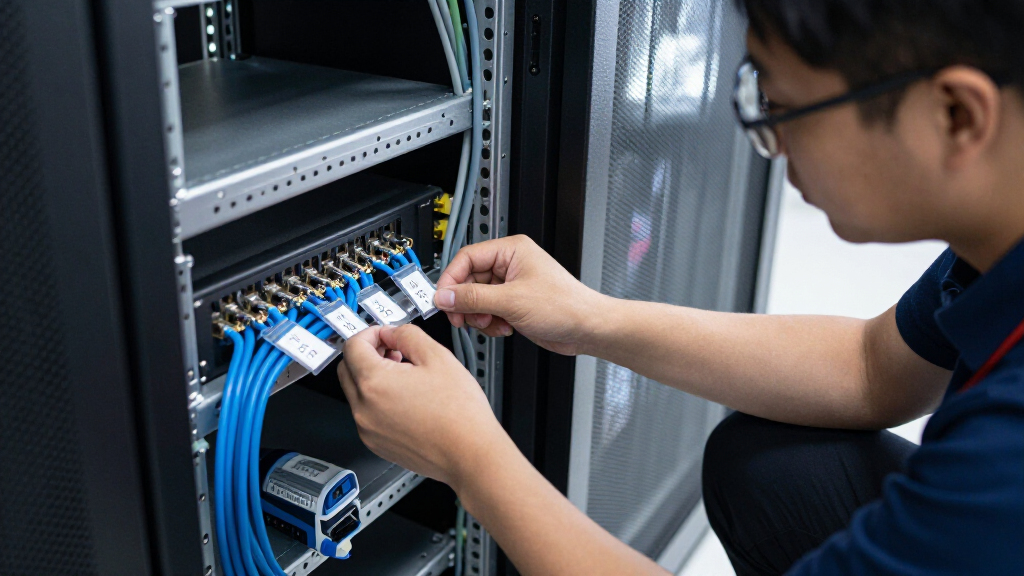
Clear, standardized, and durable labels on network equipment help responders identify devices quickly. Using modern tools like QR codes and automation reduces incident resolution times by up to 50%.
Imagine a network crisis—your core switch crashes, and chaos ensues. Without clear labels, finding and troubleshooting that device can feel like searching for a needle in a haystack. The difference between hours of downtime and a quick fix often comes down to one thing: how well your gear is labeled.
Effective labeling isn’t just about slapping a sticker on a device; it’s a strategic approach that can save precious time during incidents. When every switch, router, or access point is labeled with precise, accessible info, your team can jump straight to the problem, not waste time deciphering what’s what.
This guide walks you through practical, concrete steps to label your network gear so incidents go faster. From choosing the right labels to integrating them with your management tools, you’ll learn how to turn your network into a well-organized map that guides you straight to the trouble spot.
Establish a clear, consistent labeling standard to reduce confusion during incidents.
Use durable, high-contrast labels placed where they are easily visible and accessible.
Link physical labels to digital asset management systems via QR codes or NFC tags for instant info access.
Place labels strategically—front, top, or sides—to ensure quick readability even during emergencies.
Integrate labels with network management tools to automate data retrieval and streamline troubleshooting.
How to Label Network Gear So Incidents Go Faster
When a core switch fails, clear labels help responders find the right device, understand its role, and act without losing time to guesswork. Build a practical system that connects the equipment in the rack to current, useful information.
Industry reports cited in the source material suggest proper labeling can reduce incident resolution time by up to 50%.
Five habits that make labels useful under pressure
Set one naming convention so anyone can decode a label at a glance.
Choose durable materials and high contrast for long-lasting readability.
Link each physical label to a current asset record with QR or NFC.
Place labels where responders can see them without moving cables.
Connect records to network tools to speed up data retrieval.
Make every label speak the same language
A consistent pattern reduces the mental work of identifying equipment during an incident. Include the location, device type, and a unique sequence or asset identifier. Avoid vague names that require a separate lookup.
Location → device → sequence
Use a short, repeatable structure across switches, routers, and access points. Document the pattern in a style guide, then train the team to apply it consistently.
Use color with a clear legend
Color can indicate role or priority when the meaning stays consistent across the site. For example, reserve red for critical equipment and document every cue in the same style guide.
Durable material, visible placement
A label only helps if it stays attached and can be read where the work happens. Choose the material for the conditions, then place it where a responder can reach and see it.
Withstand wear
Polyester or vinyl with permanent adhesive can help labels resist moisture, heat, dust, cleaning, and abrasion.
Read at a glance
Use large, clear print with strong contrast, such as black on white. Keep any icons or color cues easy to distinguish.
Keep it accessible
Use the front, top, or open-rack-facing side. Avoid cable bundles, mounted hardware, and locations that require moving equipment.
Connect the physical device to its digital record
QR codes and NFC tags can turn a label into a fast route to asset details. Link to a maintained inventory or CMDB with useful information such as serial number, firmware, maintenance history, configuration, and recent alerts.
Conceptual workflow illustration; bar lengths show the connection from physical identification to operational context, not measured survey data.
Turn a scan into a faster next step
Spot
Read the visible device name and location.
Scan
Open the linked asset record with QR or NFC.
Verify
Check role, firmware, history, and health.
Act
Use current context to guide troubleshooting.
Refresh
Update the inventory after moves or changes.
Automate updates where your tools allow it
Connect labels and asset records to network discovery or management tools so device additions and moves can update the inventory with less manual entry. Schedule routine inspections to replace damaged labels and confirm that scans still open accurate records. For larger networks, this helps responders work from one current source of information.
Common questions from network teams
Why does labeling improve incident response?
It helps responders identify a device, understand its role, and reach relevant information without first deciphering the rack.
What makes a label durable?
Choose material and adhesive for the environment, use clear high-contrast printing, and inspect labels during maintenance.
How should a large network get started?
Define a naming convention, pilot it in one area, connect labels to the asset inventory, and expand with a documented standard.
How do records stay accurate?
Use regular audits and discovery integrations, and update records whenever devices are added, moved, or replaced.
Start with Clear, Consistent Labeling Standards
The first step to speeding up incident response is establishing a solid labeling convention. Think of it like a language everyone in your team speaks fluently. Use consistent naming patterns—perhaps including location, device type, and function—so that anyone can decipher a label at a glance.
For example, a switch in the server room might be labeled SRV-RM1-SW1, indicating ‘Server Room 1, Switch 1.’ This pattern helps your team instantly understand where the device is and what it does. Avoid vague labels like ‘Switch A’ or ‘Device 3,’ which add confusion during emergencies.
Incorporate color codes or symbols to denote device roles or statuses. For instance, red labels for critical devices, green for secondary, or a lightning bolt symbol for devices with power issues. Standardizing these visual cues across your network reduces the cognitive load during high-pressure incidents.
To implement this, create a simple style guide and train your team. Consistency means everyone knows what to expect, making troubleshooting faster and more accurate. When labels follow the same pattern, you avoid wasting time trying to decode or cross-reference them.
As an affiliate, we earn on qualifying purchases.
Use Durable, Easy-to-Read Labels for Every Device
Labels need to survive the environment—heat, moisture, dust, or frequent handling. Imagine a label peeling off in a dusty server closet or smudging in a humid data center. That’s a recipe for confusion and delays.
Choose materials like polyester or vinyl with permanent adhesive. These withstand cleaning, temperature swings, and physical wear. For example, a network rack in a warehouse might face temperature fluctuations from 50°F to 100°F, and labels must stay intact.
Print labels with large, high-contrast fonts—black on white or white on black—to ensure readability from a distance. Add icons or color coding for quick visual cues. For instance, a red label with a warning icon can alert responders to a device with known issues.
Strategically place labels where they are easy to see—front panels, top, or sides—avoiding obstructions like cables or mounted hardware. During an incident, responders shouldn’t have to crawl behind racks or move cables to read a label.
Regularly inspect and replace labels as part of your maintenance routine. This proactive approach keeps your labeling system reliable and prevents delays caused by faded or damaged labels.
QR code labels for networking gear
As an affiliate, we earn on qualifying purchases.
As an affiliate, we earn on qualifying purchases.
Link Labels to a Digital Asset Inventory for Instant Info
Physical labels are powerful, but their real magic comes when linked to a digital asset management system. Think of labels as keys to a detailed database—scan a QR code or NFC tag, and you get all the device info instantly.
For example, a QR code on a switch can be scanned with a smartphone, pulling up details like serial number, firmware version, last maintenance date, and network configuration. This saves your team from hunting down manuals or digging through spreadsheets during a crisis.
Implement barcode or QR code labels that are scannable and update your asset database regularly. Use asset management software that integrates with network discovery tools, so when a device is added or moved, the system updates automatically.
This approach reduces human error, speeds up troubleshooting, and ensures everyone is working from the same, current data. During an incident, a quick scan can reveal if a device is outdated, misconfigured, or in need of replacement.
For large networks, this integration is a game-changer. It transforms static labels into dynamic gateways to detailed, actionable info, making incident response feel like a well-rehearsed dance rather than a frantic search.
As an affiliate, we earn on qualifying purchases.
Strategic Placement of Labels to Maximize Visibility
Even the best labels are useless if they’re hidden or hard to access. Think of a label placed behind a cable bundle or on the back of a device—during an emergency, that’s like trying to find a needle in a haystack.
Place labels on accessible, prominent spots—front panels, top surfaces, or sides facing open racks. For example, a label on the front of a switch allows responders to read it without moving cables or opening panels.
In environments with high cable density, consider color-coded labels on cable bundles or ports to quickly identify device connections. For instance, red labels on critical links can alert responders to prioritize those connections first.
Use clear mounting techniques—stickers, engraved plates, or clip-on tags—that won’t fall off or get obscured over time. Regularly check labels during maintenance routines to ensure they remain visible and legible.
Remember, during a crisis, every second counts. Well-placed labels act like signposts guiding your team straight to the source of the problem.
As an affiliate, we earn on qualifying purchases.
Integrate Labels with Network Management Tools for Automation
Linking physical labels with network management tools turns manual efforts into automated workflows. Imagine scanning a QR code and having your network management system instantly pull up device details, configuration, and health status.
For example, integrating labels into your CMDB (Configuration Management Database) allows your incident response team to access real-time data without hunting through logs or manuals. Automated discovery tools can even update labels and records, reducing errors and manual entry.
In practice, this means when a device malfunctions, your team can scan its label, see its last firmware update, current configuration, and even recent alerts—all from a single dashboard.
This seamless connection reduces response time dramatically. Instead of guessing or searching, responders get precise, current info that guides their actions.
Adopting this approach requires initial setup but pays off by making incident management more efficient, especially in large, complex networks where manual tracking becomes unmanageable.
Frequently Asked Questions
Why is labeling network gear so important for incident response?
Labeling helps responders quickly identify devices, understand their roles, and access relevant info without wasting time. It turns a chaotic scene into a straightforward process, reducing troubleshooting time by up to 50%.What are best practices for creating durable, effective labels?
Use high-quality, weather-resistant materials like vinyl or polyester, with large, high-contrast fonts. Place labels where they are easy to see—front or top surfaces—and check them regularly to replace any that fade or peel.How can I implement a labeling system in a large network?
Start with a standardized naming convention, use scannable QR or barcode labels, and connect them to your asset management software. Automate discovery and updates to keep data current, saving time during incidents.What technologies are available for modern network labeling?
QR codes, NFC tags, RFID labels, and smart labels that monitor environmental conditions are current options. They enable rapid data access and can even trigger automated responses or alerts.How do I keep my labeling system up to date?
Regular audits, integrating labels with your asset management system, and using automated discovery tools ensure labels remain accurate and legible, preventing delays caused by outdated info.Conclusion
Labeling network gear isn’t just a housekeeping task; it’s a strategic move that can slash incident resolution times and boost your team’s confidence. When your equipment is clearly identified, accessible, and connected to your management systems, troubleshooting becomes a matter of following signposts rather than hunting blindly.
Think of it as turning your network into a well-lit map—every device a clearly marked landmark guiding you straight to the problem. Invest in good labels, standardize your approach, and integrate them into your workflows. The result? Faster fixes, less downtime, and a network that’s always ready for the next challenge.
Next time you’re in the server room, imagine your labels as the GPS coordinates for your network’s health—precise, reliable, and always guiding you home.
Halloween Picks
halloween
As an affiliate, we earn on qualifying purchases.