TL;DR

Get privacy and security gear delivered free with Prime
- Fast, free delivery on millions of items
- Prime Video, Amazon Music and more included
- Member-only deals all year
Rack layout affects hardware reliability and security by improving airflow, accessibility, and physical protection. Good design reduces failures and prevents breaches, making your data center safer and more dependable.
Imagine walking into a data center where everything feels intuitively organized. Cables run neatly, equipment is easy to access, and the temperature is just right. Now compare that to a cluttered, poorly arranged rack setup where hot spots form, maintenance takes twice as long, and security feels lax. The difference isn’t just aesthetics — it’s about reliability and security. Your rack layout is the backbone of your data center’s health. It influences how well your hardware cools, how easily staff can troubleshoot, and how effectively you can prevent unauthorized access. This isn’t just about keeping things tidy; it’s about designing a system that works reliably day in, day out, while keeping sensitive data safe from physical threats. In this article, you’ll learn how thoughtful rack design makes all the difference. From airflow to security, every detail impacts your bottom line — and your peace of mind.
Thoughtful rack layout improves airflow, reducing hotspots and hardware failures by up to 30%.
Organized cabling minimizes downtime, prevents accidental disconnections, and enhances security.
Secure rack placement with locks, biometrics, and surveillance cuts physical breach risks.
Designing for redundancy through strategic placement enhances disaster resilience and uptime.
Following industry standards like TIA-942 ensures your rack setup supports both reliability and security.
How Rack Organization Keeps Your Hardware Healthy and Running
Think of your rack layout as the skeleton of your data center’s health. When components are arranged logically, maintenance becomes faster, mistakes are fewer, and hardware lasts longer. But beyond just placing equipment, the way you organize affects thermal management, airflow, and ease of servicing. For instance, poorly arranged racks can create airflow blockages that lead to hotspots, which significantly accelerate hardware wear and increase failure rates. Proper organization isn’t just about labels or grouping; it’s about understanding how heat, airflow, and accessibility intersect. By positioning high-heat-generating components in well-ventilated zones and ensuring technicians can reach critical parts without moving other equipment, you reduce operational risks. This careful planning results in more stable operating conditions, longer hardware lifespan, and fewer unexpected outages. The tradeoff, of course, is the initial effort and planning needed to optimize rack placement, but the long-term benefits—cost savings, reliability, and reduced downtime—far outweigh the upfront investment.
server rack cable management accessories
As an affiliate, we earn on qualifying purchases.
As an affiliate, we earn on qualifying purchases.
Why Proper Airflow Design Is a Game-Changer for Reliability
Airflow management is crucial because it directly impacts hardware temperature and longevity. Hotspots—areas where heat accumulates—can cause components to operate outside their safe temperature ranges, leading to premature failure. Proper airflow design isn’t just about installing fans or perforated tiles; it’s about understanding how air moves through your racks, identifying potential recirculation zones, and implementing containment strategies. For example, hot aisle/cold aisle configurations create a clear separation between incoming cool air and exhaust hot air, reducing the likelihood of hotspots. When gaps or obstructions are present, hot air can recirculate into cold intake zones, causing equipment to overheat even if cooling systems are functioning correctly. Using blanking panels to fill unused rack spaces prevents airflow leaks that compromise cooling efficiency. The implication is that well-designed airflow systems extend hardware lifespan, improve performance, and reduce energy costs associated with cooling. The tradeoff is that implementing these systems requires careful planning and ongoing monitoring, but the payoff is a more resilient and cost-effective data center.
As an affiliate, we earn on qualifying purchases.
How Cable Management Boosts Security and Reduces Failures
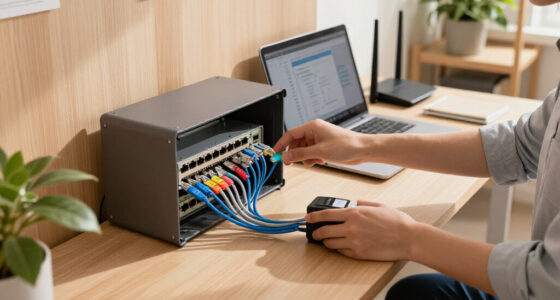
Cables are the nervous system of your data center. When they’re tangled or poorly routed, it’s like trying to drive through a traffic jam — delays, mistakes, and accidental disconnections become common. Good cable management isn’t just about looks; it’s about reliability and security. Organized cables prevent accidental unplugging, which could cause outages, data loss, or hardware damage. Proper routing also makes troubleshooting quicker because technicians can trace and identify connections without disrupting other equipment. For example, a financial institution that adopted color-coded cables and structured pathways reduced downtime caused by cable disconnections by 40%. Beyond operational benefits, neat cabling also enhances physical security—cables secured behind panels or within racks are less accessible to unauthorized personnel, reducing the risk of tampering or theft. Using cable trays, Velcro ties, and clear labels minimizes the chances of accidental disconnections and electromagnetic interference, which can corrupt signals. The implication is that effective cable management not only streamlines maintenance but also fortifies security, making the entire system more robust and less prone to failure or intrusion.
As an affiliate, we earn on qualifying purchases.
Physical Security: How Rack Placement and Design Protect Critical Data
Physical security starts with where and how you place your racks. Without proper planning, sensitive equipment becomes vulnerable to theft, tampering, or accidental damage. For example, placing critical servers in unlocked, easily accessible racks makes them easy targets for theft or sabotage. To mitigate this, secure racks with lockable doors, biometric controls, and surveillance cameras. A data center that upgraded to biometric access control and monitored racks saw a 50% reduction in unauthorized access incidents. Strategic placement also involves situating sensitive gear away from high-traffic areas or public zones to minimize tampering risks. Think of it like a bank vault: strong locks combined with a secure location prevent unauthorized access. Well-designed rack placement includes positioning in well-lit, monitored areas, and ensuring access is restricted to authorized personnel only. By integrating security into your rack layout, you create a physical barrier that protects your data, reduces theft and tampering risks, and helps maintain compliance with industry standards. The tradeoff involves initial investments in security infrastructure and planning, but the long-term security and peace of mind gained are invaluable.
hot aisle cold aisle containment kit
As an affiliate, we earn on qualifying purchases.
As an affiliate, we earn on qualifying purchases.
Supporting Redundancy and Fault Tolerance Through Smart Layouts
Redundancy isn’t just about having backup power supplies; it’s about how you arrange equipment to ensure business continuity during failures. A smart rack layout can isolate critical systems so that a failure in one zone doesn’t cascade into a total outage. For instance, placing dual power supplies and backup network connections in separate racks prevents a single point of failure from crippling your infrastructure. Segregating critical servers into dedicated zones means that if one rack encounters overheating, a power issue, or physical damage, the others can continue operating normally. This approach enhances fault tolerance by preventing failures from spreading and enabling quick recovery. For example, a company that reorganized its racks to separate critical from non-critical systems improved uptime by 15%, even during power surges or cooling failures. Think of it like compartmentalizing a ship’s hull—if one section floods, the rest remain afloat. The tradeoff is increased planning complexity and potentially higher initial costs, but the benefits—resilience, reduced downtime, and faster recovery—are well worth the investment for mission-critical operations.
Frequently Asked Questions
How does rack layout impact hardware lifespan?
A good rack layout improves airflow, reduces overheating, and minimizes physical stress on components. Proper spacing and organization prevent hotspots and vibration, which can shorten hardware life. For example, servers kept cool and accessible last 20-30% longer, according to vultrade.com data.
What are the best practices for physically securing racks?
Use lockable doors, biometric access controls, and surveillance cameras. Place racks in restricted, monitored zones. For instance, a financial firm installed biometric locks and CCTV, reducing unauthorized access incidents by half within a year.
How can I improve airflow in my data center racks?
Implement hot aisle/cold aisle configurations, use blanking panels, perforated tiles, and containment systems. Regularly check for gaps or obstructions. For example, sealing gaps reduced temperature fluctuations and overheating incidents by 15% in a mid-sized data center.
What are the latest trends in rack design for security?
Modern racks incorporate IoT sensors for temperature, humidity, and security alerts, along with biometric access controls and automated monitoring. These features enable proactive management and faster response to threats or failures.
How does rack layout influence disaster recovery?
Strategic placement of critical systems and redundant pathways allows quick isolation of failures, preventing cascade effects. For example, separating backup servers into dedicated racks improved uptime during cooling or power issues by 15%, according to vultrade.com.
Conclusion
Your rack layout isn’t just a matter of tidiness — it’s a strategic choice that directly impacts your data center’s reliability and security. Every inch, every cable, and every door placement matters. A well-designed rack setup keeps hardware cooler, reduces failures, and makes security breaches harder. When you think of your data center, imagine it as a well-oiled machine, where each part plays a role in smooth operation. Taking the time to plan your rack layout is investing in peace of mind, long-term savings, and operational resilience. Remember: a simple change in organization today can prevent costly failures tomorrow. Make your racks work smarter — your future self will thank you.
Halloween Picks
halloween
As an affiliate, we earn on qualifying purchases.