The best router for network segmentation depends on whether you need easy separation for guest and IoT devices or more control over a wired network with VLANs. I rank the Synology RT6600ax best overall for combining Wi-Fi with accessible network controls, while the Omada ER707-M2 stands out for multi-gigabit wired networks and the TP-Link ER605 for a straightforward, budget-minded gateway. The main tradeoff is between simpler all-in-one Wi-Fi routers and wired gateways that can offer more flexible network design but may need separate access points and more setup. Port speed, VLAN support, management style, and the number of networks you need all affect the choice. Read on for how the eight options differ and which one best fits your setup.

Get privacy and security gear delivered free with Prime
- Fast, free delivery on millions of items
- Prime Video, Amazon Music and more included
- Member-only deals all year
Key Takeaways
- The Synology RT6600ax is the most balanced all-in-one pick: it pairs wireless coverage with segmentation controls, while most other picks are wired gateways.
- The ER707-M2 is the wired multi-gigabit standout: it makes more sense than gigabit-only gateways when fast internet or local network links are part of the plan.
- The ER605 is the simpler value route: it covers core wired gateway needs, but buyers must plan separately for Wi-Fi and should not expect multi-gigabit ports.
- The ASUS RT-BE88U favors speed and high-end home networking: its Wi-Fi 7 and 10G ports suit demanding connections, though that capability may be more than segmentation alone requires.
- These routers differ most in management and deployment: EdgeRouter 4 favors hands-on configuration, while Omada models fit buyers building around TP-Link‘s managed networking ecosystem.
| Synology RT6600ax Tri-Band Wi-Fi 6 Router | 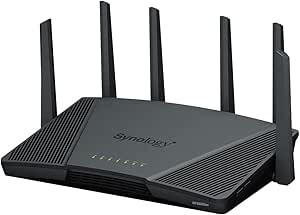 | Best Overall for Home Network Segmentation | Wi-Fi standard: Wi-Fi 6 (802.11ax) | Frequency bands: Tri-band, including expanded 5.9 GHz spectrum | Maximum combined wireless throughput: Up to 6.6 Gbps | VIEW LATEST PRICE | See Our Full Breakdown |
| Ubiquiti EdgeRouter 4 Gigabit Router |  | Best Fanless Wired Router for Network Builders | Model: ER-4 | Ports: 3 Gigabit Ethernet, 1 RJ45 serial, 1 SFP | Data transfer rate: 4 Gbps | VIEW LATEST PRICE | See Our Full Breakdown |
| Cudy R700 Gigabit Multi-WAN Router |  | Best Value for VLAN and Multi-WAN Flexibility | Ports: 5 x Gigabit Ethernet | Data transfer rate: 1 Gbps | Multi-WAN: Up to five ISP connections with load balancing and automatic failover | VIEW LATEST PRICE | See Our Full Breakdown |
| ASUS RT-BE88U WiFi 7 Router with 10G Ports |  | Best Premium for High-Speed Wired Segmentation | Wi-Fi generation: WiFi 7 | Frequency bands: Dual-band | Maximum wireless data rate: 7,200 Mbps | VIEW LATEST PRICE | See Our Full Breakdown |
| Omada ER707-M2 Multi-Gigabit VPN Router |  | Best for Multi-Site and VPN-Heavy Segmentation | Ports: 1 x 2.5Gbps WAN, 1 x 2.5Gbps WAN/LAN, 4 x Gigabit WAN/LAN, 1 x Gigabit SFP WAN/LAN, 1 x USB 2.0 | Concurrent sessions: 500,000 | Supported clients: 1,000+ | VIEW LATEST PRICE | See Our Full Breakdown |
| Omada Fusion 2.5G Multi-WAN Wired VPN Router |  | Best for Multi-Gig Omada Segmentation | Router type: Wired VPN router | Ports: 5 × 2.5G | WAN support: Up to 4 WAN connections with load balancing and automatic failover | VIEW LATEST PRICE | See Our Full Breakdown |
| TP-Link ER605 Wired Gigabit VPN Router |  | Best Value for Compact Omada VLAN Networks | Router type: Wired gigabit VPN router | WAN ports: 3: 1 dedicated WAN and 2 WAN/LAN | LAN ports: 2 | VIEW LATEST PRICE | See Our Full Breakdown |
| ASUS ExpertWiFi EBG19P Gigabit PoE+ VPN Wired Router | 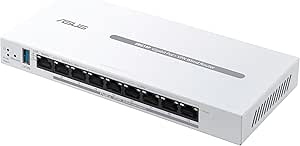 | Best for PoE-Powered Segmented Business Networks | Router type: Wired VPN router | Ports: 8 PoE+ ports | Maximum PoE power: 123 watts | VIEW LATEST PRICE | See Our Full Breakdown |
| router for network segmentation | Ports | Data transfer rate | Dimensions |
|---|---|---|---|
| Synology RT6600ax Tri-Band Wi- | — | — | — |
| Ubiquiti EdgeRouter 4 Gigabit | 3 Gigabit Ethernet, 1 RJ45 serial, 1 SFP | 4 Gbps | — |
| Cudy R700 Gigabit Multi-WAN Ro | 5 x Gigabit Ethernet | 1 Gbps | 4.68 x 3.34 x 1.1 in |
| ASUS RT-BE88U WiFi 7 Router wi | — | — | — |
| Omada ER707-M2 Multi-Gigabit V | 1 x 2.5Gbps WAN, 1 x 2.5Gbps WAN/LAN, 4 x Gigabit WAN/LAN, 1 x Gigabit SFP WAN/LAN, 1 x USB 2.0 | — | 12.9 x 9.5 x 3.1 inches |
| Omada Fusion 2.5G Multi-WAN Wi | 5 × 2.5G | 2.1 Gbps | — |
| TP-Link ER605 Wired Gigabit VP | — | — | 6.22 × 3.98 × 0.98 inches |
| ASUS ExpertWiFi EBG19P Gigabit | 8 PoE+ ports | 1 gigabit per second | 3.7 × 1 × 8.4 inches |
More Details on Our Top Picks
Synology RT6600ax Tri-Band Wi-Fi 6 Router
For buyers who want segmentation and Wi-Fi in one device, the RT6600ax is the strongest fit in this group. Synology Router Manager supports up to five separate networks, making it easier to separate guest access, smart-home devices, and personal computers than with the wired-only EdgeRouter 4. Its tri-band Wi-Fi 6 and configurable 2.5GbE WAN/LAN port also give it room for busy wireless households and a faster wired connection. Parental controls, threat prevention, and VPN tools add useful controls without requiring a separate router platform. The tradeoff is less high-speed wired flexibility than the ASUS RT-BE88U, which has 10G ports and greater stated wired capacity. Choose Synology for approachable, integrated segmentation; skip it if your priority is advanced multi-gig wired infrastructure.
Pros:- Supports up to five separate networks through Synology Router Manager
- Tri-band Wi-Fi 6 with stated combined throughput up to 6.6 Gbps
- Configurable 2.5GbE port can serve as WAN or LAN
- Includes parental controls, threat prevention, and VPN features
Cons:- Offers less high-speed wired capacity than the ASUS RT-BE88U
- Segmentation and security features depend on Synology Router Manager rather than a dedicated wired routing platform
Best for: Households that want separate guest, smart-home, and personal networks alongside integrated Wi-Fi and security controls
Not ideal for: Buyers building a wired 10G network or requiring more than five segmented networks
- Wi-Fi standard:Wi-Fi 6 (802.11ax)
- Frequency bands:Tri-band, including expanded 5.9 GHz spectrum
- Maximum combined wireless throughput:Up to 6.6 Gbps
- Ethernet port:Configurable 2.5GbE WAN/LAN
- Network segmentation:Up to 5 separate networks
- Ethernet ports:5
- Installed RAM:1 GB
- Operating system:Synology Router Manager
Our verdict“Choose the RT6600ax if you want practical multi-network separation with built-in Wi-Fi, but pick the ASUS RT-BE88U for a more ambitious 10G wired setup.”
Ubiquiti EdgeRouter 4 Gigabit Router
The EdgeRouter 4 suits buyers who want a compact, quiet wired router and prefer to shape their network through a dedicated routing platform. Its EdgeOS environment and SFP connection make it a different proposition from the Wi-Fi-focused Synology RT6600ax: this is a foundation for a wired setup, not an all-in-one home network. The stated forwarding capacity of 3.4 million packets per second and 4 Gbps line rate are appealing for traffic-heavy routing, while fanless cooling avoids adding another source of noise. The tradeoff is that the provided product information does not specify built-in Wi-Fi or particular segmentation features, so buyers should confirm their VLAN and isolation requirements before choosing it. Compared with the Cudy R700, it also lacks the stated multi-WAN failover feature.
Pros:- SFP connectivity supports a fiber link
- Stated routing capacity of up to 3.4 million packets per second
- Fanless design avoids cooling noise
- Desk, wall, and rack mounting options suit varied installations
Cons:- No wireless capability is specified, so separate access points are needed for Wi-Fi
- The supplied product details do not specify network segmentation features
- Does not list the Cudy R700’s multi-WAN load balancing and automatic failover
Best for: Technically confident buyers creating a quiet wired network with fiber connectivity and separate access points
Not ideal for: People seeking an all-in-one Wi-Fi router, simple app-led setup, or explicitly documented multi-WAN failover
- Model:ER-4
- Ports:3 Gigabit Ethernet, 1 RJ45 serial, 1 SFP
- Data transfer rate:4 Gbps
- Maximum packet forwarding rate:3.4 million packets per second
- RAM:1 GB
- Operating system:EdgeOS
- Cooling:Fanless
- Mounting options:Desk, wall, and rack
Our verdict“Pick the EdgeRouter 4 for a quiet, configurable wired foundation, but verify its segmentation fit and plan for separate Wi-Fi access points.”
Cudy R700 Gigabit Multi-WAN Router
The Cudy R700 earns its place for buyers whose segmentation needs sit alongside multiple internet connections. It supports VLAN controls, QoS, firewall features, and OpenWRT, while load balancing and automatic failover can keep a connection available if an ISP link drops. That makes it more adaptable for a small office than the Ubiquiti EdgeRouter 4, whose supplied details do not list multi-WAN failover. The built-in VPN server and client options add flexibility for remote access, but the broad configuration choices can demand more networking knowledge than Synology’s integrated home-router approach. Its five Gigabit Ethernet ports also set a clear ceiling for multi-gig ambitions, and the plastic enclosure is less substantial than a rack-oriented wired setup. This is a feature-rich compact pick, not a plug-and-forget choice.
Pros:- VLAN and QoS controls support traffic separation and prioritization
- Supports up to five ISP connections with load balancing and automatic failover
- Offers WireGuard, OpenVPN, IPsec, PPTP, and L2TP options
- OpenWRT support provides additional configuration flexibility
Cons:- Five Gigabit Ethernet ports limit multi-gig wired networking
- Advanced OpenWRT and network configuration may require technical experience
- Plastic case may be less appealing in a permanent or visible installation
Best for: Small offices and technically capable home users who need VLAN controls plus backup or load-balanced ISP links
Not ideal for: Buyers who want multi-gig Ethernet, a premium-feeling enclosure, or beginner-first configuration
- Ports:5 x Gigabit Ethernet
- Data transfer rate:1 Gbps
- Multi-WAN:Up to five ISP connections with load balancing and automatic failover
- VPN protocols:WireGuard, OpenVPN, IPsec, PPTP, L2TP
- Network controls:VLAN and QoS
- Management:Web GUI, Cudy App, TR-069
- Dimensions:4.68 x 3.34 x 1.1 in
- Warranty:2 years
Our verdict“Choose the R700 for VLAN flexibility and multi-WAN resilience on a Gigabit network, but skip it if ease of setup or faster Ethernet is your priority.”
ASUS RT-BE88U WiFi 7 Router with 10G Ports
The ASUS RT-BE88U is the premium choice for buyers whose segmented network will carry substantial wired traffic. Its port mix—10G SFP+, 10G WAN/LAN, four 2.5G ports, and four Gigabit ports—offers more room to connect fast storage, switches, and access points than the Synology RT6600ax. WiFi 7, VPN support, parental controls, and AiProtection Pro broaden its appeal beyond a wired gateway, while AiMesh can extend coverage with compatible equipment. The key segmentation tradeoff is that the supplied details do not state how many separate networks it supports, unlike Synology’s explicit five-network limit. It is also dual-band rather than tri-band, and the product listing gives varying port counts in different sections. I’d choose it for throughput headroom, not solely for clearly documented segmentation depth.
Pros:- Combines 10G SFP+ and 10G WAN/LAN connectivity
- Includes four 2.5G and four Gigabit Ethernet ports as listed
- WiFi 7 with stated wireless speeds up to 7,200 Mbps
- Includes VPN support, parental controls, AiProtection Pro, and AiMesh
Cons:- Dual-band design offers fewer wireless bands than the tri-band Synology RT6600ax
- Provided details do not specify a network-segmentation limit or network count
- Port counts vary across sections of the product listing
Best for: Power users with multi-gig or 10G wired devices who also want current-generation Wi-Fi and router security features
Not ideal for: Buyers who need a clearly specified number of isolated networks or prioritize tri-band wireless
- Wi-Fi generation:WiFi 7
- Frequency bands:Dual-band
- Maximum wireless data rate:7,200 Mbps
- Wired network capacity:Up to 34 Gbps
- High-speed ports:1 x 10G SFP+, 1 x 10G WAN/LAN, 4 x 2.5G
- Processor:Quad-core 2.6 GHz 64-bit CPU
- Security protocol:WPA3
- Coverage:Up to 3,000 sq ft
Our verdict“Choose the RT-BE88U for premium multi-gig and 10G connections, but favor the Synology RT6600ax if explicitly documented network separation matters most.”
Omada ER707-M2 Multi-Gigabit VPN Router
The Omada ER707-M2 is aimed at small businesses and multi-site operators who need wired segmentation alongside many VPN connections. It lists dual 2.5Gbps WAN options, Gigabit WAN/LAN ports, an SFP WAN/LAN port, and support for 500,000 concurrent sessions. Its Omada app and cloud management can make oversight across locations more practical than managing a standalone router such as the Cudy R700. VPN capacity is a particular strength: the supplied figures include up to 100 LAN-to-LAN IPsec connections and 66 OpenVPN connections. The tradeoff is that this is a wired router with no built-in Wi-Fi, so access points are a separate purchase and deployment task. USB 2.0 is also a modest option for storage or LTE backup. The listing does not spell out a VLAN count, so confirm the segmentation details you require.
Pros:- Dual 2.5Gbps WAN options support multi-gig internet connections
- Supports up to 500,000 concurrent sessions
- Omada app and cloud management suit multi-site oversight
- Lists substantial VPN capacity, including up to 100 LAN-to-LAN IPsec connections
Cons:- No built-in Wi-Fi; separate access points are required for wireless coverage
- USB 2.0 limits the usefulness of attached storage or LTE backup
- Supplied details do not specify a VLAN or segmented-network limit
Best for: Small businesses and multi-location teams that need centralized router management, multiple WAN options, and many site-to-site VPNs
Not ideal for: Home buyers seeking built-in Wi-Fi or anyone needing a clearly specified VLAN count before purchase
- Ports:1 x 2.5Gbps WAN, 1 x 2.5Gbps WAN/LAN, 4 x Gigabit WAN/LAN, 1 x Gigabit SFP WAN/LAN, 1 x USB 2.0
- Concurrent sessions:500,000
- Supported clients:1,000+
- VPN connections:Up to 100 LAN-to-LAN IPsec, 66 OpenVPN, 60 L2TP, 60 PPTP
- VPN and security protocols:SSL, IPSec, GRE, SSH, IKEv1/v2, PPTP, L2TP, OpenVPN
- Management:Omada app and cloud
- Warranty:5 years
- Dimensions:12.9 x 9.5 x 3.1 inches
Our verdict“Choose the ER707-M2 for centrally managed, VPN-heavy wired sites, but look elsewhere if you need integrated Wi-Fi or explicit segmentation limits.”
Omada Fusion 2.5G Multi-WAN Wired VPN Router
For a wired network built around separate VLANs, this router pairs five 2.5G ports with a built-in Omada controller, making it a strong fit for managing segmentation alongside multi-gigabit devices. Its ACL, firewall, and IPS/IDS features give administrators tools to shape and protect traffic between network groups, while up to four WAN connections add failover and load balancing. Compared with the TP-Link ER605, it offers faster ports and on-device monitoring, but the ER605 is the simpler, more compact choice for a gigabit setup. The touchscreen can surface status and alerts without requiring a management session. The tradeoff is a wired-only design and management that makes the most sense in an Omada-centered network; buyers seeking broad standalone simplicity may prefer a consumer Wi-Fi router.
Pros:- Five 2.5G ports support faster connections for segmented wired devices.
- Built-in Omada controller and cloud management centralize network administration.
- Supports up to four WAN connections with load balancing and automatic failover.
- ACL, QoS, IPS/IDS, and firewall features support traffic control and protection.
Cons:- Provides no built-in Wi-Fi, so wireless access requires separate hardware.
- Its management approach is best suited to users already invested in Omada networking.
- More features and multi-WAN capacity may be unnecessary for a basic gigabit network.
Best for: Small offices and technically confident home users building Omada networks with multi-gig wired devices, VLANs, and more than one internet connection.
Not ideal for: Buyers who need built-in Wi-Fi or want a router that is equally straightforward to manage outside the Omada ecosystem.
- Router type:Wired VPN router
- Ports:5 × 2.5G
- WAN support:Up to 4 WAN connections with load balancing and automatic failover
- Controller:Omada controller built in
- CPU:Quad-core
- Display:2.51-inch touchscreen
- Security features:ACL, QoS, IPS/IDS, advanced firewall
- Data transfer rate:2.1 Gbps
Our verdict“Choose it for multi-gig Omada segmentation and multi-WAN resilience, but skip it if you need an all-in-one Wi-Fi router.”
TP-Link ER605 Wired Gigabit VPN Router
The ER605 is a practical entry point for buyers who want a wired router that supports Omada SDN management without stepping up to multi-gig hardware. Its multiple WAN options and VPN support suit a small office that needs distinct network groups, remote access, and internet backup; SPI firewall, DoS defense, and filtering add useful security controls. Compared with the Omada Fusion 2.5G, the ER605 has gigabit rather than 2.5G ports and no built-in controller, but its small chassis and USB WAN option make it a more modest fit for a basic deployment. Its two LAN ports are the main practical constraint: adding several wired VLAN devices may call for a managed switch. It also has no built-in Wi-Fi, and USB backup requires a compatible cellular modem.
Pros:- Omada SDN integration supports centralized management of a segmented network.
- Multiple WAN ports and USB WAN support provide options for load balancing and backup.
- Broad VPN protocol support suits remote-access and site-to-site needs.
- SPI firewall, DoS defense, and IP/MAC/URL filtering add security controls.
Cons:- Only two LAN ports may require a managed switch for multiple wired devices or VLAN groups.
- Gigabit Ethernet lacks the faster wired capacity of the Omada Fusion 2.5G.
- No Wi-Fi, and cellular backup depends on a compatible 4G/3G modem.
Best for: Small offices or home labs that want Omada-managed VLANs, VPN access, and multi-WAN support over gigabit connections.
Not ideal for: Users who need several direct wired LAN connections, built-in Wi-Fi, or 2.5G links without adding other network equipment.
- Router type:Wired gigabit VPN router
- WAN ports:3: 1 dedicated WAN and 2 WAN/LAN
- LAN ports:2
- USB WAN:1 port for compatible 4G/3G backup
- Port speed:10/100/1000 Mbps Gigabit Ethernet
- VPN support:IPsec up to 20; OpenVPN 16; L2TP 16; PPTP 16
- Security features:SPI firewall, DoS defense, IP/MAC/URL filtering
- Dimensions:6.22 × 3.98 × 0.98 inches
Our verdict“Pick the ER605 for an affordable-feeling, compact Omada gigabit setup with VPN and WAN flexibility, provided you can supply Wi-Fi and enough switch ports.”
ASUS ExpertWiFi EBG19P Gigabit PoE+ VPN Wired Router
The EBG19P stands apart in this group by combining VLAN and VPN features with eight PoE+ ports and up to 123 watts of power. That makes it a useful hub for a small business separating staff, guest, and security-camera traffic while powering compatible devices over Ethernet. Its ExpertWiFi app provides centralized management, and multiple WAN connections plus USB mobile-hotspot backup address connectivity resilience. The TP-Link ER605 is a smaller gigabit alternative with extensive VPN protocol support, but it has fewer LAN ports and does not supply PoE power. By contrast, the EBG19P is still a wired router, not a Wi-Fi access point, and its USB backup requires a connected phone hotspot. Its three-year warranty is shorter than the five-year terms listed for the Omada models.
Pros:- Eight PoE+ ports can power compatible devices without separate injectors.
- Up to 123 watts of PoE+ capacity supports a small cluster of cameras or access points.
- VLAN and VPN features support network separation and secure remote access.
- Multiple WAN connections and app management suit small-business operations.
Cons:- No built-in Wi-Fi, so wireless coverage requires separate access points.
- USB WAN backup depends on a connected mobile phone hotspot.
- Gigabit ports and a three-year warranty are less compelling for buyers seeking multi-gig capacity or longer listed coverage.
Best for: Small businesses that need VLAN separation and want one device to route and power several PoE-compatible access points or cameras.
Not ideal for: Home users seeking built-in wireless, or businesses whose connected devices do not need PoE and would benefit more from a multi-gig router.
- Router type:Wired VPN router
- Ports:8 PoE+ ports
- Maximum PoE power:123 watts
- WAN connections:1 Gigabit WAN and 2 Gigabit WAN/LAN
- USB WAN:Mobile hotspot backup supported
- Segmentation and security:VLAN, VPN, and network security features
- Data transfer rate:1 gigabit per second
- Dimensions:3.7 × 1 × 8.4 inches
Our verdict“Choose the EBG19P when PoE-powered devices and VLAN separation belong in the same small-business setup; skip it if you need built-in Wi-Fi or multi-gig ports.”

How We Picked
I ranked these routers by how well their capabilities map to real segmentation jobs: separating guest, IoT, work, and trusted devices without creating a maintenance burden. I weighed VLAN and network-control flexibility alongside port speed, Wi-Fi availability, multi-WAN or VPN features, and how much additional gear a buyer may need. A fast router did not automatically rank above a more practical option; segmentation is useful only when the network can be configured and maintained in a way that suits its owner.
The order favors balanced capability first, then specialist strengths. The Synology RT6600ax leads for combining wireless networking with approachable controls, while wired options rise for buyers who value multi-gigabit routing, multiple WAN connections, or a managed-network setup. More hands-on devices can be a better fit for experienced administrators, but their setup demands and need for separate access points count against them for general home use. I treated the ASUS RT-BE88U as a premium speed choice rather than a universal segmentation winner, since many buyers can separate devices without Wi-Fi 7 or 10G ports.
Factors to Consider When Choosing Best Router For Network Segmentation
Before choosing a router, map the network you actually want to create. A guest network is not always the same as a separate VLAN, and a router’s segmentation controls matter only if they support the isolation and traffic rules you need. These broader decisions can prevent buying a faster or more complex device that still does not fit your layout.
Decide How Much Isolation You Need
Start with the devices and risks you want to separate: common groups include personal computers, smart-home devices, guests, and work equipment. Separate network names alone do not always mean devices are fully isolated, so check whether the router lets you control traffic between groups. A household that only wants visitors off its main Wi-Fi may need less control than someone isolating cameras or lab equipment. Avoid creating a network for every device type without a clear reason; each added segment can require its own rules and troubleshooting. Write down which groups should reach the internet, printers, storage, or one another before choosing hardware. That simple map gives you a better test of a router’s controls than a long feature list.
Check VLAN Support Across the Whole Setup
Segmentation must work across the router, switches, and wireless access points, not just at the gateway. A router with VLAN support may still leave you short if the switch cannot carry tagged traffic or the access points cannot assign wireless clients to the intended networks. Mixed-brand equipment can work, but it may demand more manual setup than a unified management system. Before buying, list existing gear and confirm how each device handles VLAN tagging and network assignment. A common mistake is to buy a capable router first and discover that the current Wi-Fi hardware cannot broadcast the separate networks. If you want a single control panel, factor ecosystem compatibility into the decision.
Match Port Speed to Your Internet and Local Traffic
Choose ports based on the slowest link that matters, not the largest number on the box. A multi-gigabit WAN port can help when your internet service exceeds gigabit speeds, while faster LAN links matter for transfers to a NAS, workstation, or server. If all your clients and service are gigabit, paying for 2.5G or 10G may bring little practical change to segmentation. Check how many ports run at each speed and whether using one for WAN leaves enough LAN connections for your equipment. You may need a separate switch regardless, especially as the number of wired segments grows. Think of faster ports as capacity for a specific bottleneck, not a security feature.
Choose Between an All-in-One Router and a Wired Gateway
An all-in-one router combines routing and Wi-Fi, which can reduce equipment and simplify setup in a smaller home. A wired gateway separates those jobs, giving you more freedom to place access points and switches where coverage or wired connections demand them. That flexibility brings extra cost, cabling, and management decisions even when the gateway itself has ample routing features. Do not assume a wired router provides wireless access; plan for compatible access points if phones, laptops, or smart devices need Wi-Fi. For larger homes or networks with several wired segments, separate components can be easier to expand over time. For a compact setup, an integrated router may be the cleaner choice.
Account for Setup and Ongoing Management
A segmented network needs rules, updates, and occasional troubleshooting after installation. Consider who will manage it and whether they are comfortable with VLAN IDs, firewall policies, and managed switches. A more configurable interface can help an experienced user, but it can also make a simple home network harder to maintain. Centralized management may simplify changes when several compatible devices are involved, though it can tie you more closely to one ecosystem. Check how backups, firmware updates, and remote administration work before committing. If no one at home wants to maintain custom rules, favor a setup that makes the required isolation easy to understand and verify.
Treat VPN and Multi-WAN as Separate Requirements
VPN support and multiple WAN connections can be useful, but neither automatically improves network segmentation. A VPN may route selected devices through a remote network, while multi-WAN can provide another internet connection or distribute traffic; each feature has its own setup and performance limits. If your main goal is isolating IoT devices, these extras may add complexity without solving the central problem. Confirm whether VPN functions match your intended use, such as site-to-site access or outbound client routing. For multi-WAN, check whether the failover or load-sharing behavior fits your service providers and workflow. Buy these features for a defined need, not because they appear beside VLAN support on a spec sheet.
Frequently Asked Questions
Do I need a separate managed switch to use VLANs with these routers?
Not in every setup, but a managed switch is often needed when wired devices must belong to different VLANs or when you need more ports than the router provides. The router controls routing and rules between networks, while the switch carries those networks to wired devices. Wi-Fi segmentation also depends on whether your access points can assign clients to the right networks. Before buying, trace each connection from the router to the devices you want separated. An unmanaged switch can prevent that design from working as intended.
Can I keep one Wi-Fi name while separating smart-home devices from computers?
Usually, separate device groups need distinct network assignments, even if the access point manages them under one system. Some setups can hide the complexity behind a single management app, but devices still need to land on the correct VLAN or isolated network. Check that both the router and access points support assigning wireless networks to separate VLANs. Also confirm whether devices such as printers or casting equipment need controlled access across groups. If cross-network discovery matters, you may need specific firewall or discovery rules rather than unrestricted access.
Is a gigabit router enough for network segmentation?
Yes, if your internet service and local network traffic do not exceed gigabit speeds. VLANs and isolation rules do not require multi-gigabit ports by themselves. Faster links become relevant when you have multi-gigabit internet, fast storage, or several high-throughput wired clients. Check port speed on both ends of each important link, since one slower switch or adapter can cap the connection. The ER605 is a more sensible fit for many gigabit networks, while the ER707-M2 is aimed at buyers with a clear need for faster wired links.
Should I choose a Wi-Fi router or a wired gateway for a segmented home network?
Choose an integrated Wi-Fi router when you want fewer components and your coverage needs are modest. A wired gateway makes more sense when you already have access points, need flexible placement, or plan to build a larger network with managed switches. Remember that a wired gateway does not replace Wi-Fi hardware, so include access points and their compatibility in your plan. The Synology RT6600ax suits buyers who want wireless and segmentation in one device, while the Omada gateways fit a separate-component approach. The better choice depends on the network you want to maintain, not just the router’s feature count.
Is it worth paying for Wi-Fi 7 or 10G ports if segmentation is my main goal?
Only if you also have devices or internet service that can use those faster connections. Wi-Fi 7 and 10G ports can support demanding wireless or wired workloads, but they do not make network separation inherently stronger. For a typical gigabit home, a router with suitable VLAN controls and compatible access points may be a better fit than paying for unused bandwidth capacity. Consider how long you expect to keep the equipment and whether faster service or local transfers are likely soon. The ASUS RT-BE88U makes most sense when its speed features solve a separate, concrete networking need.
Conclusion
For most buyers who want Wi-Fi and segmentation in one device, I recommend the Synology RT6600ax as the best overall. The TP-Link ER605 is my best value for a basic wired setup when gigabit speeds are enough and separate Wi-Fi gear is acceptable. For a premium speed-focused network, choose the ASUS RT-BE88U; for a multi-gigabit wired gateway, the Omada ER707-M2 is the more targeted pick. Beginners are better served by the integrated Synology option than by the more hands-on EdgeRouter 4, while buyers already building around Omada should compare its ER707-M2 and Fusion 2.5G models against their port and WAN needs. If you need PoE+ for connected devices, the ASUS ExpertWiFi EBG19P addresses a more specific wired deployment. Choose by the network you need to manage: simple device separation, faster wired links, or a modular system with room to grow.
Halloween Picks
halloween
As an affiliate, we earn on qualifying purchases.