
The best router with VLAN support for most homes is the GL.iNet Flint 2, which pairs configurable network separation with built-in Wi-Fi 6. For a wired-first setup, the TP-Link Omada ER707-M2 adds multi-gigabit connectivity, while the Synology RT6600ax is a strong fit for buyers who want VLAN controls alongside a polished Wi-Fi router. The main tradeoff is between easy setup and granular network control: dedicated gateways can offer more routing flexibility, but often need a separate access point for wireless coverage. Wi-Fi routers simplify an all-in-one setup, though their VLAN options and port capacity may not fit every network plan. Read on for how these seven options differ and which one fits your devices, internet service, and comfort with network management.

Get privacy and security gear delivered free with Prime
- Fast, free delivery on millions of items
- Prime Video, Amazon Music and more included
- Member-only deals all year
Key Takeaways
- The Flint 2 is the most balanced all-in-one choice in this group, combining Wi-Fi 6 with network-separation features without requiring a separate wireless access point.
- The Omada ER707-M2 stands apart for multi-gigabit wired networks; it is a better gateway pick than the ER605 when faster-than-gigabit links matter, but neither is an all-in-one Wi-Fi router.
- The ER605 and Cudy R700 focus on wired routing value and flexibility, making them more appropriate for buyers who already have access points or plan to add them.
- The RT6600ax and EBR63 offer a more approachable router-and-Wi-Fi format, while buyers should compare their VLAN workflows and network-management needs rather than assume all consumer-style interfaces work alike.
- The pcWRT PW-AX1800 is a specialized alternative for buyers interested in policy-oriented network controls; its Wi-Fi class and feature priorities differ from the faster or more port-focused picks.
| GL.iNet Flint 2 Wi-Fi 6 Gaming Router (GL-MT6000) |  | Best for Fast Wi-Fi and Flexible VLAN-Ready Networking | Model: GL-MT6000 | Wi-Fi: Wi-Fi 6 (802.11ax), dual-band | Maximum data rate: Up to 6000 Mbps | VIEW LATEST PRICE | See Our Full Breakdown |
| Cudy R700 Gigabit Multi-WAN Router |  | Best Value for Multi-WAN VLAN Routing | Ports: 5 RJ45 Gigabit Ethernet | Data transfer rate: 1 Gbps | WAN connections: Up to 5 ISP connections | VIEW LATEST PRICE | See Our Full Breakdown |
| TP-Link ER605 Multi-WAN Gigabit VPN Router |  | Best for Omada Business Networks | Ports: 5 Gigabit Ethernet: 1 WAN, 2 WAN/LAN, 2 LAN | Ethernet WAN support: Up to 3 WAN connections | USB WAN: Compatible 4G/3G modem backup | VIEW LATEST PRICE | See Our Full Breakdown |
| ASUS ExpertWiFi EBR63 AX3000 WiFi 6 Business Router |  | Best for Small-Business Guest Networks | Model: EBR63 | Wi-Fi: Wi-Fi 6 (802.11ax), dual-band | Data transfer rate: 3000 Mbps | VIEW LATEST PRICE | See Our Full Breakdown |
| Synology RT6600ax Tri-Band Wi-Fi 6 Router | 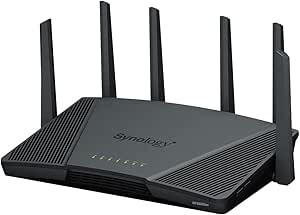 | Best for Advanced Home Network Segmentation | Model: RT6600ax (US) | Wi-Fi: Wi-Fi 6 (802.11ax), tri-band | Maximum combined wireless throughput: Up to 6.6 Gbps | VIEW LATEST PRICE | See Our Full Breakdown |
| pcWRT PW-AX1800 WiFi 6 Dual-Band Router |  | Best for VLAN and VPN Controls at Home | Wi-Fi generation: Wi-Fi 6 | Bands: 2.4 GHz and 5 GHz | Maximum data transfer rate: 1800 Mbps | VIEW LATEST PRICE | See Our Full Breakdown |
| TP-Link Omada ER707-M2 Multi-Gigabit VPN Router |  | Best for Multi-Gigabit Omada Networks | 2.5Gbps ports: 1 × WAN and 1 × WAN/LAN | Gigabit ports: 4 × WAN/LAN | SFP port: 1 × gigabit WAN/LAN | VIEW LATEST PRICE | See Our Full Breakdown |
More Details on Our Top Picks
GL.iNet Flint 2 Wi-Fi 6 Gaming Router (GL-MT6000)
The Flint 2 is a strong fit for buyers who want wireless speed and wired headroom alongside VLAN-capable networking. Its two 2.5G ports give multi-gig internet or a fast local device more room than the all-Gigabit Cudy R700, while Wi-Fi 6 and support for more than 100 devices suit busy homes and small offices. OpenVPN and WireGuard, AdGuard Home, guest mode, and QoS add useful ways to manage traffic and security. Compared with the wired TP-Link ER605, the Flint 2 is the clearer choice when built-in Wi-Fi matters; the ER605 instead offers more explicit multi-WAN options for business links. The tradeoff is that the provided details do not spell out VLAN configuration depth, so buyers with complex segmentation needs should check firmware capabilities. Plan on a firmware update during setup, and treat the stated wireless speeds as maximums rather than guarantees.
Pros:- Two 2.5G ports plus four Gigabit ports provide more wired capacity than the Cudy R700.
- Wi-Fi 6 with stated support for more than 100 connected devices suits busy networks.
- WireGuard and OpenVPN support, with listed VPN speeds up to 900 Mbps and 880 Mbps respectively.
- AdGuard Home, guest mode, and QoS add traffic-management options.
Cons:- A firmware update is recommended during initial setup.
- Actual wireless and internet speeds depend on network and service conditions.
- The supplied product details do not describe the depth of its VLAN configuration.
Best for: Homes or small offices that want Wi-Fi 6, two multi-gig ports, VPN options, and the ability to manage many connected devices.
Not ideal for: Buyers who need clearly documented, advanced VLAN controls or a wired multi-WAN appliance with several ISP connections.
- Model:GL-MT6000
- Wi-Fi:Wi-Fi 6 (802.11ax), dual-band
- Maximum data rate:Up to 6000 Mbps
- Wireless speeds:Up to 1148 Mbps and 4804 Mbps
- Ethernet ports:2 × 2.5G and 4 × 1G
- Memory and storage:1 GB DDR4 RAM; 8 GB eMMC
- VPN:WireGuard up to 900 Mbps; OpenVPN up to 880 Mbps
- Other features:Access Point Mode, Guest Mode, QoS, AdGuard Home
Our verdict“Choose the Flint 2 if you want fast built-in Wi-Fi and multi-gig ports, but verify its VLAN controls before relying on it for complex segmentation.”
Cudy R700 Gigabit Multi-WAN Router
The R700 puts VLAN controls and multi-WAN flexibility ahead of wireless convenience. It can connect up to five ISP links and use automatic failover or load balancing, making it a more natural fit for a small office with several internet connections than the ASUS ExpertWiFi EBR63, which is oriented toward built-in Wi-Fi and guest access. OpenWRT support, QoS, firewall controls, and several VPN protocols give technically minded owners room to shape the network. Its compact five-port design is easy to place, though all ports are Gigabit and its stated data transfer rate is 1 Gbps; the TP-Link ER605 also offers multi-WAN routing but adds Omada integration and USB modem backup. The R700’s plastic case and wired-only design are clear compromises. Choose it for configurable wired routing, not as a one-box wireless solution.
Pros:- Supports up to five ISP connections with automatic failover and load balancing.
- OpenWRT support includes VLAN, firewall, and QoS controls.
- Offers WireGuard, OpenVPN, IPsec, PPTP, and L2TP options.
- Compact design provides five Gigabit Ethernet ports.
Cons:- Gigabit ports and a stated 1 Gbps transfer rate limit multi-gig wired networks.
- No built-in wireless connectivity.
- Plastic case may be less suitable for buyers seeking a more substantial enclosure.
Best for: Small offices, home labs, and technically confident users who need VLAN controls, multiple ISP links, and wired VPN routing.
Not ideal for: Buyers seeking built-in Wi-Fi, multi-gig Ethernet, or a polished wireless setup for a household.
- Ports:5 RJ45 Gigabit Ethernet
- Data transfer rate:1 Gbps
- WAN connections:Up to 5 ISP connections
- VPN protocols:WireGuard, OpenVPN, IPsec, PPTP, L2TP
- Software support:OpenWRT
- Power input:12 V DC, 1 A
- Dimensions:4.68 × 3.34 × 1.1 in
- Weight and case:455 g; plastic
Our verdict“Pick the R700 when flexible VLAN routing and multiple ISP links matter more than Wi-Fi or multi-gig ports.”
TP-Link ER605 Multi-WAN Gigabit VPN Router
The ER605 makes the most sense when wired VLAN routing and centralized management matter more than Wi-Fi. Its five Ethernet ports can support up to three Ethernet WAN connections, and a compatible USB modem can serve as a mobile broadband backup. Omada SDN integration is its main distinction from the Cudy R700: buyers already building around Omada can manage it as part of that network, while the R700 is the more natural pick for those who specifically want OpenWRT support. The ER605 also lists multiple VPN protocols and concurrent connection capacities, giving small teams options for remote access. It is still a Gigabit-only wired router, so it cannot match the Flint 2’s built-in Wi-Fi or 2.5G ports. USB modem support depends on compatibility, and wireless access requires a separate access point.
Pros:- Supports up to three Ethernet WAN connections for load balancing.
- USB WAN can provide backup through a compatible 4G/3G modem.
- Omada SDN integration suits businesses managing a broader Omada network.
- Supports IPsec, OpenVPN, L2TP, and PPTP connections.
Cons:- Wired-only design requires a separate wireless access point.
- Gigabit Ethernet does not provide multi-gig port capacity.
- USB modem backup depends on the modem being compatible.
Best for: Small businesses using or planning an Omada network that need wired VLAN routing, several WAN options, and VPN access.
Not ideal for: Households or offices that want one device with Wi-Fi, or networks that need multi-gig Ethernet.
- Ports:5 Gigabit Ethernet: 1 WAN, 2 WAN/LAN, 2 LAN
- Ethernet WAN support:Up to 3 WAN connections
- USB WAN:Compatible 4G/3G modem backup
- VPN capacity:Up to 20 IPsec, 16 OpenVPN, 16 L2TP, and 16 PPTP connections
- Management:Omada SDN integration
- Security:SPI firewall, DoS defense, IP/MAC/URL filtering, VPN pass-through
- Dimensions:6.22 × 3.98 × 0.98 in
- Weight:12.64 oz
Our verdict“Choose the ER605 for a wired Omada-based business network with multi-WAN and VPN needs, not for an all-in-one wireless setup.”
ASUS ExpertWiFi EBR63 AX3000 WiFi 6 Business Router
The EBR63 is the most approachable pick here for a small business that needs wireless VLAN separation and guest access without building around a standalone wired gateway. It supports up to five SSIDs, a customizable guest portal, app-based setup, and VLAN features, so staff, guests, and other device groups can be kept apart more easily than with a basic home router. Compared with the Synology RT6600ax, it offers a more business-oriented guest portal and phone-based management; Synology provides tri-band Wi-Fi and up to five separate networks for buyers who want more network-management depth. USB mobile-hotspot backup and AiProtection Pro add practical extras. The tradeoff is that this is a small-to-mid-sized-business router with five Gigabit ports, not a multi-gig workhorse. Its stated speed and coverage can also vary with the building and network conditions.
Pros:- VLAN support and up to five SSIDs help separate guest and business devices.
- Customizable guest portal suits customer-facing locations.
- USB backup WAN can use a mobile phone hotspot.
- App-based management and AiProtection Pro add accessible setup and security features.
Cons:- Gigabit LAN ports do not provide multi-gig wired connections.
- Coverage is aimed at small-to-mid-sized business environments.
- Actual speed and coverage vary with the network and building.
Best for: Small shops, studios, and service businesses that need managed guest Wi-Fi, several SSIDs, and straightforward app setup.
Not ideal for: Larger sites or multi-gig offices that need extensive wired capacity, broad coverage, or more advanced network controls.
- Model:EBR63
- Wi-Fi:Wi-Fi 6 (802.11ax), dual-band
- Data transfer rate:3000 Mbps
- Ports:5; Gigabit LAN
- SSIDs:Up to 5
- VLAN and network features:VLAN, guest portal, QoS, access point mode
- USB:Backup WAN via mobile hotspot
- Memory and antennas:512 MB RAM; 4 fixed antennas
Our verdict“Choose the EBR63 for a small business that values easy guest Wi-Fi and SSID separation over multi-gig capacity or advanced wired routing.”
Synology RT6600ax Tri-Band Wi-Fi 6 Router
The RT6600ax stands out for buyers who want segmentation controls joined to capable tri-band Wi-Fi. Synology Router Manager supports up to five separate networks, along with parental controls, web filtering, threat prevention, and VPN features. That makes it a more network-management-focused choice than the ASUS ExpertWiFi EBR63, which emphasizes small-business guest access and app setup. Its configurable 2.5GbE WAN/LAN port also gives a fast internet connection or compatible wired device an upgrade path, while the Flint 2 offers two 2.5G ports for buyers who need more than one. The RT6600ax’s other Ethernet ports are listed as Gigabit, so multi-gig wired capacity is limited to that configurable port. Its feature-rich management may suit a household or home lab better than someone seeking a simple router with minimal setup.
Pros:- Synology Router Manager supports up to five separate networks.
- Tri-band Wi-Fi 6 offers stated combined throughput up to 6.6 Gbps.
- Configurable 2.5GbE WAN/LAN port supports a multi-gig internet link or wired device.
- Includes parental controls, web filtering, threat prevention, and VPN features.
Cons:- Only one port is specified as configurable 2.5GbE; the remaining LAN port bandwidth is Gigabit.
- Its extensive network-management features may be more than a basic home network needs.
- Unlike the multi-WAN-focused TP-Link ER605, the supplied details do not list multiple ISP connections.
Best for: Advanced households and home labs that want several isolated networks, tri-band Wi-Fi, parental controls, and VPN features.
Not ideal for: Buyers who need multiple multi-gig Ethernet ports, a simple plug-and-play router, or a business gateway focused on multi-WAN links.
- Model:RT6600ax (US)
- Wi-Fi:Wi-Fi 6 (802.11ax), tri-band
- Maximum combined wireless throughput:Up to 6.6 Gbps
- Spectrum:2.4 GHz and expanded 5.9 GHz support
- Ethernet:5 ports, including configurable 2.5GbE WAN/LAN
- Network segmentation:Up to 5 separate networks
- Memory and antennas:1 GB RAM; 6 internal antennas
- Software and VPN:Synology Router Manager; remote desktop and site-to-site tunneling
Our verdict“Choose the RT6600ax if you want Synology’s multi-network controls and tri-band Wi-Fi, and can work within its single configurable 2.5GbE port.”
pcWRT PW-AX1800 WiFi 6 Dual-Band Router
The PW-AX1800 is a strong fit for buyers who want VLAN separation on both wired ports and Wi-Fi networks, plus the option to send selected VLANs through a VPN. Its OpenWrt-based feature set also includes parental controls, network-wide ad blocking, and encrypted DNS, giving it more built-in household controls than a basic VLAN router such as the TP-Link ER605. Unlike the wired Omada ER707-M2, this pcWRT model includes Wi-Fi 6, so it can serve as the main router for a small or medium home without a separate access point. The tradeoff is scale: its 1800 Mbps dual-band Wi-Fi and stated coverage suit modest spaces better than larger homes. Mesh is supported only after a firmware update, so buyers seeking a ready-to-expand wireless system should account for that extra step.
Pros:- Assigns VLANs to both LAN ports and Wi-Fi networks
- Can route selected VLANs through OpenVPN, IPsec, or WireGuard
- Includes parental controls, network-wide ad blocking, and encrypted DNS
- Four gigabit Ethernet ports and Wi-Fi 6 for a small or medium network
Cons:- Mesh support requires a firmware update
- Coverage is specified for small to medium homes or offices
- Dual-band Wi-Fi has less capacity than the tri-band Synology RT6600ax
Best for: Households or small offices that want separate guest, work, and smart-device networks, with per-VLAN VPN routing and built-in web controls.
Not ideal for: Buyers covering a large or multi-floor home, or anyone who wants mesh capability ready without a firmware update.
- Wi-Fi generation:Wi-Fi 6
- Bands:2.4 GHz and 5 GHz
- Maximum data transfer rate:1800 Mbps
- Ethernet ports:4 × 10/100/1000 Mbps
- Processor:IPQ6000 quad-core ARM, 1.2 GHz
- VPN protocols:OpenVPN, IPsec, WireGuard
- Operating system:OpenWrt
- Security:WPA2, WPA3
- Mesh support:Available after a firmware update
Our verdict“Choose the PW-AX1800 if you want Wi-Fi, practical VLAN controls, and VPN routing in one home-focused router, and can work within its coverage range.”
TP-Link Omada ER707-M2 Multi-Gigabit VPN Router
The ER707-M2 suits a different job from the Wi-Fi-equipped pcWRT PW-AX1800: it is a wired gateway built for multi-WAN links, centralized management, and a large client base. Its two 2.5-gigabit WAN-capable ports, additional gigabit WAN/LAN connections, and SFP port give network builders more routing and uplink options than the gigabit-only TP-Link ER605. Omada cloud access and load balancing make it a better match for a managed office or multi-site setup than a home user who just needs to split devices into VLANs. The stated capacity—up to 500,000 concurrent sessions and 1,000+ clients—targets networks far beyond a typical household. The key tradeoff is that no Wi-Fi is listed, so wireless access requires separate hardware. USB LTE backup also depends on a separately purchased dongle.
Pros:- Two 2.5-gigabit WAN-capable ports support faster uplinks and flexible WAN use
- Additional gigabit WAN/LAN ports and an SFP WAN/LAN port provide connection options
- Omada cloud access and load balancing support centralized network management
- High stated capacity of up to 500,000 concurrent sessions and 1,000+ clients
Cons:- No Wi-Fi is listed, so wireless access requires separate access points
- USB LTE backup requires a separate LTE dongle
- Its business-oriented multi-WAN and management features may be unnecessary for a typical home VLAN setup
Best for: Small-business and managed-network administrators who need multi-gigabit WAN options, Omada cloud management, and room for many clients.
Not ideal for: Home buyers who want a single box with Wi-Fi, or anyone who does not need multi-WAN routing and centralized network management.
- 2.5Gbps ports:1 × WAN and 1 × WAN/LAN
- Gigabit ports:4 × WAN/LAN
- SFP port:1 × gigabit WAN/LAN
- Concurrent sessions:Up to 500,000
- Maximum clients:1,000+
- VPN capacity:Up to 100 IPsec, 66 OpenVPN, 60 L2TP, and 60 PPTP connections
- Management:Omada cloud access and app
- USB:1 × USB 2.0
- Warranty:5 years
Our verdict“Pick the ER707-M2 for an Omada-managed business network with multi-gigabit WAN needs, not as an all-in-one home Wi-Fi router.”
How We Picked
I ranked these routers by how well their VLAN support serves real network-separation needs, not by the presence of a VLAN label alone. I weighed whether the device is a complete wireless router or a wired gateway, how its ports and Wi-Fi suit typical home or small-office layouts, and how much setup and ongoing management it asks of the owner. I also considered flexibility for separating trusted devices, guests, work equipment, and smart-home gear, along with the practical cost of adding access points where wireless is not built in.
The Flint 2 ranks first for balancing Wi-Fi and configurable networking in one unit. The Omada ER707-M2 ranks highly for wired performance and multi-gigabit plans, but sits below an all-in-one pick for buyers who need wireless from the router itself. The ER605 and Cudy R700 are more compelling as gateway choices for an existing access-point setup; the Synology RT6600ax and ASUS EBR63 serve buyers prioritizing integrated Wi-Fi and managed features, while the pcWRT is a narrower fit for people drawn to its policy controls. I treated interface demands, network scale, and feature fit as ranking factors, since VLAN support is only useful when buyers can configure and maintain it safely.
Factors to Consider When Choosing Best Router With VLAN Support
Before choosing a model, map the network you want to build rather than shopping by VLAN support alone. Router role, wireless coverage, and management complexity can matter as much as the number of VLAN-related settings listed in a specification.
Decide Whether You Need a Wi-Fi Router or a Wired Gateway
A wired gateway routes traffic between networks, but it may not provide Wi-Fi at all. An all-in-one router is simpler to place in a small home, while a gateway plus separate access points gives more freedom to place wireless coverage where it is needed. A common mistake is buying a gateway and only later realizing that a switch and access point are also required. Count the extra devices, cables, and management interfaces before comparing options. If you already own compatible access points, a dedicated gateway can be a sensible fit. If you want one device and one setup process, prioritize an integrated Wi-Fi router.
Check What VLAN Traffic the Router Can Actually Handle
VLAN support can refer to different jobs: separating LAN devices, assigning ports to networks, tagging traffic for an upstream switch, or handling a VLAN-tagged internet connection. Those functions are not interchangeable, so match the router’s documented capabilities to your intended layout. A router that can create separate internal networks may still lack a feature your internet provider or managed switch requires. Sketch which devices connect to each network and where tags need to be applied before purchase. If your plan includes several VLANs, verify how firewall rules and inter-network access are controlled. This prevents the false assumption that creating separate network names automatically blocks traffic between them.
Plan the Whole Network, Not Just the Router
VLAN separation works across the network path, so switches and access points may also need VLAN-aware configuration. A basic unmanaged switch may not preserve the separation or provide the port controls your layout requires. Check whether your existing wireless gear can map different SSIDs to distinct VLANs, and whether the router and access point can exchange the needed settings. Mixing equipment from different management systems can work, but may mean configuring each device separately. That adds maintenance and makes troubleshooting less straightforward. For a first VLAN setup, a smaller, clearly documented network is often easier to maintain than a complex design copied from an enterprise diagram.
Match Port Speed to Your Internet and Local Traffic
Gigabit ports are adequate for many homes, but multi-gigabit connections or fast transfers between local devices can make port speed a limiting factor. Check the speed of the WAN port as well as the LAN ports; a multi-gigabit label is less useful if the connection to your modem or switch remains gigabit-only. Also account for the number of wired devices, since a router with limited LAN ports may require an additional switch. Do not pay for faster ports simply because they sound future-proof if your service and local equipment cannot use them. On the other hand, replacing a gateway becomes inconvenient if your internet plan already exceeds its WAN capacity.
Choose a Management Style You Can Maintain
VLANs create useful boundaries, but they also introduce settings that need to be understood and maintained. A guided interface can help a home user get basic separation running, while a more advanced gateway may expose controls suited to someone comfortable with firewall rules and tagged ports. Before committing, check how the router handles firmware updates, backups, and recovery if a configuration change cuts off access. Avoid adding many networks before you have tested device discovery, printing, casting, and other cross-network needs. Decide which devices must communicate and write down those exceptions. The easiest router to own is the one whose controls you can revisit confidently when the network changes.
Know When Paying for More Control Makes Sense
More capable routing is worth paying for when you have multi-gigabit service, multiple access points, several network groups, or a need for detailed traffic policies. It may bring little benefit to a small network that only needs a guest network and has no VLAN-aware equipment. Include the cost and effort of supporting switches, access points, and any controller software in the decision. A lower-cost gateway can be a good starting point if your existing hardware already handles Wi-Fi. A premium all-in-one router may be simpler overall when buying separate components would add setup work. Choose based on the complete network you will maintain, not the router’s feature list in isolation.
Frequently Asked Questions
Can I use VLANs with the router I already have, or do I need a new one?
That depends on whether your router supports the specific VLAN functions your network needs, not just a guest-network setting. Check for support for creating separate LANs, assigning ports or wireless networks to VLANs, and controlling traffic between them. Your switch and access points may also need VLAN-aware features. If you only need a separate guest network, your existing router may already provide enough isolation without manual VLAN setup. For multiple device groups or tagged links, confirm the full equipment chain before replacing anything.
Will VLANs stop smart-home devices from reaching my computers?
VLANs can separate smart-home devices from computers, but the separation depends on routing and firewall rules. Some routers allow or block traffic between networks, while others may need rules configured for the behavior you want. Devices such as speakers, printers, and casting systems can rely on local discovery, which may not cross network boundaries by default. Plan which services should remain available before moving devices to a separate VLAN. Test those functions after setup, and allow only the specific communication you need rather than broadly opening access.
Do all access points and switches need VLAN support?
Not every device in every layout needs the same features, but equipment carrying traffic for multiple VLANs generally must preserve VLAN tags. A managed or VLAN-aware switch is often needed to direct networks to the right wired ports. Access points typically need VLAN support if you want different wireless network names to connect to different VLANs. A device connected only to one untagged network may not require advanced VLAN controls. Confirm the capabilities and configuration steps for each link in your planned network before buying a router.
Should I choose a dedicated gateway or a Wi-Fi router with VLAN support?
Choose a dedicated gateway if you already have access points, need more flexible wired routing, or want to build a modular network. Choose an all-in-one Wi-Fi router if you prefer fewer devices and want wireless coverage in the same unit. A gateway can have stronger fit for port-heavy or multi-gigabit plans, but it may require extra hardware and more setup. An all-in-one can simplify installation, though it may offer fewer expansion choices. Compare the total network setup and management effort, not only the router’s VLAN controls.
How many VLANs should I create at home?
Create only as many networks as you can explain and maintain. Many households can start with a trusted-device network and a separate guest or smart-home network, then add more only when a clear need arises. Each additional VLAN can require its own addressing, wireless mapping, and firewall decisions. Too many segments can complicate printing, media playback, and device discovery without adding meaningful protection. Begin with a simple separation plan, test it, and expand when a specific device group or access rule calls for it.
Conclusion
For most buyers seeking the best overall router with VLAN support, I would start with the GL.iNet Flint 2 because it combines configurable networking and Wi-Fi 6 in one device. The best value for a wired-first setup is the TP-Link ER605 or Cudy R700, especially if you already own access points; choose between them based on the management features and layout your network requires. For a best premium, multi-gigabit gateway, the TP-Link Omada ER707-M2 is the standout, provided you are comfortable adding wireless hardware if needed. The best fit for beginners who want an integrated router is the ASUS ExpertWiFi EBR63 or Synology RT6600ax, with the final choice depending on which interface and feature set suits your setup. For buyers focused on policy-oriented controls, the pcWRT PW-AX1800 fills a more specialized role. Match the router to your complete network plan, including switches, access points, and the rules you can maintain.
Fall Picks
fall essentials
As an affiliate, we earn on qualifying purchases.