Choosing a laptop screen accessory is really a choice between limiting who can see your display and keeping the screen clear and easy to view from any angle. A laptop privacy screen filter reduces side visibility, which can help when working with confidential material in shared spaces. A clear screen protector is designed to sit over the display without intentionally narrowing its viewing angle; depending on its material, it may help reduce scratches, fingerprints, or glare.

Get privacy and security gear delivered free with Prime
- Fast, free delivery on millions of items
- Prime Video, Amazon Music and more included
- Member-only deals all year

Magnetic Laptop Privacy Screen for 16 Inch 16:10 Aspect Ratio
- ✔ Screen size: 16 inches
- ✔ Aspect ratio: 16:10
- ✔ Display dimensions: 13.57 inches W × 8.48 inches H
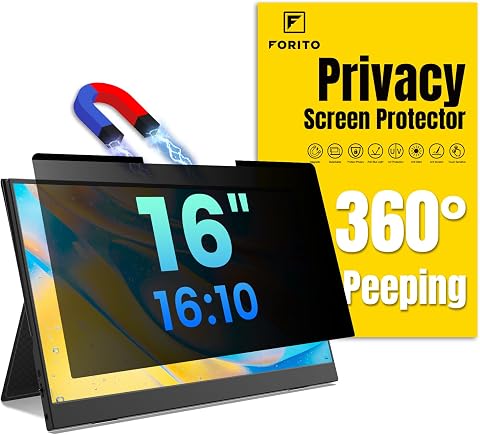
F FORITO Magnetic Laptop Privacy Screen 16 inch 16:10, 360° Anti Peeping Removable Anti Glare Blue Light Filter
- ✔ Compatible screen: 16-inch 16:10 laptop
- ✔ Finish: Reversible matte and glossy
- ✔ Mounting: Magnetic and adhesive features

15.6 Inch Privacy Screen Filter for 16:9 Monitor 1920 x 1080 Resolution
- ✔ Screen size: 15.6 inches
- ✔ Aspect ratio: 16:9
- ✔ Resolution reference: 1920 × 1080
Neither accessory replaces the other. A privacy filter can make the screen look dimmer or less crisp, while a clear protector does little to stop someone next to you from reading it. Privacy filters are the better fit for frequent travel, open offices, or sensitive work on screen. Choose a clear protector if everyday screen clarity and surface protection matter more than shoulder-surfing resistance. Before buying either, verify that the product matches your laptop’s screen dimensions, aspect ratio, and mounting style.
At a Glance
| Criteria | Laptop privacy screen filter | Clear laptop screen protector | Winner |
|---|---|---|---|
| Side-view privacy | Restricts viewing from side angles; privacy depends on filter design and viewing position. | Does not meaningfully hide the display from people viewing it from the side. | A |
| Screen clarity and brightness | Can reduce brightness and make the display look darker or less crisp. | Usually preserves broad viewing angles and the screen’s original appearance more closely. | B |
| Surface protection | Offers some physical barrier against everyday surface contact, but protection varies by construction. | Can help guard against scratches, smudges, or minor surface wear, depending on material. | B |
| Installation and removal | May attach with adhesive, tabs, or a magnetic frame; easy removal depends on the design. | Often uses adhesive or a static-cling layer; bubbles and residue depend on product and installation. | Depends |
| Fit and compatibility | Must match screen size and aspect ratio; bezel shape and camera placement can affect fit. | Must still match the laptop screen dimensions and shape. | Tie |
| Touchscreen use | Can work with touchscreens, but added layers may change touch feel or responsiveness. | Often compatible, but thickness and surface treatment can affect touch feel. | Depends |
| Typical cost and value | Usually costs more than a basic clear protector; the extra expense buys viewing-angle privacy. | Often the lower-cost choice; value depends on whether surface protection is actually needed. | Depends |
Magnetic Laptop Privacy Screen for 16 Inch 16:10 Aspect Ratio
For buyers with a 16-inch 16:10 laptop, this is the most straightforward starting point in our lineup. It specifies a display area of 13.57 by 8.48 inches, giving shoppers a useful measurement to compare against their screen before ordering. The magnetic design is removable, which makes more sense than a permanently attached filter for people who sometimes need to share their display or prefer an unobstructed view.Its feature mix is practical rather than unusually flexible: the filter combines anti-glare treatment, scratch and dust protection, and a stated 49% blue-light reduction. Compared with F FORITO, it offers a clearly stated ±30-degree viewing limit rather than a broad 360-degree privacy claim, and it does not advertise reversible matte and glossy surfaces. That more restrained framing makes its privacy expectation easier to interpret, though it may be less appealing to shoppers seeking multiple finish options.There are still compromises. The product information warns that the filter may slightly soften screen sharpness, and privacy protection is not described as blocking someone directly behind the display. Its magnetic attachment may also need optional accessories depending on the laptop. We would choose it for a matching 16:10 screen when removable mounting and stated dimensions matter more than the strongest-sounding coverage claim; owners of 16:9 or differently sized displays should skip it.
Pros:
- Lists a 13.57-by-8.48-inch display area for fit checking
- Removable magnetic attachment for easier on-and-off use
- Combines anti-glare treatment with stated blue-light reduction
- Adds a layer against dust and scratches
Cons:
- May slightly reduce perceived screen sharpness
- Stated privacy coverage is limited to approximately ±30 degrees and does not block a direct rear view
- Some laptop setups may require optional mounting accessories
Best for: Owners of 16-inch 16:10 laptops who want a removable magnetic filter with listed display dimensions and anti-glare treatment.
Not ideal for: People with 16:9 displays, buyers who need privacy from every possible position, or anyone unwilling to accept some potential image softening.
Bottom line: We rank it first for its clearly stated 16:10 dimensions and removable design, provided your laptop matches and you accept the stated viewing-angle limits.
“We rank it first for its clearly stated 16:10 dimensions and removable design, provided your laptop matches and you accept the stated viewing-angle limits.”
F FORITO Magnetic Laptop Privacy Screen 16 inch 16:10, 360° Anti Peeping Removable Anti Glare Blue Light Filter
F FORITO is the feature-rich alternative for 16-inch 16:10 laptops. Its standout distinction from our top pick is a reversible matte and glossy surface: buyers can choose the finish that better suits their lighting and viewing preference instead of being locked into one feel. The filter is also described as removable and magnetic, with adhesive features available, and it lists scratch, smudge, and fingerprint resistance alongside anti-glare treatment.The product claims 360-degree privacy and 96% blue-light blocking, which sound broader than the first pick’s stated ±30-degree viewing angle and 49% blue-light reduction. Those figures are product claims, however, and should not be taken to mean every angle or environment will deliver the same result. Its listing also notes that the display may appear dimmer, so we would weigh the added finish choice against the possibility of needing to raise brightness. Compared with the first 16:10 filter, F FORITO gives buyers more surface flexibility but less fit reassurance from the information provided here.Careful measurement is especially important: the product warns that a precise fit is required, and magnetic attachment may not suit every laptop. The listed item dimensions do not clearly establish the active filter area, so we would verify the laptop’s visible screen measurements and attachment layout before buying. This is our pick for people who value reversible finishes and a broad feature set; buyers who want the clearest published fit dimensions should consider the first option instead.
Pros:
- Reversible matte and glossy surfaces provide two viewing finishes
- Removable magnetic design with adhesive features also described
- Includes anti-glare and stated blue-light filtering
- Lists scratch, smudge, and fingerprint resistance
Cons:
- Requires precise measurement to avoid a poor fit
- May reduce display brightness
- The magnetic attachment may not suit every laptop, and the stated privacy claim should be treated as a manufacturer claim
Best for: 16-inch 16:10 laptop owners who want the option to switch between matte and glossy finishes and are comfortable verifying exact fit.
Not ideal for: Buyers who prioritize clearly listed filter dimensions, do not want possible display dimming, or have a laptop that does not work with magnetic or adhesive attachment.
Bottom line: We recommend F FORITO over the first 16:10 pick when finish flexibility matters more than clearly published filter dimensions.
“We recommend F FORITO over the first 16:10 pick when finish flexibility matters more than clearly published filter dimensions.”
15.6 Inch Privacy Screen Filter for 16:9 Monitor 1920 x 1080 Resolution
This is the only option here designed for a 15.6-inch 16:9 display, so it fills a specific compatibility gap rather than competing directly with the two 16:10 filters. Its stated dimensions—13 9/16 inches wide by 7 5/8 inches high—give owners of a matching widescreen laptop a concrete fit check. For side-view privacy, dust and scratch protection, and a stated 30% blue-light block, it covers the basics without requiring buyers to choose between two different surface finishes.Compared with the two magnetic 16:10 products, this filter offers multiple installation approaches: slide-on/off or mounted options. That may suit users who prefer a simple removable setup, but the listing does not describe magnetic attachment as its defining method. Its narrower compatibility is the key tradeoff. The product explicitly says it does not fit 16:10 displays and is not for touchscreens, so a similar-looking laptop is not enough to establish suitability.We place it third overall because it serves a smaller slice of buyers in this comparison, not because it is an inferior match for the right screen. Its 30% blue-light claim is lower than the percentages stated by both 16:10 alternatives, and the available information does not provide a comparable privacy-angle figure. Choose it when your laptop is a non-touch 15.6-inch 16:9 model and the dimensions check out. If your screen is 16:10—or you need touch input to remain usable—skip this filter and look for a format-specific alternative.
Pros:
- Designed specifically for 15.6-inch 16:9 displays
- Lists width and height for a practical fit comparison
- Offers slide-on/off or mounted installation options
- Adds stated side-view privacy and protection from dust and scratches
Cons:
- Not compatible with 16:10 displays
- Not suitable for touchscreen laptops
- Its stated blue-light block is lower than the percentages listed for the two 16:10 options
Best for: Owners of non-touch 15.6-inch 16:9 laptop screens who want side-view privacy and flexible slide-on or mounted installation.
Not ideal for: Anyone with a 16:10 display, a touchscreen, or a screen whose visible dimensions do not match the listed filter size.
Bottom line: For a matching non-touch 15.6-inch 16:9 laptop, this is the format-specific choice; outside that fit, its limitations rule it out.
“For a matching non-touch 15.6-inch 16:9 laptop, this is the format-specific choice; outside that fit, its limitations rule it out.”
As an Amazon Associate we earn from qualifying purchases.
Key Differences
The central difference is what each accessory is meant to protect. A privacy filter protects information from nearby viewers by limiting the angles from which the display is readable. A clear screen protector primarily protects the screen surface and generally leaves the display visible from the sides. If the concern is a coworker or passenger seeing sensitive content, a clear film is the wrong tool. If the concern is scratches from regular handling, a privacy filter is not automatically a better screen-protection product.
That privacy comes with a viewing tradeoff. Filters can reduce perceived brightness and make off-angle viewing harder even for the person using the laptop. This can be acceptable on a bright display used in public, but irritating for color-sensitive work or a dim screen. A clear protector is usually the better choice for preserving the display’s normal appearance, though it may introduce reflections or affect touch feel depending on its finish and material.
Fit and installation also shape the decision. Both products need to match the laptop’s actual display, not just its advertised diagonal size. A privacy filter’s attachment method determines how quickly it can be removed for sharing or collaboration; a protector’s adhesive can make precise, bubble-free installation a challenge. Pay more for a privacy filter only when restricting side views solves a regular problem. If you only want a basic layer against scratches, a clear protector is usually the more economical match.
Detailed Comparison
Side-view privacy (Laptop privacy screen filter wins — major)
Winner: Laptop privacy screen filter; major difference. A privacy filter is built to make the display harder to read from side angles. A clear protector does not provide that function, even if it has an anti-glare finish. The filter is the clear choice for confidential work on trains, planes, in cafes, or in open offices. It does not make the screen invisible from every position, though: someone directly behind you, or at an angle still within the filter’s viewing range, may see it. Placement and surroundings still matter.
Clarity and brightness (Clear laptop screen protector wins — moderate)
Winner: Clear laptop screen protector; moderate difference. A clear protector generally interferes less with brightness and broad-angle viewing than a privacy filter. The filter’s restricted viewing zone can be useful in public but also makes the display less forgiving when you shift position or share the screen. The practical cost is more noticeable on dim laptops and during detailed visual work. If accurate colors and a natural viewing experience matter more than privacy, choose the clear option—or use no overlay if even a clear layer would bother you.
Surface protection (Clear laptop screen protector wins — moderate)
Winner: Clear laptop screen protector; moderate difference. Clear protectors are commonly chosen to limit scratches and smudges, with results depending on their material and finish. A privacy filter also places a layer between the screen and contact, but models vary, and privacy performance does not guarantee stronger scratch resistance. Neither accessory should be treated as a fix for impact damage or careless handling. If everyday surface wear is the main concern, select a protector that specifies its protective properties rather than paying for a privacy feature you will not use.
Installation and removal (minor difference)
Winner: Depends; minor difference. A filter with tabs or a magnetic frame may be convenient to remove when sharing a screen, while a permanently adhered filter may be less flexible. Clear protectors are often left in place, and some adhesive versions can be difficult to align or remove cleanly. The attachment method matters more than the category name: check whether the product uses adhesive, static cling, tabs, or magnets, and whether the manufacturer explains cleaning and removal. For frequent switching between private work and collaboration, prioritize a removable filter.
Fit and compatibility (major difference)
Winner: Tie; major practical importance. Both products need to fit the precise screen area. Laptop diagonal measurements alone can be misleading because aspect ratios, bezel widths, rounded corners, and camera cutouts differ. A poorly sized privacy filter can leave viewing gaps; a poorly sized clear protector can cover the wrong area or interfere with the camera. Check the laptop’s exact model number and the seller’s listed dimensions before ordering. If the display is unusual or the screen has a touch layer, confirm compatibility rather than assuming a generic size will work.
Touchscreen performance (moderate difference)
Winner: Depends; minor to moderate difference. Either type may be compatible with a touchscreen, but the added layer can change touch feel or responsiveness. Privacy filters can be thicker or use a frame that affects how the display is handled; clear films can also add friction or interfere if they are not designed for touch. Check the maker’s compatibility statement for the laptop model and touch function. If precise, frequent touch input is essential, avoid relying on broad category claims and favor a product explicitly intended for touchscreen use.
Cost and value (moderate difference)
Winner: Depends; moderate difference. A basic clear protector is often the lower-cost purchase, while a privacy filter may cost more because it adds viewing-angle control. The premium is worthwhile if people can regularly see confidential content and you work in shared spaces. It is poor value if your laptop stays at a private desk or if screen clarity is your priority. Conversely, a cheap clear film is not a substitute for privacy. Compare the price with the problem each accessory actually solves, not just the product label.
Laptop privacy screen filter: Pros and Cons
Pros:
- Reduces visibility from side angles, helping deter casual shoulder-surfing.
- Useful for sensitive work in public, shared offices, and other close quarters.
- Some designs can be removed when full-angle viewing is needed.
Cons:
- Can reduce perceived brightness and narrow the comfortable viewing area.
- Does not guarantee privacy from every position or replace good screen positioning.
- Fit and attachment method need careful checking; some options cost more than clear films.
Clear laptop screen protector: Pros and Cons
Pros:
- Usually keeps broad viewing angles and screen appearance closer to normal.
- Can help protect against everyday scratches and smudges, depending on its construction.
- Often a lower-cost option when surface protection is the main need.
Cons:
- Does not meaningfully prevent nearby people from seeing the display.
- Installation can be frustrating if the film is difficult to align or traps bubbles.
- May add reflections or change touch feel, depending on its finish and thickness.
Who Should Choose What
Choose Laptop privacy screen filter if:
- You regularly work with confidential documents, messages, or customer information in shared spaces.
- You commute or travel with a laptop and want to reduce casual viewing from nearby seats.
- You accept some loss of brightness or viewing flexibility in return for side-angle privacy.
Choose Clear laptop screen protector if:
- You mainly want a layer against scratches or smudges and do not need side-view privacy.
- You want to preserve broad viewing angles and a display that looks closer to its original state.
- Your laptop is usually used in private, so a privacy filter’s added cost and viewing tradeoff would bring little benefit.
Skip both if: Skip both if the laptop is rarely exposed to surface wear or nearby viewers and you prioritize the clearest, unaltered display. For sensitive work, also skip the assumption that either accessory alone can guarantee confidentiality.
Value for Money
Pay more for a privacy filter only when side-view exposure is a recurring risk. For people handling private work in public, the added cost can be justified because a clear protector cannot deliver the same function. The value is lower for a laptop used mostly at home or in a private office, especially if the user is sensitive to reduced brightness.
A clear protector is usually better value when the goal is to limit everyday surface wear at a lower cost. Still, buying a protector just because it is inexpensive is not useful if the laptop’s screen is not at risk. Neither product is automatically the best deal: match the purchase to the problem, confirm exact compatibility, and avoid paying extra for features you will not use.
Final Verdict
Choose a laptop privacy screen filter if you routinely work where someone beside you could read sensitive information. Its restricted viewing angle is the meaningful advantage, and for that specific need it is worth paying more. Choose a clear laptop screen protector if surface wear is your concern and you want to retain broad viewing angles with less impact on how the display looks.
The biggest deciding factor is whether you need privacy or surface protection: these products are not interchangeable. For most users who do not handle confidential work in shared spaces, a clear protector—or neither accessory—makes more sense than accepting a privacy filter’s viewing tradeoff. For frequent travelers and people working with sensitive information in public, the privacy filter is the stronger choice, provided the exact model fits and its brightness impact is acceptable.
Frequently Asked Questions
Does a clear screen protector stop people from seeing my laptop screen?
No. A clear protector is intended to cover the display surface and generally leaves it visible from the side. Some finishes may reduce glare, but that is not the same as restricting viewing angles. Choose a privacy filter if side-view visibility is the problem.
Will a laptop privacy filter make my screen darker?
It can make the display appear dimmer or less clear, though the effect varies by product and screen. This tradeoff may be acceptable in a bright public setting, but it can be bothersome on a dim laptop or for color-sensitive work. Check product details and return terms before buying.
Can I use a privacy filter and a clear screen protector together?
Sometimes, but stacking layers can affect fit, reflections, brightness, touch response, or adhesion. Check compatibility from both manufacturers before combining them. If both privacy and scratch resistance matter, a privacy filter with stated surface protection may be simpler than adding a second layer.
How do I choose the right size?
Use the laptop’s exact model number and confirm the screen’s dimensions, aspect ratio, and whether the product covers only the active display or also the bezel. A listed diagonal measurement by itself may not be enough, especially for models with unusual screen shapes or camera cutouts.
Columbus Day / Indigenous Peoples' Day Picks
long weekend sales
As an affiliate, we earn on qualifying purchases.