
The best LTE backup router for an office should keep essential work online when your wired connection fails, without adding more network complexity than your team can manage. My best overall pick is the GL.iNet GL-X2000 Spitz Plus, which pairs dual-SIM 4G LTE with Wi-Fi 6 for a strong balance of backup flexibility and office use. For a faster cellular option, the GL.iNet GL-X3000 Spitz AX adds 5G, while the Cudy LT500 is a simpler 4G alternative for smaller setups. The main tradeoffs are cellular generation, carrier compatibility, failover capability, and whether you need a fixed router or a battery-powered hotspot. Read on for the full breakdown and guidance on matching a router to your office network.

Get privacy and security gear delivered free with Prime
- Fast, free delivery on millions of items
- Prime Video, Amazon Music and more included
- Member-only deals all year
Key Takeaways
- The GL-X2000 is the clearest all-around office fit: dual-SIM 4G LTE and Wi-Fi 6 offer more backup flexibility than the basic single-purpose 4G options.
- The GL-X3000 and GL-XE3000 are the 5G choices: they suit offices that need higher cellular potential or portable 5G access, but require checking carrier bands and service availability.
- Wi-Fi generation is only part of the decision: the Cudy LT500 and TUOSHI LT16S offer AC1200-class Wi-Fi 5, which may be sufficient for backup use if the office does not need newer wireless features.
- Fixed routers and hotspots serve different jobs: models such as the GL-XE3000, NETGEAR AC797, and KuWFi hotspot are easier to move, while a fixed router is a more natural fit for shared office coverage.
- Low-cost 4G models call for extra compatibility checks: the Dionlink, Cudy LT400, and antenna-equipped 300Mbps hotspot vary in wireless and cellular specifications, so confirm band support and carrier approval before buying.
| GL.iNet GL-X2000 Spitz Plus 4G LTE Cat 12 Wi-Fi 6 Dual-SIM Router |  | Best Overall LTE Failover | Cellular: 4G LTE Cat 12 | Wi-Fi: Dual-band Wi-Fi 6 | Wi-Fi speeds: Up to 574 Mbps (2.4 GHz) + 2402 Mbps (5 GHz) | VIEW LATEST PRICE | See Our Full Breakdown |
| GL.iNet GL-X3000 Spitz AX 5G Cellular Router with Wi-Fi 6 and Dual SIM |  | Best Premium 5G Backup | Cellular: 5G NR, LTE, and 3G | Wi-Fi: Dual-band Wi-Fi 6 | Wireless speeds: Up to 574 Mbps (2.4 GHz) + 2402 Mbps (5 GHz) | VIEW LATEST PRICE | See Our Full Breakdown |
| Dionlink Dual-Band 4G LTE Router with SIM Card Slot |  | Best for Wired Office Devices | Cellular: 4G LTE | Compatible carriers: AT&T and T-Mobile | Wi-Fi: Dual-band Wi-Fi 5 (802.11ac) | VIEW LATEST PRICE | See Our Full Breakdown |
| Cudy LT500 4G LTE AC1200 Dual-Band Wi-Fi 5 Router | 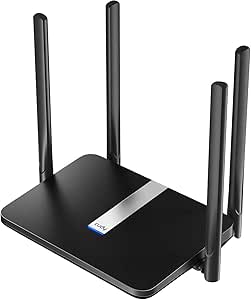 | Best for VPN-Conscious Small Offices | Cellular: 4G LTE Cat 4 | Maximum cellular download: 150 Mbps | Maximum cellular upload: 50 Mbps | VIEW LATEST PRICE | See Our Full Breakdown |
| TUOSHI LT16S AC1200 Wi-Fi 5 4G LTE Router with SIM Card Slot |  | Best for Small AT&T or T-Mobile Teams | Cellular: 4G LTE Cat 4 | LTE download: Up to 150 Mbps | Wi-Fi: Dual-band Wi-Fi 5 (802.11ac) | VIEW LATEST PRICE | See Our Full Breakdown |
| NETGEAR AC797 4G LTE Mobile WiFi Hotspot (Renewed) |  | Best Battery-Powered Backup for Small Teams | Cellular network: 4G LTE; GSM carriers | Listed carrier: AT&T | Maximum download speed: Up to 400 Mbps | VIEW LATEST PRICE | See Our Full Breakdown |
| GL.iNet GL-XE3000 Puli AX 5G Router with Dual SIM and 6400mAh Battery | 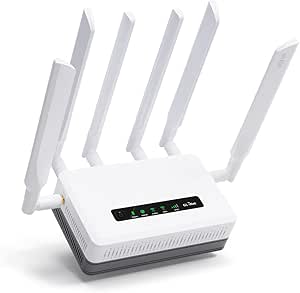 | Best Advanced Failover Control | Cellular connectivity: 5G NSA/SA and 4G LTE | SIM: Dual SIM, single standby; separate physical eSIM card supported | Wi-Fi: Dual-band Wi-Fi 6; up to 574 Mbps at 2.4 GHz and 2,402 Mbps at 5 GHz | VIEW LATEST PRICE | See Our Full Breakdown |
| KuWFi 4G LTE Unlocked WiFi Hotspot, Portable Router with SIM Card Slot |  | Best Compact Backup for Solo Work | Cellular support: 4G LTE; AT&T/T-Mobile US bands | Wi-Fi standard: 802.11n (Wi-Fi 4) | Listed data rate: 150 Mbps | VIEW LATEST PRICE | See Our Full Breakdown |
| 4G LTE Wireless Router with SIM Card Slot – Unlocked 300Mbps Mobile WiFi Hotspot with Antenna (B2/B4/B5/B12/B13/B17/B18/B25) – Supports T‑Mobile & AT&T |  | Best for Broad Local Coverage | LTE bands: B2/B4/B5/B12/B13/B17/B18/B25/B26 | Wi-Fi standard: 802.11b/g/n (Wi-Fi 4) | Maximum Wi-Fi speed: 300 Mbps down / 50 Mbps up | VIEW LATEST PRICE | See Our Full Breakdown |
| Cudy LT400 N300 4G LTE Wi-Fi Router |  | Best for Wired Office Connections | Cellular standard: 4G LTE Cat 4 | Maximum LTE speed: Up to 150 Mbps down / 50 Mbps up | Wi-Fi: 2.4 GHz, 802.11n (Wi-Fi 4), up to 300 Mbps | VIEW LATEST PRICE | See Our Full Breakdown |
| LTE backup router for office | Wi-Fi | Cellular | LAN bandwidth |
|---|---|---|---|
| GL.iNet GL-X2000 Spitz Plus 4G | Dual-band Wi-Fi 6 | 4G LTE Cat 12 | 1000 Mbps |
| GL.iNet GL-X3000 Spitz AX 5G C | Dual-band Wi-Fi 6 | 5G NR, LTE, and 3G | 1000 Mbps |
| Dionlink Dual-Band 4G LTE Rout | Dual-band Wi-Fi 5 (802.11ac) | 4G LTE | 1000 Mbps |
| Cudy LT500 4G LTE AC1200 Dual- | Dual-band Wi-Fi 5 (802.11ac) | 4G LTE Cat 4 | — |
| TUOSHI LT16S AC1200 Wi-Fi 5 4G | Dual-band Wi-Fi 5 (802.11ac) | 4G LTE Cat 4 | 100 Mbps |
| NETGEAR AC797 4G LTE Mobile Wi | Dual-band 802.11ac (Wi-Fi 5) | — | — |
| GL.iNet GL-XE3000 Puli AX 5G R | Dual-band Wi-Fi 6; up to 574 Mbps at 2.4 GHz and 2,402 Mbps at 5 GHz | — | — |
| KuWFi 4G LTE Unlocked WiFi Hot | — | — | — |
| 4G LTE Wireless Router with SI | — | — | — |
| Cudy LT400 N300 4G LTE Wi-Fi R | 2.4 GHz, 802.11n (Wi-Fi 4), up to 300 Mbps | — | 100 Mbps |
More Details on Our Top Picks
GL.iNet GL-X2000 Spitz Plus 4G LTE Cat 12 Wi-Fi 6 Dual-SIM Router
I’d put the GL-X2000 Spitz Plus first for offices that need a capable LTE backup without moving to 5G. Its Cat 12 modem, Wi-Fi 6, and multiple WAN options give it more room to handle staff devices and different backup paths than the basic Wi-Fi 5 Cudy LT500. Ethernet, repeater, cellular, and tethering connections also make it easier to fit into an existing network setup. Four SMA connectors allow external antennas, a useful option when the router sits where cellular reception is weak. The tradeoff is that its two SIMs work in single-standby mode, not as simultaneous active lines, and regional cellular restrictions may limit where it works. I’d choose the 5G GL-X3000 instead when faster cellular service is available and the added cost and complexity are justified.
Pros:- Cat 12 LTE and Wi-Fi 6 provide a stronger office feature set than the Wi-Fi 5 Cudy LT500.
- Supports Ethernet, repeater, cellular, and tethered WAN connections.
- Four SMA connectors support external antenna setups for challenging signal locations.
- Includes OpenVPN and WireGuard, with higher listed WireGuard throughput.
Cons:- Dual SIM is single-standby rather than simultaneous active cellular service.
- Cellular functionality is restricted in some regions.
- Actual LTE performance depends on carrier coverage and network conditions.
Best for: Small and midsize offices that want Wi-Fi 6, flexible WAN failover, and the option to add external LTE antennas.
Not ideal for: Offices that require active simultaneous connections from two SIMs or need 5G cellular service.
- Cellular:4G LTE Cat 12
- Wi-Fi:Dual-band Wi-Fi 6
- Wi-Fi speeds:Up to 574 Mbps (2.4 GHz) + 2402 Mbps (5 GHz)
- SIM:Dual SIM, single standby
- WAN options:Ethernet, repeater, cellular, and tethering
- VPN:OpenVPN and WireGuard; up to 30 Mbps OpenVPN and 190 Mbps WireGuard
- Antenna connectors:4 SMA
- LAN bandwidth:1000 Mbps
Our verdict“Choose the GL-X2000 if you want a flexible Wi-Fi 6 LTE backup router and do not need 5G or two active SIM links.”
GL.iNet GL-X3000 Spitz AX 5G Cellular Router with Wi-Fi 6 and Dual SIM
For an office where backup connectivity must do more than keep a few tasks online, I’d shortlist the GL-X3000 Spitz AX. Its 5G support, Wi-Fi 6, OpenWrt-based firmware, and multiple WAN modes make it the most capable cellular option here; compared with the LTE-only GL-X2000, it can take advantage of 5G service where the carrier and location support it. Six detachable antennas offer placement flexibility, while OpenVPN and WireGuard add remote-access options. The compromise is that the dual SIM setup is still single standby, and the physical eSIM card is sold separately. Its extra cellular capability may not help an office with weak 5G coverage or an LTE-only data plan. I’d pick the GL-X2000 for a simpler LTE-only deployment.
Pros:- Supports 5G NR as well as LTE and 3G.
- Wi-Fi 6 and multiple WAN connection modes suit a flexible office backup setup.
- Six detachable antennas allow more placement choices than fixed-antenna models.
- OpenVPN, WireGuard, and OpenWrt-based firmware offer network configuration options.
Cons:- Dual SIM operates in single-standby mode rather than keeping both lines active.
- Physical eSIM card is supported but sold separately.
- 5G capability offers limited benefit where coverage or the office plan is LTE-only.
Best for: Offices with dependable 5G coverage that want advanced WAN options, Wi-Fi 6, and configurable OpenWrt-based networking.
Not ideal for: Teams that only need basic LTE failover, cannot use 5G in their area, or want eSIM support without buying a separate card.
- Cellular:5G NR, LTE, and 3G
- Wi-Fi:Dual-band Wi-Fi 6
- Wireless speeds:Up to 574 Mbps (2.4 GHz) + 2402 Mbps (5 GHz)
- SIM:Dual SIM, single standby; physical eSIM card supported and sold separately
- Antennas:6 detachable antennas
- VPN:OpenVPN up to 150 Mbps; WireGuard up to 300 Mbps
- WAN options:Ethernet, repeater, cellular, and tethering
- LAN bandwidth:1000 Mbps
Our verdict“Choose the GL-X3000 when your office has usable 5G and needs more configuration flexibility than the LTE-only GL-X2000.”
Dionlink Dual-Band 4G LTE Router with SIM Card Slot
The Dionlink makes a practical case for offices that want LTE backup with several wired connections and a straightforward Wi-Fi 5 setup. Its four LAN ports and automatic switch to LTE can keep desktop PCs, printers, or other Ethernet devices online when fixed broadband drops. That gives it a more office-friendly wired layout than the Cudy LT500, whose Ethernet ports are limited to 10/100 Mbps. The Dionlink also supports up to 32 devices and has both 2.4 GHz and 5 GHz Wi-Fi, but it lacks the Wi-Fi 6 and broader WAN choices of the GL-X2000. Carrier support is limited to AT&T and T-Mobile, and the SIM and data plan are not included. I’d favor it for a small wired workgroup, not for businesses needing broader carrier options or advanced network controls.
Pros:- Four gigabit LAN ports support multiple wired office devices.
- Automatically switches to LTE when broadband disconnects.
- Dual-band Wi-Fi and support for up to 32 connected devices suit a small team.
- Listed LTE speeds reach 150 Mbps down and 50 Mbps up.
Cons:- Compatible carriers are limited to AT&T and T-Mobile.
- SIM card and data plan are not included.
- Uses Wi-Fi 5 rather than the Wi-Fi 6 standard in the GL-X2000 and GL-X3000.
Best for: Small offices with several wired devices that need basic LTE failover and use AT&T or T-Mobile.
Not ideal for: Businesses that need Wi-Fi 6, broader carrier compatibility, advanced VPN features, or a supplied SIM and data service.
- Cellular:4G LTE
- Compatible carriers:AT&T and T-Mobile
- Wi-Fi:Dual-band Wi-Fi 5 (802.11ac)
- Maximum Wi-Fi rate:1200 Mbps
- Maximum LTE speeds:150 Mbps download; 50 Mbps upload
- Ethernet ports:1 WAN and 4 LAN
- LAN bandwidth:1000 Mbps
- Maximum connected devices:32
Our verdict“Choose the Dionlink for a small AT&T or T-Mobile office that needs several wired ports and automatic LTE fallback.”
Cudy LT500 4G LTE AC1200 Dual-Band Wi-Fi 5 Router
I’d choose the Cudy LT500 when the office wants familiar dual-band Wi-Fi, cellular failover, and VPN options in a relatively straightforward LTE router. Its listed support for WireGuard, OpenVPN, and IPsec is a useful distinction from the Dionlink, whose supplied specs do not list VPN support. Four Ethernet ports also give a small office wired connections for essential devices. The main limitation is easy to miss: those ports are 10/100 Mbps, unlike the gigabit LAN on the GL-X2000 and Dionlink. That can constrain wired transfers even when the cellular connection is not the bottleneck. LTE is Cat 4 with a listed maximum download of 150 Mbps, so I’d treat it as a backup path for routine work rather than a substitute for a high-capacity primary line.
Pros:- Lists WireGuard, OpenVPN, and IPsec VPN support.
- Automatic WAN failover can shift connectivity to LTE when the primary link fails.
- Four Ethernet ports and dual-band Wi-Fi support common small-office devices.
- Nano SIM slot accepts a common SIM form factor.
Cons:- All four Ethernet ports are limited to 10/100 Mbps.
- Cat 4 LTE is less capable than the Cat 12 GL-X2000 and 5G GL-X3000.
- Cellular performance depends on carrier coverage and signal conditions.
Best for: Small offices that want LTE failover, basic wired connections, and listed support for several VPN protocols.
Not ideal for: Teams with gigabit wired devices, heavy local file transfers, or a need for 5G or Wi-Fi 6.
- Cellular:4G LTE Cat 4
- Maximum cellular download:150 Mbps
- Maximum cellular upload:50 Mbps
- Wi-Fi:Dual-band Wi-Fi 5 (802.11ac)
- Wi-Fi speed:867 Mbps (5 GHz) + 300 Mbps (2.4 GHz)
- Ethernet:4 Fast Ethernet ports, 10/100 Mbps
- SIM slot:Nano SIM
- VPN protocols:WireGuard, OpenVPN, and IPsec
Our verdict“Choose the LT500 if VPN options matter more than gigabit Ethernet or newer Wi-Fi and cellular standards.”
TUOSHI LT16S AC1200 Wi-Fi 5 4G LTE Router with SIM Card Slot
The TUOSHI LT16S is aimed at a small team that needs a basic LTE fallback, dual-band Wi-Fi, and several LAN connections without stepping up to the more configurable GL.iNet models. It lists support for up to 32 Wi-Fi devices, four LAN ports, and cellular failover, giving it a useful combination for a small office with mixed wired and wireless equipment. Compared with the Dionlink, it lists L2TP, PPTP, and OpenVPN, but carrier compatibility is specifically given as AT&T and T-Mobile. Its key office limitation is the 100 Mbps LAN bandwidth: the gigabit ports on the Dionlink or GL-X2000 are a better fit for faster local wired networking. The standard SIM format may also call for an adapter if your carrier supplies a different size. I’d keep it to modest backup workloads.
Pros:- Supports cellular failover for locations with unreliable fixed broadband.
- Four LAN ports and dual-band Wi-Fi cover a mix of office devices.
- Lists VPN support for L2TP, PPTP, and OpenVPN.
- Supports up to 32 Wi-Fi devices.
Cons:- LAN bandwidth is limited to 100 Mbps, below the gigabit LAN on the Dionlink and GL-X2000.
- Listed network compatibility is limited to AT&T and T-Mobile.
- LTE service requires a compatible SIM and carrier coverage.
Best for: Small teams using AT&T or T-Mobile that need basic LTE failover, dual-band Wi-Fi, and multiple LAN ports.
Not ideal for: Offices needing gigabit wired LAN, Wi-Fi 6, broad carrier flexibility, or high-capacity cellular backup.
- Cellular:4G LTE Cat 4
- LTE download:Up to 150 Mbps
- Wi-Fi:Dual-band Wi-Fi 5 (802.11ac)
- Wi-Fi speed:Up to 1167 Mbps
- SIM slot:Standard SIM
- Ethernet ports:1 WAN and 4 LAN
- LAN bandwidth:100 Mbps
- VPN protocols:L2TP, PPTP, and OpenVPN
- Compatible networks:AT&T and T-Mobile
Our verdict“Choose the LT16S for a small AT&T or T-Mobile team with modest backup needs, but skip it if gigabit LAN matters.”
NETGEAR AC797 4G LTE Mobile WiFi Hotspot (Renewed)
The NETGEAR AC797 is the simplest fit here when your office needs a temporary connection that can keep working away from an outlet. Its up to 11-hour battery life and support for 15 devices suit a small team through a short outage, while the stated download speed of up to 400 Mbps gives it more headroom than the Wi-Fi 4 KuWFi L100US. Unlike the desk-oriented Cudy LT400, this is a portable hotspot, not a router built around several wired office connections. That distinction limits its usefulness as a permanent failover device. Carrier choice is restricted to GSM networks, and the renewed unit has only a 90-day limited warranty. I’d choose it for a mobile, low-fuss backup plan, but not for an office that needs broad carrier options or a fixed wired setup.
Pros:- Battery is rated for up to 11 hours of use
- Supports up to 15 connected devices
- Listed download speeds reach up to 400 Mbps
- Dual-band 802.11ac Wi-Fi
Cons:- Limited to GSM carrier compatibility
- Renewed product has a 90-day limited warranty
- Portable hotspot format is less suited to a fixed multi-wired office setup
Best for: Small teams that need a portable, battery-powered LTE connection for brief outages or work away from the office.
Not ideal for: Offices that need wired LAN connections, a longer warranty, or compatibility beyond GSM carriers.
- Cellular network:4G LTE; GSM carriers
- Listed carrier:AT&T
- Maximum download speed:Up to 400 Mbps
- Device capacity:Up to 15 devices
- Wi-Fi:Dual-band 802.11ac (Wi-Fi 5)
- Battery:2,930 mAh; up to 11 hours
- Security:WPA2
- Warranty:90-day limited warranty
Our verdict“Choose the AC797 if battery-powered portability matters more than wired connectivity and broad carrier support.”
GL.iNet GL-XE3000 Puli AX 5G Router with Dual SIM and 6400mAh Battery
For an office where a cellular backup must do more than simply provide Wi-Fi, the GL.iNet GL-XE3000 Puli AX offers the most capable routing toolkit in this group. It supports 5G and 4G LTE, dual SIM with automatic failover, and Ethernet, repeater, cellular, and tethered WAN options—useful when the primary connection or carrier needs a fallback path. Wi-Fi 6 and WPA3 also make it a more current network platform than the Wi-Fi 4 C910 or Cudy LT400. Its OpenWrt-based firmware and built-in VPN options reward administrators who want control, but add complexity for a team seeking plug-and-play setup. The battery is rated for up to eight hours, less than the NETGEAR AC797’s stated 11 hours, and physical eSIM support requires a separately purchased card. Regional cellular restrictions may also rule it out.
Pros:- Supports 5G, 4G LTE, and dual-SIM automatic failover
- Accepts Ethernet, repeater, cellular, and tethering WAN connections
- Built-in OpenVPN and WireGuard support
- Wi-Fi 6 with WPA3 and customizable OpenWrt-based firmware
Cons:- Up to eight hours of battery life is shorter than the NETGEAR AC797’s stated runtime
- Physical eSIM card is sold separately
- Cellular functionality is restricted in some regions
Best for: IT-minded small offices that need dual-SIM cellular failover, multiple WAN options, VPN support, and Wi-Fi 6.
Not ideal for: Teams seeking a simple LTE-only appliance, longer battery runtime, or cellular use in a restricted region.
- Cellular connectivity:5G NSA/SA and 4G LTE
- SIM:Dual SIM, single standby; separate physical eSIM card supported
- Wi-Fi:Dual-band Wi-Fi 6; up to 574 Mbps at 2.4 GHz and 2,402 Mbps at 5 GHz
- WAN options:Ethernet, repeater, cellular, and tethering
- Battery:6,400 mAh; up to 8 hours
- VPN:OpenVPN up to 150 Mbps; WireGuard up to 300 Mbps
- LAN port:1,000 Mbps bandwidth
- Security:WPA2 and WPA3
Our verdict“Pick the Puli AX when flexible failover and network control matter more than simple setup or maximum battery runtime.”
KuWFi 4G LTE Unlocked WiFi Hotspot, Portable Router with SIM Card Slot
The KuWFi L100US is the most travel-friendly choice in this set: its pocket-sized design, built-in battery, and screen make it easy to carry and check without setting up a desk router. It supports up to 10 devices, enough for a solo worker’s laptop, phone, and accessories, but the Wi-Fi 4 connection is limited to a stated 150 Mbps. That makes it a lighter-duty option than the NETGEAR AC797, which lists up to 400 Mbps and supports more devices. The single LAN port gives it one wired connection, but not the multi-device wired layout an office may want; the Cudy LT400 is a better fit for a stationary router role. KuWFi’s US-carrier band support and lack of roaming also narrow where it can serve as backup, and some SIMs may need manual APN settings.
Pros:- Compact, battery-powered design is easy to carry
- Supports up to 10 simultaneous devices
- Screen displays connection information
- Includes one LAN port for a wired device
Cons:- Wi-Fi 4 and a stated 150 Mbps data rate limit performance compared with the NETGEAR AC797
- Supports US carrier bands and does not support roaming
- May require manual APN configuration and has only one LAN port
Best for: Solo professionals or very small teams who need a compact LTE hotspot for travel and occasional office outages.
Not ideal for: Offices that need fast Wi-Fi, several wired devices, roaming, or cellular compatibility outside the listed US carrier bands.
- Cellular support:4G LTE; AT&T/T-Mobile US bands
- Wi-Fi standard:802.11n (Wi-Fi 4)
- Listed data rate:150 Mbps
- Device capacity:Up to 10 devices
- Battery:2,400 mAh
- Coverage range:Up to 50 meters
- Ports:1 LAN port
- Warranty:12 months
Our verdict“Choose the KuWFi for portable, small-scale LTE access, not as the main wired failover router for a busy office.”
4G LTE Wireless Router with SIM Card Slot – Unlocked 300Mbps Mobile WiFi Hotspot with Antenna (B2/B4/B5/B12/B13/B17/B18/B25) – Supports T‑Mobile & AT&T
The C910 is built for an office that needs a stationary LTE hotspot to reach several rooms and connect a larger number of devices. Its four fixed antennas, two LAN ports, and support for up to 32 devices give it a more office-oriented layout than the battery-powered KuWFi L100US or NETGEAR AC797. Router, access point, and repeater modes also make it easier to fit into different network arrangements. Those strengths come with a clear ceiling: it uses Wi-Fi 4 and LTE only, so it lacks the newer wireless and 5G options of the GL.iNet Puli AX. Carrier support is aimed at North America, with no roaming or virtual SIM support, and the antennas cannot be detached. The listed 300–500-meter coverage is a stated range, not a substitute for checking signal and building conditions at the office.
Pros:- Supports up to 32 devices
- Two LAN ports plus one WAN port
- Router, access point, and repeater modes
- Four antennas and support for several North American LTE bands
Cons:- Wi-Fi 4 and LTE-only connectivity trail the GL.iNet Puli AX’s Wi-Fi 6 and 5G support
- Does not support roaming, virtual SIMs, or many international SIM cards
- Antennas are non-detachable
Best for: Small offices that want a powered, fixed LTE router with multiple wired ports and capacity for many local devices.
Not ideal for: Businesses needing 5G, roaming or international SIM support, detachable antennas, or current Wi-Fi standards.
- LTE bands:B2/B4/B5/B12/B13/B17/B18/B25/B26
- Wi-Fi standard:802.11b/g/n (Wi-Fi 4)
- Maximum Wi-Fi speed:300 Mbps down / 50 Mbps up
- Device capacity:Up to 32 devices
- Ports:2 LAN, 1 WAN, 1 SIM slot
- Antennas:4 non-detachable antennas
- Operating modes:Router, AP, and repeater
- Power:12 V
Our verdict“Choose the C910 for a fixed North American LTE backup with multiple wired connections, provided Wi-Fi 4 and LTE-only service meet your needs.”
Cudy LT400 N300 4G LTE Wi-Fi Router
The Cudy LT400 is the practical pick when a backup router needs several physical connections rather than a battery for travel. It has four ports and four high-gain antennas, plus VPN clients, DDNS, and DNS encryption support for offices that want more network controls than the compact KuWFi L100US offers. Its LTE Cat 4 connection is rated for up to 150 Mbps down and 50 Mbps up, which can support routine backup tasks but may constrain several active users. The main compromise is wireless: this is a 2.4 GHz-only Wi-Fi 4 router, unlike the dual-band Wi-Fi 6 GL.iNet Puli AX. The supplied data lists 100 Mbps LAN bandwidth and 64 MB RAM, so I would not choose it for a network expecting high wired throughput or advanced workloads. Its stated coverage region is North and South America.
Pros:- Four ports support a wired office setup
- Four 5 dBi antennas
- VPN clients include PPTP, L2TP, OpenVPN, and WireGuard
- Supports DDNS and DNS encryption
Cons:- 2.4 GHz-only Wi-Fi 4 is less flexible than the GL.iNet Puli AX’s dual-band Wi-Fi 6
- Maximum LTE download speed is listed as 150 Mbps
- LAN port bandwidth is 100 Mbps and RAM is 64 MB
Best for: Small offices in North or South America that need LTE backup with multiple wired ports and built-in VPN client options.
Not ideal for: Teams needing dual-band Wi-Fi, 5G, high wired throughput, or cellular service outside the stated coverage region.
- Cellular standard:4G LTE Cat 4
- Maximum LTE speed:Up to 150 Mbps down / 50 Mbps up
- Wi-Fi:2.4 GHz, 802.11n (Wi-Fi 4), up to 300 Mbps
- Antennas:4 × 5 dBi
- Ports:4
- LAN bandwidth:100 Mbps
- VPN clients:PPTP, L2TP, OpenVPN, WireGuard
- Coverage region:North and South America
Our verdict“Pick the LT400 for a modest wired LTE backup with VPN features, but skip it if dual-band Wi-Fi or faster LAN links are a requirement.”

How We Picked
I ranked these options around the job they need to do in an office: provide a dependable cellular path when the primary internet connection is unavailable. The main criteria were LTE or 5G capability, dual-SIM flexibility, Wi-Fi generation, the distinction between a fixed router and a portable hotspot, and how clearly the product’s stated features map to shared office use. I also weighed practical fit: a compact battery-powered device can help a traveling team, but it is not automatically a better substitute for a router serving several desks.
The GL-X2000 ranks first for its mix of dual-SIM 4G LTE and Wi-Fi 6 without requiring a 5G-dependent setup. The GL-X3000 and GL-XE3000 rank high for offices that can use 5G and value cellular flexibility, with the latter more suited to mobile use. The Cudy LT500 is a straightforward fixed-router alternative; the remaining 4G routers and hotspots rank lower when their simpler feature sets, older wireless standards, or portable form factor are less suited to a shared office network. Carrier compatibility and automatic WAN failover must still be verified for the specific model and office connection.
Factors to Consider When Choosing Best LTE Backup Router For Office
Choosing an LTE backup router is less about chasing the largest headline speed and more about fitting the device into the office’s existing internet setup. I would settle the network and carrier questions first, then choose between fixed coverage, portability, and a higher cellular tier.
Check Whether It Can Actually Take Over From Your Main Router
A SIM slot alone does not mean a device can automatically take over when wired internet fails. Check whether the router supports WAN failover, how the wired connection connects to it, and whether the feature works with your existing router or firewall. If failover is not automatic, staff may need to switch networks by hand, which can lengthen an outage. Ask how the router handles returning to the primary connection as well, since manual recovery can leave the office on cellular longer than intended. For a small office with just a few essential devices, manual switching may be acceptable; for a shared network, automatic behavior is usually the more useful target.
Verify Carrier Bands and Local Coverage Before Choosing 4G or 5G
Cellular performance depends on the carrier, supported frequency bands, signal conditions, and congestion at the office—not just the router’s LTE category or 5G label. Compare the router’s band list with the carrier’s current requirements for the exact location, and confirm that the carrier permits the device on its network. A model that supports a carrier in one region may not support the bands needed elsewhere. If the office already has a phone on the intended carrier, use it to check indoor signal in the planned router location, but remember that antenna design and modem support can differ. Paying for 5G makes sense only when local coverage and the service plan can use it.
Match Cellular Data Allowance to What the Office Must Keep Running
Backup internet can consume data quickly when cloud backups, video meetings, operating-system updates, and guest Wi-Fi all remain active. Estimate which services must stay online during an outage and how long the office may need cellular access. A limited data plan may call for restricting guest traffic or pausing large downloads, while a longer outage plan needs enough allowance to support essential work. Check whether the router can separate or prioritize traffic before relying on it for multiple teams. The least expensive data plan can become a poor fit if it forces staff to ration connectivity during an extended service failure.
Choose Fixed Coverage or Portable Backup Deliberately
A fixed router is generally easier to leave connected to a shared office network and positioned for a stable cellular signal. A mobile hotspot is useful when the office needs a travel backup, temporary connectivity at another site, or a device that can run without a nearby power outlet. Its compact design does not automatically provide the same coverage or network integration as a dedicated office router. Also check how long a battery-powered device can support the expected workload and whether it can operate while charging. Avoid buying a hotspot as the office’s sole backup just because it is portable if several wired devices need a reliable connection.
Treat Wi-Fi Specs as a Coverage and Client-Density Question
Wi-Fi 6 can help manage newer clients and busy wireless networks, but it cannot improve a weak cellular signal from the carrier. For backup use, the main question is whether the router can serve the staff, devices, and office layout that must remain connected. Count the likely simultaneous clients, include printers and other shared equipment, and consider whether some devices need Ethernet rather than Wi-Fi. If backup use is limited to a few essential laptops, a Wi-Fi 5 model may be enough; a busier shared network may benefit from newer wireless support. Do not assume an AC1200 or N300 label describes real-world coverage through office walls.
Plan for Signal Placement, Power, and Recovery
A router placed beside the main network equipment may have poor cellular reception, especially inside a windowless communications room. Before committing to a location, check whether the router has suitable antenna options and whether a better signal location can be reached without disrupting the office network. Think through power during an outage too: a router without a battery still needs a powered outlet or an uninterruptible power supply to provide backup internet. Keep SIM and account details accessible to whoever handles network interruptions, and document the steps for testing the backup link. A short scheduled test can reveal dead zones, expired service, or failover settings that are easy to miss until an outage.
Frequently Asked Questions
Will an LTE backup router automatically switch over when office broadband fails?
Not every cellular router does, and a SIM slot by itself is not evidence of automatic failover. Check for an explicit WAN failover feature and confirm how the router connects to your existing gateway or firewall. Some setups need configuration before they can detect a failed wired connection and move traffic to cellular. Also check whether the system returns to the primary connection automatically once service is restored. If staff cannot manage a manual switch during an outage, prioritize a confirmed automatic setup over a lower-cost device with unclear failover support.
Should I choose a 5G router or a dual-SIM 4G router for a small office?
Choose based on local carrier coverage, supported bands, data plan, and the office’s backup requirements rather than the generation label alone. A 5G router can be a better fit where the carrier provides useful 5G service and the office needs more cellular capacity. A dual-SIM 4G model can offer a practical alternative when you want two compatible carrier options but do not need 5G. In either case, verify that both the router and service plan support the intended networks. If the office’s signal is weak indoors, placement may matter more than upgrading from 4G to 5G.
Can a mobile hotspot replace a fixed LTE router for office backup?
A hotspot can cover a small team or provide temporary internet for a meeting room, remote site, or traveling employee. It may be less suitable as the main office backup if the network relies on Ethernet, automatic failover, or coverage for many simultaneous devices. Battery runtime, heat, charging arrangements, and signal placement also affect whether it can stay online through a prolonged outage. Check how many clients it supports and whether it can join the office network in the way your setup requires. For a shared workplace, a fixed router is often easier to integrate; a hotspot is strongest when portability is the priority.
How much cellular data should an office backup plan include?
There is no single allowance that fits every office: usage depends on how many people remain online, which apps stay active, and how long the outage lasts. Video calls, cloud synchronization, and large downloads can use far more data than basic email or point-of-sale traffic. Identify the services the office must keep available and estimate their use over a realistic outage period. If the plan is limited, configure the network to restrict guest access or delay large updates while on cellular. Check for throttling or other plan limits, since a high allowance may still have conditions that affect performance.
Do I need a dual-SIM router if I already have a cellular plan?
Dual-SIM support can give an office another carrier option if the primary cellular network is unavailable or weak at the site. Its value depends on whether you can maintain a second compatible SIM and whether the router’s switching behavior fits your failover plan. Two SIM slots do not automatically mean two active connections or seamless switching, so check the model’s documented behavior. A single-SIM router may be the simpler choice when the office has one reliable carrier and a separate wired primary connection. Before paying for dual-SIM flexibility, confirm that the second carrier has usable coverage inside the office.
Conclusion
For most offices seeking a balance of cellular flexibility and modern wireless support, I would choose the GL.iNet GL-X2000 Spitz Plus as the best overall pick. The Cudy LT500 is my best value-style choice for buyers who want a simpler fixed 4G router, while the GL.iNet GL-X3000 Spitz AX is the best premium fit for offices that can use 5G. For beginners who want a straightforward fixed-router form, I would start with the Cudy LT500 and verify its carrier and failover fit before setup. If portability matters most, the GL.iNet GL-XE3000 Puli AX or a hotspot such as the NETGEAR AC797 better suits temporary and mobile use. Whichever you choose, confirm carrier bands, data-plan limits, and failover behavior before relying on it during an outage.
Halloween Picks
halloween
As an affiliate, we earn on qualifying purchases.