
The best hardware security key for two-factor authentication is the Yubico YubiKey 5 NFC, which pairs broad protocol support (FIDO2, U2F, PIV, and one-time passcodes) with both USB-A and NFC connectivity in a durable, pocket-friendly body. Close behind, the Thetis Pro FIDO2 with USB-A, USB-C, NFC, and PinPlex offers dual-connector flexibility and a built-in PIN pad at a friendlier price, while the Yubico YubiKey 5Ci stands alone for iPhone users thanks to its Lightning connector. The main tradeoffs in this category come down to connector coverage versus portability, whether your accounts need advanced protocols beyond basic FIDO2, and how much you are willing to pay for rugged metal builds over plastic. Cheaper keys handle Google, Microsoft, and password-manager logins just fine, but premium models add enterprise features and longer lifespans. Read on for the full breakdown of all fifteen keys and which one fits your devices and accounts.

Get privacy and security gear delivered free — and shop member deals
- Fast, free delivery on millions of items
- Access to Prime Big Deal Days deals on October 6–7
- Prime Video, Amazon Music and more included
Key Takeaways
- Connector coverage is the single biggest differentiator: only the Thetis Pro models with USB-A plus USB-C plus NFC cover virtually every computer and phone without adapters, while nano-format keys like the Thetis Nano-C trade versatility for a near-invisible footprint.
- Yubico‘s lineup justified its premium through protocol breadth — PIV smart card support and OTP capability that Thetis and HyperFIDO keys lack — but for pure FIDO2 logins at Google, Microsoft, and most password managers, the cheaper keys performed the same core job.
- Biometric authentication remains a niche: the Kensington VeriMark NFC+ was the only key adding fingerprint matching, which makes sense for shared workstations but adds enrollment hassle and a larger housing.
- Multi-packs (the Yubico Security Key NFC 2-Pack and Thetis USB-A 2-Pack) emerged as the smartest way to buy, since every serious 2FA setup should include a backup key registered to the same accounts.
- The YubiKey 5Ci is the only key in this roundup that plugs directly into iPhones via Lightning, making it unavoidable for iOS-heavy users despite its awkward shape and higher cost — no other pick here covers Apple phones without NFC or adapters.
| Yubico YubiKey 5 NFC Security Key |  | Best Overall | Connection: USB-A and NFC | Authentication protocols: FIDO2/WebAuthn, FIDO U2F, Yubico OTP, OATH-TOTP/HOTP, PIV smart card, OpenPGP | Compatibility: More than 1,000 accounts | VIEW LATEST PRICE | See Our Full Breakdown |
| Thetis Pro FIDO2 Security Key with USB-A, USB-C, and NFC |  | Best Value | Authentication: FIDO2, passkeys, TOTP/HOTP | Connectivity: USB-A, USB-C, NFC | Supported devices: PCs, Macs, iPhones, Android devices | VIEW LATEST PRICE | See Our Full Breakdown |
| Thetis Nano-A FIDO2 USB-A Security Key |  | Best Compact | Hardware interface: USB 2.0 | Connector: USB Type-A | Dimensions: 0.25 x 0.74 x 0.25 in | VIEW LATEST PRICE | See Our Full Breakdown |
| Yubico YubiKey 5C NFC Security Key |  | Best for Modern Laptops | Connectivity: USB-C, NFC | Supported protocols: FIDO2/WebAuthn, FIDO U2F, Yubico OTP, OATH-TOTP/HOTP, PIV, OpenPGP | Passkey slots: 100 | VIEW LATEST PRICE | See Our Full Breakdown |
| Kensington VeriMark NFC+ USB-A Biometric Fingerprint Security Key K64738WW |  | Best for Password-Haters | Model: K64738WW | Connectivity: USB-A, NFC | Authentication standard: FIDO2, WebAuthn | VIEW LATEST PRICE | See Our Full Breakdown |
| Thetis FIDO2 Security Key with Folding USB-A Design |  | Best Budget USB-A Pick | Authentication: FIDO2, U2F, HOTP | Hardware interface: USB Type-A | Compatibility: Windows, macOS, Linux, Chrome OS | VIEW LATEST PRICE | See Our Full Breakdown |
| Thetis Pro FIDO2 Security Key with USB-A, USB-C, NFC, and PinPlex | 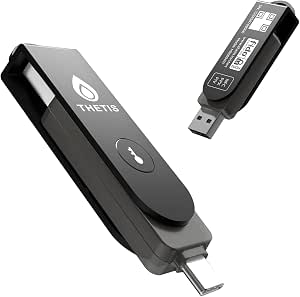 | Best Connectivity Flexibility | Connectors: USB-A and USB-C | Wireless: NFC | Authentication standards: FIDO2 and FIDO U2F | VIEW LATEST PRICE | See Our Full Breakdown |
| Thetis Pro-A FIDO2 Security Key with USB-A and NFC |  | Best for Phone-and-Desktop Pairs | Authentication: FIDO2, TOTP/HOTP | Connectivity: USB-A, NFC | Compatible systems: Windows, macOS, Linux, Chrome OS | VIEW LATEST PRICE | See Our Full Breakdown |
| Yubico YubiKey 5C USB Security Key |  | Best Ecosystem Depth | Connection: USB-C | Authentication protocols: FIDO2/WebAuthn, FIDO U2F, Yubico OTP, OATH-TOTP/HOTP, PIV, OpenPGP | Supported operating systems: Windows, macOS, ChromeOS, Linux | VIEW LATEST PRICE | See Our Full Breakdown |
| Thetis Nano-C FIDO2 USB-C Security Key |  | Best Compact Low-Profile Key | Connector: USB-C | Standards: FIDO, FIDO2, WebAuthn, CTAP2 | FIDO2 passkey slots: 200 | VIEW LATEST PRICE | See Our Full Breakdown |
| Yubico YubiKey 5Ci Multi-Factor Security Key for iPhone, Android, and PC |  | Best Premium Pick | Connectors: Lightning and USB-C | Supported standards: FIDO2/WebAuthn, FIDO U2F, Yubico OTP, OATH-TOTP/HOTP, PIV, OpenPGP | Firmware: 5.7 | VIEW LATEST PRICE | See Our Full Breakdown |
| Yubico Security Key NFC (Pack of 2) – FIDO Certified MFA Security Key |  | Best Value Duo | Quantity: 2 keys | Connectivity: USB-A, NFC | Certification: FIDO Certified (FIDO2/WebAuthn, FIDO U2F) | VIEW LATEST PRICE | See Our Full Breakdown |
| Thetis Pro FIDO2 NFC Security Key with USB-A and USB-C |  | Best Dual-Connector Flexibility | Connectors: USB-A, USB-C | Authentication: FIDO2, HOTP, NFC | NFC support: Mobile authentication only | VIEW LATEST PRICE | See Our Full Breakdown |
| Thetis FIDO2 Security Key, USB-A, 2-Pack |  | Best Budget Backup Pair | Connectivity: USB-A | Pack size: 2 keys | Certification: FIDO2 Level 1 | VIEW LATEST PRICE | See Our Full Breakdown |
| HyperFIDO Pro Mini Security Key |  | Best Minimalist Option | Authentication protocols: FIDO2, FIDO U2F | One-time password support: OATH HOTP (event-based) | NFC: Not supported | VIEW LATEST PRICE | See Our Full Breakdown |
| hardware security keys for two-factor authentication | Power |
|---|---|
| Yubico YubiKey 5 NFC Security | No batteries required |
| Thetis Pro FIDO2 Security Key | No batteries required |
| Thetis Nano-A FIDO2 USB-A Secu | — |
| Yubico YubiKey 5C NFC Security | — |
| Kensington VeriMark NFC+ USB-A | — |
| Thetis FIDO2 Security Key with | — |
| Thetis Pro FIDO2 Security Key | — |
| Thetis Pro-A FIDO2 Security Ke | No batteries required |
| Yubico YubiKey 5C USB Security | — |
| Thetis Nano-C FIDO2 USB-C Secu | — |
| Yubico YubiKey 5Ci Multi-Facto | No batteries required |
| Yubico Security Key NFC | No batteries required |
| Thetis Pro FIDO2 NFC Security | No battery required |
| Thetis FIDO2 Security Key | No batteries required |
| HyperFIDO Pro Mini Security Ke | No battery required |
More Details on Our Top Picks
Yubico YubiKey 5 NFC Security Key
The YubiKey 5 NFC sets the standard for what a hardware security key should be, and it earns the top spot on protocol breadth alone. Where the Thetis Pro covers FIDO2 and TOTP/HOTP, this key adds Yubico OTP, PIV smart card, and OpenPGP, which matters if you secure enterprise systems, SSH keys, or encrypted email alongside everyday accounts. Compatibility with more than 1,000 services means fewer surprises when you enroll a new account.
The tradeoff is coverage, not convenience: it’s USB-A only, so newer laptops without an A port will rely on NFC or an adapter. Compared with the YubiKey 5C NFC, the connector is the real difference — buyers should pick based on their port situation. And like every single key, losing it without a registered backup means an account recovery headache.
Pros:- Phishing-resistant protection across the broadest protocol set in this lineup
- Works with more than 1,000 online services
- No batteries, charging, or network connection required
- PIV and OpenPGP support for enterprise and advanced use cases
Cons:- USB-A connector won’t fit modern port-less laptops without NFC or an adapter
- A spare key is recommended to avoid lockout if this one is lost
Best for: Users with USB-A equipped machines who want the widest protocol and service support in one durable key
Not ideal for: Owners of USB-C-only laptops or phones without NFC who will fight the connector instead of using the key
- Connection:USB-A and NFC
- Authentication protocols:FIDO2/WebAuthn, FIDO U2F, Yubico OTP, OATH-TOTP/HOTP, PIV smart card, OpenPGP
- Compatibility:More than 1,000 accounts
- Firmware:5.7
- Power:No batteries required
- Form factor:Keychain-ready USB-A dongle
Our verdict“The safest default pick for anyone who wants one key that covers nearly every account and authentication standard for years.”
Thetis Pro FIDO2 Security Key with USB-A, USB-C, and NFC
This model makes the list because it solves the problem the YubiKey 5 NFC can’t: connector flexibility. With USB-A, USB-C, and NFC on a single key, one purchase covers an old desktop, a new laptop, and a phone — no adapters, no second key. The rotating metal cover also protects the USB-C connector in a way that bare-dongle keys don’t, which matters for pocket and bag carry.
The savings show up in compatibility details, though. NFC works only with mobile devices, not macOS or Windows, and Windows Hello support is restricted to Enterprise editions with Entra ID — a real limitation for anyone on Windows Home managing local credentials. Unlike Yubico’s keys, there’s no PIV or OpenPGP either. For personal account protection across mixed devices, the tradeoff is reasonable; for enterprise smart-card workflows, it isn’t.
Pros:- Three connection options (USB-A, USB-C, NFC) on one key
- TOTP/HOTP support via the Thetis Manager App for accounts without FIDO2
- Water, crush, and tamper-resistant rotating metal design
- FIDO2 passkey support for major services like Gmail, GitHub, and Coinbase
Cons:- NFC is mobile-only; not supported for macOS or Windows authentication
- Windows Hello works only on Enterprise editions with Entra ID
- Lacks PIV smart card and OpenPGP protocols found on Yubico keys
Best for: Budget-minded buyers juggling USB-A desktops, USB-C laptops, and NFC phones who mainly protect personal accounts
Not ideal for: Windows Home users who need Windows Hello, or anyone requiring PIV smart card and OpenPGP support
- Authentication:FIDO2, passkeys, TOTP/HOTP
- Connectivity:USB-A, USB-C, NFC
- Supported devices:PCs, Macs, iPhones, Android devices
- Setup:Hardware PIN configured via Thetis Manager App
- Durability:Water, crush, and tamper-resistant
- Power:No batteries required
- NFC limitation:Mobile authentication only
- Windows Hello limitation:Windows Enterprise with Entra ID only
Our verdict“The smart pick if you want one inexpensive key for every device you own, as long as your needs stay within FIDO2 and TOTP territory.”
Thetis Nano-A FIDO2 USB-A Security Key
At 0.74 inches long, the Nano-A is the key you actually carry. Most security keys fail not on technology but on habit — a bulky dongle gets left in a drawer, and the account goes unprotected. This one disappears onto a keyring, so the strongest factor is always with you. Despite the size, it carries 200 passkey slots and 50 OATH-TOTP slots, double the capacity of the YubiKey 5C NFC’s 100 passkey slots.
The tradeoff is structural: USB-A only, with no NFC or USB-C fallback. Compared with the Thetis Pro, you give up mobile tap-to-authenticate entirely, and compared with the YubiKey 5 NFC, you lose OTP, PIV, and OpenPGP flexibility. It’s a specialist — a key for the desktop-first person who values portability over versatility, and whose services actually support passkeys.
Pros:- Ultra-compact size that genuinely travels on a keyring
- 200 FIDO2 passkey slots plus 50 OATH-TOTP slots
- Passwordless sign-in support across Windows, macOS, iOS, Android, Linux, and Chrome OS
- Simple USB 2.0 operation with no batteries
Cons:- USB-A only — no USB-C or NFC connectivity
- Passkey support depends on each website or service supporting FIDO2
- No OTP, PIV, or OpenPGP protocols for advanced use cases
Best for: Desktop users who want a nearly invisible key for a keyring and mainly need passkey and TOTP authentication
Not ideal for: Mobile-first users or anyone needing NFC, since there is no wireless option at all
- Hardware interface:USB 2.0
- Connector:USB Type-A
- Dimensions:0.25 x 0.74 x 0.25 in
- Passkey slots:200
- OATH-TOTP slots:50
- Compatibility:Windows, macOS, iOS, Android, Linux, Chrome OS
- Standards:FIDO, FIDO2, WebAuthn, CTAP2
Our verdict“The right choice for minimalists with USB-A ports who will actually carry a tiny key everywhere, and the wrong one for anyone needing mobile NFC.”
Yubico YubiKey 5C NFC Security Key
Think of this as the YubiKey 5 NFC re-engineered for the present: same full protocol stack — FIDO2/WebAuthn, U2F, OTP, PIV, and OpenPGP — but with a USB-C connector that fits current MacBooks, Surface devices, and Android phones. If your hardware has moved on from USB-A, this is the version of the top pick that matches it, and unlike the Thetis Pro, it pairs NFC with a complete enterprise protocol set rather than a consumer-focused subset.
Its water-resistant, keychain-sized body holds 100 passkey slots — half the capacity of the Thetis Nano-A — though that ceiling is generous for nearly everyone. The genuine drawback is the same one that haunts every YubiKey: it’s a single point of failure, and losing your only registered key means painful account recovery. NFC behavior also varies by device, so older phones may not cooperate.
Pros:- USB-C plus NFC covers modern laptops and mobile devices
- Complete protocol support including PIV smart card and OpenPGP
- Works with over 1,000 accounts with no batteries or fees
- Water-resistant, keychain-friendly build
Cons:- A spare key is recommended to avoid account lockout if lost
- NFC compatibility depends on the specific device
- 100 passkey slots is half the capacity of some competitors
Best for: Owners of USB-C laptops and NFC-capable phones who want the full Yubico protocol stack in one key
Not ideal for: Budget buyers or households outfitting multiple people — the cost adds up, and cheaper Thetis models cover basic FIDO2 needs
- Connectivity:USB-C, NFC
- Supported protocols:FIDO2/WebAuthn, FIDO U2F, Yubico OTP, OATH-TOTP/HOTP, PIV, OpenPGP
- Passkey slots:100
- Dimensions:0.15 × 0.7 × 1.77 in
- Water resistant:Yes
- Hardware interface:USB
Our verdict“The premium pick for USB-C-first users who want the same near-universal compatibility as the top pick without carrying an adapter.”
Kensington VeriMark NFC+ USB-A Biometric Fingerprint Security Key K64738WW
The VeriMark NFC+ takes a different approach from every other key here: it adds a fingerprint sensor, so authentication requires something you are rather than something you type. Compared with the Yubico YubiKey 5 NFC, which uses a PIN for FIDO2 verification, this removes the step where people fumble codes at the login prompt — a real benefit for passwordless sign-in on Microsoft, Google, and GitHub.
Setup is genuinely frictionless: no drivers, and it works across Windows, macOS, ChromeOS, and all major browsers. But the scope is narrower than Yubico or Thetis options — it covers FIDO2/WebAuthn only, with no TOTP, OTP, PIV, or OpenPGP, so legacy services and enterprise smart-card workflows are out. And the USB-A connector means newer laptops depend on NFC or an adapter, assuming the hardware plays along.
Pros:- Fingerprint biometrics enable true passwordless, phishing-resistant sign-in
- Dual USB-A and NFC connectivity
- Driver-free setup with broad OS and browser support
- Keyring-friendly form factor with no batteries
Cons:- FIDO2/WebAuthn only — no TOTP, OTP, PIV, or OpenPGP support
- USB-A connector leaves USB-C laptops dependent on NFC or adapters
- NFC function requires compatible hardware
Best for: Users who want fully passwordless, fingerprint-verified sign-in on major services without managing PINs
Not ideal for: Anyone with accounts that still rely on TOTP codes or need PIV/OpenPGP, since this key handles FIDO2 exclusively
- Model:K64738WW
- Connectivity:USB-A, NFC
- Authentication standard:FIDO2, WebAuthn
- Biometrics:Built-in fingerprint sensor
- Compatibility:Windows, macOS, ChromeOS; Chrome, Edge, Firefox, Safari
- Drivers:None required
- Form factor:USB-A with keyring hole
Our verdict“The pick for people who want a fingerprint tap instead of a PIN, provided their accounts are all-in on FIDO2.”
Thetis FIDO2 Security Key with Folding USB-A Design
For buyers who want phishing-resistant two-factor authentication without paying flagship prices, this model covers the fundamentals well. The rotating aluminum cover is more than a cosmetic touch — it shields the USB-A connector in a pocket or bag, which matters if the key lives on a keychain rather than in a drawer. Unlike the Thetis Pro FIDO2, it lacks NFC and USB-C, so phone-based authentication and modern laptops are off the table. The built-in HOTP support gives it a fallback for services that don’t accept FIDO keys at all, a genuine advantage over entry-level rivals that only do U2F.
The tradeoffs are real, though: FIDO2 does not work for Mac login, and Windows Hello sign-in is locked to enterprise Azure AD accounts, so home users still need a password alongside the key.
Pros:- FIDO2 passwordless sign-in plus U2F for broad website compatibility
- Rotating aluminum cover protects the connector during daily carry
- Built-in HOTP one-time passwords serve services without FIDO support
- No batteries, software, or network connection required
Cons:- FIDO2 does not support Mac login
- Windows Hello sign-in limited to enterprise Azure Active Directory users
- USB-A only — no NFC or USB-C for mobile or newer laptops
Best for: Budget-conscious desktop users with USB-A ports who mainly protect web accounts like Google, GitHub, and Dropbox
Not ideal for: Mac users wanting passwordless OS login, or anyone relying on phones and modern USB-C laptops, since there’s no NFC or USB-C option
- Authentication:FIDO2, U2F, HOTP
- Hardware interface:USB Type-A
- Compatibility:Windows, macOS, Linux, Chrome OS
- Design:Rotating aluminum alloy cover
- Dimensions:0.39 × 0.59 × 1.73 in
- Color:Black
Our verdict“A sensible low-cost entry point for USB-A desktop users who accept that OS-level login features won’t work at home.”
Thetis Pro FIDO2 Security Key with USB-A, USB-C, NFC, and PinPlex
This is the most connector-flexible Thetis in the lineup, pairing USB-A and USB-C with NFC tap-to-authenticate on phones. That three-way coverage means one key handles an aging work desktop, a USB-C laptop, and an Android phone — something neither the Thetis FIDO2 folding USB-A nor the USB-C-only Yubico YubiKey 5C can manage alone. Protocol support runs unusually deep: PIV smart card certificates for enterprise use sit alongside passkeys, TOTP, and HOTP, closing the gap with Yubico’s pricier models.
PinPlex adds a layered PIN scheme, but Windows Hello login still demands Enterprise edition with Entra ID, and ID Austria accounts are unsupported — so it’s a connectivity champion, not a universal one.
Pros:- USB-A, USB-C, and NFC cover virtually every modern device
- Passkey support via WebAuthn and CTAP2 for passwordless login
- PIV, TOTP, and HOTP support matches enterprise and legacy needs
- PinPlex PIN system adds an extra defensive layer
Cons:- Windows Hello login requires Enterprise edition with Entra ID
- Does not support ID Austria
- Multi-connector body is bulkier than single-connector keys like the YubiKey 5C
Best for: Multi-device users who want one key to cover USB-A desktops, USB-C laptops, and NFC-enabled phones, including developers managing PIV-protected systems
Not ideal for: Home Windows users expecting passwordless Windows Hello login without an Enterprise setup, or anyone needing ID Austria support
- Connectors:USB-A and USB-C
- Wireless:NFC
- Authentication standards:FIDO2 and FIDO U2F
- Additional authentication:PIV certificates, TOTP, HOTP
- Passkey protocols:WebAuthn, CTAP2
- Compatibility notes:Chrome login on Windows; Windows Hello needs Enterprise with Entra ID; ID Austria unsupported
Our verdict“The pick for buyers who refuse to buy two keys to cover three connector types, provided they don’t need consumer Windows Hello login.”
Thetis Pro-A FIDO2 Security Key with USB-A and NFC
Where the Thetis Pro with USB-A, USB-C, and NFC tries to do everything, this model trims USB-C and focuses on the two connections most people actually use: USB-A for the desktop and NFC for the phone. That focus pays off in a slimmer, keychain-friendly body with the same rotating metal cover that protects the connector in a pocket. TOTP and HOTP support means it can also store one-time codes as a fallback for services that don’t do FIDO — a useful hedge the HyperFIDO Pro Mini lacks. It works offline with no batteries, which keeps it dependable when traveling.
The compromise is straightforward: a USB-C-only laptop user is stranded, and compatibility still depends on each service supporting hardware keys, so it won’t replace authenticator apps everywhere.
Pros:- USB-A plus NFC covers desktop and phone with one key
- FIDO2 passwordless login plus TOTP/HOTP fallback codes
- Compact 360° rotating metal cover for pocket durability
- No batteries or network connection needed
Cons:- Only works with services that support hardware security keys
- No USB-C connector for modern laptops
- Compatible services and devices may vary
Best for: Buyers who split their time between a USB-A desktop and an NFC-enabled Android phone and want one slim key for both
Not ideal for: Owners of USB-C-only laptops or iPhones without NFC-friendly workflows, since there’s no USB-C connector
- Authentication:FIDO2, TOTP/HOTP
- Connectivity:USB-A, NFC
- Compatible systems:Windows, macOS, Linux, Chrome OS
- Design:360° rotating metal cover
- Power:No batteries required
- Color:Black
Our verdict“A streamlined two-connector key that suits the classic desktop-plus-phone setup better than bulkier do-everything alternatives.”
Yubico YubiKey 5C USB Security Key
The YubiKey 5C stands out for protocol breadth that the Thetis lineup only partially matches: alongside FIDO2/WebAuthn and U2F, it carries Yubico OTP, OATH-TOTP/HOTP, PIV smart card, and OpenPGP. That last one matters for developers and privacy-focused users who want to sign commits or encrypt email with a hardware key — a capability no Thetis model here offers. Build quality is another differentiator: waterproof and crush-resistant construction gives it a durability edge over aluminum-covered competitors like the Thetis Pro-A, which relies on a rotating shell rather than a sealed body.
Its single USB-C connector is the obvious limitation compared with the Thetis Pro — no USB-A, no NFC, no phones. And like any hardware key, losing your only key risks account lockout, so a registered backup is wise.
Pros:- Broadest protocol set: FIDO2/WebAuthn, U2F, OTP, OATH, PIV, and OpenPGP
- Waterproof and crush-resistant sealed housing
- Works across Windows, macOS, ChromeOS, and Linux with no batteries or internet
- Trusted compatibility with hundreds of major services
Cons:- USB-C only — no NFC or USB-A for phones and older ports
- Losing the key without a registered backup means account lockout
Best for: Developers and power users on USB-C laptops who want OpenPGP commit signing, PIV smart card access, and passkeys on one device
Not ideal for: Buyers who need to authenticate on phones or USB-A desktops — the single USB-C connector covers neither
- Connection:USB-C
- Authentication protocols:FIDO2/WebAuthn, FIDO U2F, Yubico OTP, OATH-TOTP/HOTP, PIV, OpenPGP
- Supported operating systems:Windows, macOS, ChromeOS, Linux
- Firmware:5.7
- Dimensions:0.49 × 1.16 × 0.2 in
- Weight:0.2 oz
- Durability:Waterproof and crush-resistant
Our verdict“The strongest choice for USB-C-centric professionals whose authentication needs go beyond passkeys into OpenPGP and PIV territory.”
Thetis Nano-C FIDO2 USB-C Security Key
At under an inch in every dimension, this is the smallest key in the batch — small enough to leave semi-permanently plugged into a laptop without snagging, which the longer Yubico YubiKey 5C can’t comfortably do. What sets it apart from most nano-format keys is capacity: 200 FIDO2 passkey slots and 50 OATH-TOTP slots mean it can hold credentials for an entire portfolio of accounts rather than a handful. Platform reach includes Android and USB-C iPhones, matching the multi-device ambitions of the Thetis Pro in a far smaller package.
The tradeoff for the tiny footprint is usability — a flush-fit key is awkward to grip and easier to misplace, and passkey support still depends on each service. Windows Hello is again Enterprise-and-Entra-ID only, and ID Austria is off the list.
Pros:- Ultra-compact body sits flush in a USB-C port for leave-in use
- 200 FIDO2 passkey slots plus 50 OATH-TOTP slots for large account sets
- Works with PC, Mac, Android, and USB-C iPhones
- Supports passwordless FIDO2/WebAuthn sign-in
Cons:- Tiny form factor makes it easy to lose and awkward to remove
- Passkey support varies by website or service
- Windows Hello requires Enterprise edition with Entra ID; no ID Austria support
Best for: Laptop owners who want an always-plugged-in or keychain-invisible key with room for dozens of accounts across passkeys and TOTP
Not ideal for: People prone to losing small objects, or home Windows users who expect consumer Windows Hello login support
- Connector:USB-C
- Standards:FIDO, FIDO2, WebAuthn, CTAP2
- FIDO2 passkey slots:200
- OATH-TOTP slots:50
- Compatible platforms:PC, Mac, Android, USB-C iPhone
- Dimensions:0.73 × 0.60 × 0.30 in
- Windows Hello limitation:Requires Enterprise edition with Entra ID
Our verdict“The right pick when staying plugged in and storing many credentials matters more than grip comfort or OS-level login features.”
Yubico YubiKey 5Ci Multi-Factor Security Key for iPhone, Android, and PC
The YubiKey 5Ci stands out as the most capable key in this lineup, pairing a Lightning connector with USB-C in a single device — something no other product here offers. Where the Yubico Security Key NFC covers only FIDO standards, the 5Ci adds smart card (PIV) and OpenPGP support, which matters for developers, IT admins, and anyone signing Git commits or using enterprise PKI. It also handles OTP codes, so legacy services that can’t do FIDO2 still work. The tradeoff is cost and scope: most people locking down a Gmail or iCloud account simply don’t need PIV, and the Lightning connector is steadily losing relevance as iPhones move to USB-C. Compared with the YubiKey 5C NFC, you give up NFC tap-to-authenticate in exchange for that Lightning port.
Pros:- Broadest protocol support in the lineup: FIDO2, U2F, OTP, PIV, and OpenPGP
- Dual Lightning and USB-C connectors cover iPhone, Android, and PC without adapters
- Waterproof, crush-resistant build with no batteries or network dependency
- Works with password managers and developer tools that require advanced standards
Cons:- Premium price for features most everyday users will never touch
- Lightning connector is being phased out across Apple’s lineup
- Device and account compatibility varies, so some services won’t use every protocol
Best for: Power users, developers, and IT professionals who need PIV/OpenPGP support plus iPhone compatibility in one key
Not ideal for: Casual users protecting a few personal accounts — the extra protocols add cost without benefit, and a Lightning port is increasingly dated
- Connectors:Lightning and USB-C
- Supported standards:FIDO2/WebAuthn, FIDO U2F, Yubico OTP, OATH-TOTP/HOTP, PIV, OpenPGP
- Firmware:5.7
- Durability:Waterproof and crush-resistant
- Power:No batteries required
- Manufacturing:Made in Sweden; programmed in the USA
Our verdict“The 5Ci makes the most sense for security professionals and Apple-device users who want one key that speaks every authentication language.”
Yubico Security Key NFC (Pack of 2) – FIDO Certified MFA Security Key
This two-pack solves the problem most security key buyers forget: what happens if you lose your only key. Yubico itself recommends a spare, and buying them together is cheaper than a single YubiKey 5-series equivalent. Compared with the YubiKey 5Ci, the Security Key NFC drops OTP, PIV, and OpenPGP support, but for phishing-resistant sign-in on Google, Microsoft, Apple, and a thousand-plus other services, FIDO2/WebAuthn is all you need. NFC tap authentication works with modern phones, and USB-A covers older laptops. The two-key setup lets you keep one on a keychain and one in a drawer as recovery backup — a genuinely practical pattern. The drawback is USB-A only: newer laptops with just USB-C will need an adapter or a different model like the YubiKey 5C NFC.
Pros:- Two keys in one purchase, covering the lockout-recovery problem
- NFC tap sign-in on phones plus USB-A for computers
- FIDO2/WebAuthn certified and compatible with 1,000+ services
- No batteries, subscriptions, or network connection required
Cons:- No USB-C connector for modern laptops
- Lacks OTP and smart card support found in the YubiKey 5 Series
Best for: Anyone setting up hardware MFA for the first time who wants a primary key plus a backup at a lower per-key cost
Not ideal for: Users needing USB-C natively, OTP codes for older services, or smart card features — this model covers FIDO standards only
- Quantity:2 keys
- Connectivity:USB-A, NFC
- Certification:FIDO Certified (FIDO2/WebAuthn, FIDO U2F)
- Firmware:5.7
- Durability:Waterproof, crush-resistant
- Power:No batteries required
- Origin:Manufactured in Sweden; programmed in USA
Our verdict“The most sensible entry point for mainstream users who want dependable phishing-resistant MFA with a built-in spare.”
Thetis Pro FIDO2 NFC Security Key with USB-A and USB-C
The Thetis Pro earns its spot by covering USB-A, USB-C, and NFC in a single affordable key — a connector combination that even Yubico reserves for its pricier models. If you move between an older work laptop, a new MacBook, and an Android phone, this option removes the adapter problem entirely. Its rotating metal cover protects the USB-C end in a way the exposed-connector Yubico keys don’t, which helps if your key lives loose in a bag. The compromises are real though: NFC is mobile-only, ID Austria isn’t supported, and Windows Hello sign-in needs a compatible Windows Enterprise setup with Entra ID. Compared with the Thetis FIDO2 2-Pack, you get more connectivity here but only one key, so lockout risk remains unless you buy a second.
Pros:- USB-A, USB-C, and NFC cover nearly every device without adapters
- Rotating metal cover shields the connector from damage
- Compact keychain-friendly size with tamper- and water-resistant build
- No battery or network connection needed
Cons:- NFC authentication works only with mobile devices
- Windows Hello support limited to compatible Windows Enterprise setups
- No ID Austria support and fewer protocols than Yubico’s 5 Series
Best for: Multi-device users juggling USB-A laptops, USB-C machines, and NFC-capable phones who want one key for everything
Not ideal for: Windows users expecting Windows Hello logins on Home editions, or anyone needing ID Austria support
- Connectors:USB-A, USB-C
- Authentication:FIDO2, HOTP, NFC
- NFC support:Mobile authentication only
- Compatible OS:Windows, macOS, Linux, Chrome OS
- Protection:Tamper-resistant, water-resistant, crush-resistant
- Power:No battery required
- Dimensions:2.9 × 0.72 × 0.5 in
Our verdict“A smart middle-ground pick for people who refuse to choose between USB-A and USB-C — as long as their Windows setup cooperates.”
Thetis FIDO2 Security Key, USB-A, 2-Pack
Where the Thetis Pro trades breadth of connectivity, this two-pack bets on simplicity: two FIDO2-certified USB-A keys for basic per-key economy. The dual-key approach mirrors the Yubico Security Key NFC 2-Pack‘s logic — one primary, one backup — but skips NFC entirely, which means no tap-to-sign-in on phones. Setup has a quirk worth knowing: the initial hardware PIN requires the Thetis Manager App, an extra step Yubico keys don’t impose. Durability is genuinely solid for the class, with water, crush, and tamper resistance plus the same rotating metal cover as its siblings. Windows Hello works only with supported Enterprise editions using Entra ID, so home users should plan on browser-based FIDO2 sign-in instead. If your machines all have USB-A ports and your phone can wait, the value case is easy.
Pros:- Two FIDO2 Level 1 certified keys in one pack at a low per-key cost
- Rotating metal cover and water-, crush-, and tamper-resistant build
- Works with many major online services supporting passkeys and hardware MFA
- No batteries or network connection required
Cons:- No NFC support for phone authentication
- Initial PIN setup requires the Thetis Manager App
- Windows Hello limited to Enterprise editions with Entra ID
Best for: Budget-conscious buyers with USB-A computers who want a primary and spare key for browser-based FIDO2 sign-in
Not ideal for: Phone-first users — no NFC means every mobile login needs an adapter — and Windows Home users needing Windows Hello
- Connectivity:USB-A
- Pack size:2 keys
- Certification:FIDO2 Level 1
- NFC:Not supported
- Setup:Initial hardware PIN setup via Thetis Manager App
- Durability:Water-, crush-, and tamper-resistant
- Power:No batteries required
Our verdict“A practical, no-frills pair for USB-A desktop setups where a spare key matters more than phone tap-in convenience.”
HyperFIDO Pro Mini Security Key
The HyperFIDO Pro Mini is the barebones choice: FIDO2, FIDO U2F, and OATH HOTP support in a tiny footprint and nothing else. That minimalism cuts both ways. On the plus side, the compact design disappears into a wallet or sits nearly flush in a laptop port — noticeably lower profile than the Thetis Pro with its rotating cover, and far cheaper than a YubiKey 5Ci. HOTP support is a genuine bonus at this level, handling older services that still rely on event-based one-time passwords. But there’s no published durability rating, no NFC for phones, and no connector flexibility — it’s USB-only and protocol-light compared with nearly everything else in this roundup. This pick makes the most sense as a second travel key rather than your only line of defense, since a single lost key with no backup means account lockout.
Pros:- Very small footprint that barely protrudes from a port
- Supports FIDO2 and FIDO U2F for phishing-resistant sign-in
- Includes OATH HOTP for older one-time-password services
- Low-cost entry point for hardware authentication
Cons:- No NFC support for mobile authentication
- No published durability or waterproofing claims, unlike Yubico and Thetis models
- Single connector and limited protocol set reduce long-term versatility
Best for: Buyers who want an ultra-compact, low-cost spare key for FIDO2 sign-in on a computer, including older HOTP-based services
Not ideal for: Anyone wanting phone authentication, durable waterproofing, or a sole primary key — this model is too limited to carry alone
- Authentication protocols:FIDO2, FIDO U2F
- One-time password support:OATH HOTP (event-based)
- NFC:Not supported
- Design:Compact mini form factor
- Power:No battery required
Our verdict“A fine minimal backup key for desktop FIDO2 logins, but too spartan to be your only security key.”

How We Picked
I ranked these hardware security keys by weighing connector compatibility first, because a key that cannot plug into your devices is worthless regardless of its features. That means keys offering USB-A, USB-C, and NFC together scored highest, followed by dual-connector and NFC-only models, with single-connector nano keys ranked lower despite their portability. Second, I evaluated protocol support: FIDO2 and U2F are the baseline every pick here meets, but keys that also handle PIV, OpenPGP, or one-time passcodes earned higher placement because they serve password managers, remote access, and enterprise login scenarios, not just consumer accounts.
Build quality, physical design, and long-term value rounded out the criteria. Metal-housed keys that survive keychain life scored better than plastic models, and designs that avoid blocking adjacent ports ranked above bulky ones. Finally, I factored in ecosystem fit and bundled value — multi-packs and keys certified by major platforms (Google, Microsoft, Apple) placed higher because compatibility surprises are the most common failure mode with security keys. The ranking deliberately balances price against longevity: a slightly costlier key that covers every device you own beats a cheap one that strands you at your next laptop upgrade.
| hardware security keys for two-factor authentication | Power |
|---|---|
| Yubico YubiKey 5 NFC Security | No batteries required |
| Thetis Pro FIDO2 Security Key | No batteries required |
| Thetis Nano-A FIDO2 USB-A Secu | — |
| Yubico YubiKey 5C NFC Security | — |
| Kensington VeriMark NFC+ USB-A | — |
| Thetis FIDO2 Security Key with | — |
| Thetis Pro FIDO2 Security Key | — |
| Thetis Pro-A FIDO2 Security Ke | No batteries required |
| Yubico YubiKey 5C USB Security | — |
| Thetis Nano-C FIDO2 USB-C Secu | — |
| Yubico YubiKey 5Ci Multi-Facto | No batteries required |
| Yubico Security Key NFC | No batteries required |
| Thetis Pro FIDO2 NFC Security | No battery required |
| Thetis FIDO2 Security Key | No batteries required |
| HyperFIDO Pro Mini Security Ke | No battery required |
Factors to Consider When Choosing Hardware Security Keys For Two-factor Authentication
Choosing a hardware security key is less about raw specs and more about matching the key to your devices, your accounts, and how you plan to carry it. Before settling on any model above, work through these five factors — they explain most of the ranking order and most of the mistakes buyers make.Match the Connector to Every Device You Own
The most common buying mistake is purchasing a key that fits your current laptop but not your phone, your work machine, or your next computer. USB-C is the safe bet for modern MacBooks and recent Android phones via OTG, but plenty of offices still run USB-A only, and NFC is what lets a single key tap against iPhones and Android devices without any cable at all. If you own a mix of hardware, dual-connector models with NFC — like the Thetis Pro series — eliminate guesswork, while single-connector nano keys only make sense as a secondary key for one specific device. Also check physical clearance: wide-bodied keys can block adjacent ports on slim laptops, which is exactly why folding and low-profile designs exist. The cheapest key with the wrong connector is more expensive than the pricier key with the right one, once you factor in buying a replacement.
Know Which Protocols Your Accounts Actually Require
Every key in this roundup supports FIDO2/WebAuthn and legacy U2F, which covers Google, Microsoft, Apple ID, Facebook, Twitter, and virtually every major password manager. The differences appear at the edges: YubiKey models add OTP (one-time passcodes generated on the key itself), PIV smart card support for enterprise VPNs and certificate-based login, and OpenPGP for encrypted email and code signing. If you are a consumer protecting personal accounts, paying extra for those protocols is money spent on capability you will never touch. But IT professionals, developers pushing signed commits, and anyone subject to corporate security policies genuinely need them — and that is precisely why Yubico occupies the premium tier here. Check your account providers’ security settings pages before buying, because some services only accept specific certification levels.
Always Buy Two — Or Buy a Pack
A hardware key is a physical object you can lose, wash, or break, and if it is your only second factor, losing it can lock you out of your accounts entirely. The industry-standard practice is to register at least two keys per account and store the backup somewhere safe — a drawer at home, a safe deposit box, or with a trusted family member. This is why the two-packs in this roundup rank so well on value: they solve the backup problem in a single purchase and usually cost less per key than buying individually. A sensible budget approach pairs one premium daily-driver key with one cheap backup rather than two premium keys. Also remember to keep recovery codes for your accounts current, because even a backup key cannot help if a service has an outage or deprecates a protocol.
Build Quality and How You Carry It
Security keys live on keychains, in pockets, and at the bottom of bags, which makes housing material and form factor matter more than it first appears. Metal-bodied keys like the YubiKeys and Thetis Pro models shrug off years of keychain abrasion, while plastic-bodied budget keys can crack at the loop hole — the single most reported physical failure point for any key. Nano-format keys are nearly indestructible by virtue of being tiny, but that same size makes them easy to leave in a laptop port and forget. Folding designs protect the USB connector from lint and pocket debris, which is a real long-term reliability factor, not a gimmick. Think honestly about whether the key will live on your keyring or stay plugged into one machine, and choose accordingly.
Biometric and PIN-Entry Keys: When They Are Worth It
Most FIDO2 keys use PIN verification on the host device, which is fine for personal use but awkward on shared or public computers where you do not want to type a PIN at all. Keys with onboard fingerprint readers (like the Kensington VeriMark NFC+) or built-in PIN pads (like the Thetis PinPlex model) move verification to the key itself, which matters in shared workstations, lab environments, and front-desk scenarios. The tradeoffs are real: biometric keys cost more, require enrollment, are physically larger, and add a sensor that represents one more component that can fail. For a solo user with one laptop and one phone, they are overkill. For anyone logging in where the computer itself cannot be trusted, they fill a role no standard key can.
Platform Certification and Future-Proofing
FIDO certification is not marketing fluff — it determines whether services like Google Advanced Protection or Microsoft passwordless sign-in will accept your key without friction. All fifteen keys here carry FIDO certification, but subtle differences exist in firmware update paths and vendor track records, and some services maintain compatibility lists that name specific vendors. Buying from an established vendor with a history of firmware support protects you when standards evolve, as they did when FIDO U2F gave way to FIDO2 and when passkey support arrived. Cheaper keys from newer vendors can be excellent value, but read their compatibility documentation for the specific services you depend on before committing. A five-dollar savings is not worth discovering your bank’s login flow rejects your key.
Frequently Asked Questions
Do I need a hardware key if I already use an authenticator app?
Authenticator apps are far better than SMS codes, but they share a weakness with your phone: if the device is lost, stolen, or compromised, every account tied to it is at risk at once. A hardware key stores your credentials on a separate physical chip that never leaves the device and cannot be phished, because the cryptographic handshake only completes on the genuine website. Attackers who trick you into a lookalike login page cannot relay a hardware key response the way they can relay an app-generated code. The practical middle ground many people adopt is a hardware key as the primary factor on their most important accounts, with an authenticator app as the fallback for everything else. If you already have an app set up, adding a key takes minutes per account and does not require removing the app.
Will one key work across all my accounts, or do I need a key per service?
One key can hold credentials for dozens or even hundreds of services simultaneously, because modern FIDO2 keys generate a unique cryptographic identity for each account rather than storing a shared secret. You simply register the same physical key with Google, Microsoft, Apple, your password manager, and so on, and each registration is independent. The limit you are more likely to hit is a per-protocol slot count on older keys, but for FIDO2/WebAuthn the practical ceiling is effectively unlimited for normal use. What you genuinely need more than one of is backup — losing your only registered key forces recovery workflows on every service at once, which is tedious and sometimes slow. Registering two keys everywhere means one stays in a drawer while the other rides on your keychain.
Can I use a security key with an iPhone?
Yes, and there are two paths. Any NFC-equipped key — which includes most picks in this roundup — works with iPhones by tapping the key against the back of the phone when Safari or an app prompts for it, provided the iPhone runs iOS 13.4 or later. The alternative is the Yubico YubiKey 5Ci, the only key here with a Lightning connector, which plugs in directly and appeals to people who prefer a wired connection or whose phone case blocks NFC. For most iPhone owners, an NFC key like the YubiKey 5 NFC or a Thetis Pro model is the simpler choice because the same key also serves computers. Check that your specific apps support hardware-key 2FA, since a handful of banking apps still only accept SMS or app codes.
What happens if I lose my security key?
Nothing catastrophic, provided you prepared: each service lets you register multiple keys, and your backup key logs in exactly like the primary one. You then visit each account’s security settings, remove the lost key, register a replacement, and carry on. If you have no backup, you fall back to the recovery methods you set up earlier — printed recovery codes, secondary email, or the account provider’s identity verification process, which can take days for high-security accounts like Google Advanced Protection. This is why buying a two-pack or pairing a premium key with a cheap backup is standard advice rather than an upsell. Treat a lost key like a lost house key: not a crisis if you planned ahead, a serious headache if you did not.
Is it worth paying more for a Yubico key over a budget FIDO2 key?
It depends entirely on what you log into. For consumer FIDO2 logins at Google, Microsoft, and major password managers, budget keys like the Thetis and HyperFIDO options perform the same core function — the authentication standard, not the brand, does the work. The case for Yubico is breadth: OTP codes for older services, PIV smart card support for corporate VPNs and certificate login, OpenPGP for encrypted email and Git signing, plus a long firmware-support track record and metal housings built for years of keychain abuse. Professionals and anyone managing credentials for work will use those extras; a user protecting a personal email account will not. A reasonable strategy is a YubiKey as your daily driver and a budget key as the registered backup, which spreads the cost sensibly.
Conclusion
For best overall, the Yubico YubiKey 5 NFC earns the top spot with its unmatched protocol support, USB-A and NFC connectivity, and keychain-proof build — it is the one key that fits nearly everyone. For best value, the Thetis FIDO2 USB-A 2-Pack solves the primary-key-and-backup problem in one inexpensive purchase, while the Thetis Pro FIDO2 with USB-A, USB-C, NFC, and PinPlex is the value pick for anyone wanting a single key that connects to literally everything. For best premium, the Yubico YubiKey 5Ci is in a class of its own for iPhone, Android, and PC users who want direct wired access across all three.
For beginners, the Yubico Security Key NFC 2-Pack is the gentlest entry point — dead-simple FIDO2 setup, two keys for backup, and no advanced features to confuse the setup process. For specific needs: the Kensington VeriMark NFC+ for shared or untrusted workstations that need fingerprint verification, the Thetis Nano-C or Nano-A for a permanent low-profile key that stays plugged in, and the Thetis Folding USB-A for anyone whose key lives in a dusty pocket or bag. Whatever you choose, register two keys on every account that matters — the model matters far less than having a backup.
Fall Picks
fall essentials
As an affiliate, we earn on qualifying purchases.